
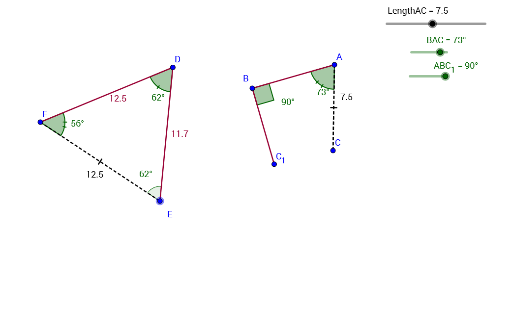
Angle-Angle-Side
Loading the math board and drawing, please wait…
GeoGebra Commands & Parameters
Rotate(A, (-ABC_1), B) → B'Angle(B', B, A) → αRay(B, B') → aPoint(a) → C_1Segment(B, C_1) → bSegment(B, A) → cAngle(D_1, A, B) → βRotate(D_1, (-(β - BAC)), A) → CAngle(C, A, D_1) → γSegment(A, C) → dAngle(C, A, B) → δSegment(B, C_1) → eSegment(C_1, C) → fPolygon(B, C, A) → poly1, a_1, b_1, c_1Segment(C, B) → gSegment(B, A) → hAngle(A, C, B) → εPoint(Circle[F, 12.5]) → ESegment(F, E) → iRotate(E, 56°, F) → DAngle(E, F, D) → ζAngle(F, D, E) → ηSegment(F, D) → jSegment(D, E) → kAngle(D, E, F) → θ
AI Drawing Prompt Reference
Construct a dynamic geometry figure demonstrating the Angle-Angle-Side (AAS) triangle congruence condition. Start with a triangle where one vertex is draggable. Use rotation and ray construction to create another triangle with two corresponding angles equal and a non-included side equal. Display all interior angle measures and label corresponding equal angles and sides. When dragging vertices, the two triangles maintain the AAS condition, visually proving congruence. Include triangles, rays, segments, angle markings, and vertex labels for classroom demonstration.
The prompt above was compiled from the original drawing commands and is for reference only.