
Altitudes and Orthocenter of a Triangle by Munachii
Loading the math board and drawing, please wait…
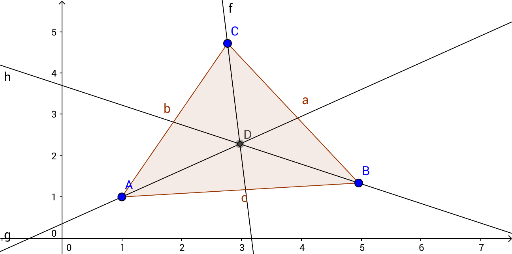
①This example demonstrates how to construct the three altitudes of a triangle and locate their common intersection point, the orthocenter. ②The core mathematical concept is the orthocenter property: the three altitudes of a triangle are concurrent, and the orthocenter lies inside for acute triangles, at the right-angle vertex for right triangles, and outside for obtuse triangles. ③Construction details: using GeoGebra commands Polygon to create triangle ABC (objects A, B, C, poly1), OrthogonalLine to draw perpendiculars from each vertex to the opposite side (objects c, a, b, f, g, h), and Intersect to find the intersection point D of the altitudes. ④Suitable for middle and high school geometry lessons, helping students visualize the definition of the orthocenter and its position changes across different triangle types, and explore relationships with other triangle centers (centroid, circumcenter, incenter).
GeoGebra Commands & Parameters
Polygon(A, B, C) → poly1, c, a, bOrthogonalLine(C, c) → fOrthogonalLine(A, a) → gOrthogonalLine(B, b) → hIntersect(f, g) → D
AI Drawing Prompt Reference
Draw an arbitrary triangle and construct the three altitudes by dropping perpendicular lines from each vertex to the opposite side. These three altitudes should intersect at a single common point, known as the orthocenter. Clearly mark the intersection point of the altitudes. The figure should include the triangle, the three altitude lines, and their common intersection point, allowing observation of how the orthocenter's position changes for different triangle shapes.
The prompt above was compiled from the original drawing commands and is for reference only.