
Adding Fractions with Unequal Denominators
Loading the math board and drawing, please wait…
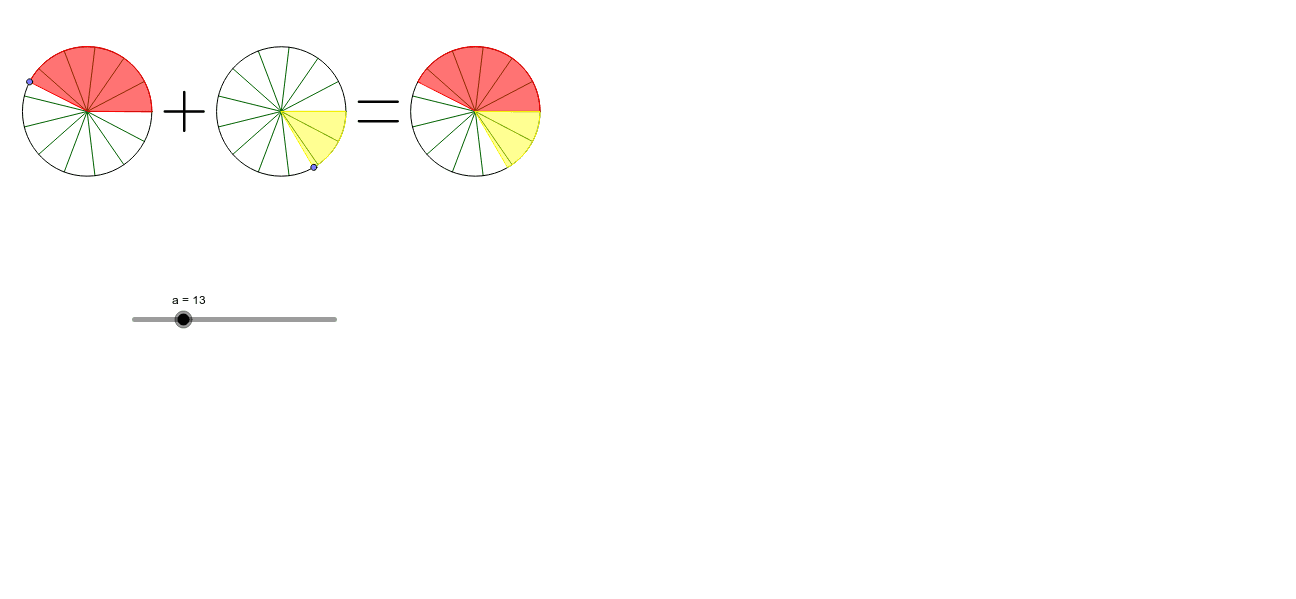
This example demonstrates how to add fractions with unequal denominators by using a slider to change the denominator and dragging points on circles to adjust the numerators. It visually illustrates the process of fraction addition. Key math concepts include fraction operations, handling unlike denominators, and geometric representation. The construction utilizes GeoGebra commands such as Sequence, Intersect, Point, Circle, Segment, CircumcircleSector, Vector, and Translate. Suitable for middle school and above students to understand fraction addition and geometric interpretations.
GeoGebra Commands & Parameters
Sequence(Segment[(cos(((i * 360) * ° / a)), sin(((i * 360) * ° / a))), (0, 0)], i, 1, a) → liste1Intersect(xAxis, yAxis) → CPoint(xAxis) → DCircle(C, D) → cSequence(Segment[(3 + cos(((i * 360) * ° / a)), sin(((i * 360) * ° / a))), (3, 0)], i, 1, a) → liste2Sequence(Segment[(cos(((i * 360) * ° / a)) + 6, sin(((i * 360) * ° / a))), (6, 0)], i, 1, a) → liste3Point(xAxis) → EPoint(xAxis) → FCircle(E, F) → dPoint(xAxis) → GPoint(xAxis) → HCircle(G, H) → eSegment((4.2, 0.15), (4.8, 0.15)) → bSegment((4.2, -0.15), (4.8, -0.15)) → fPoint(c) → KCircumcircleSector(I, J, K) → kPoint(d) → LPoint(d) → MPoint(d) → NCircumcircleSector(L, M, N) → pSegment((1.2, 0), (1.8, 0)) → hSegment((1.5, -0.3), (1.5, 0.3)) → iVector((0, 0), (6, 0)) → uVector((3, 0), (6, 0)) → vTranslate(I, u) → I'Translate(J, u) → J'Translate(K, u) → K'CircumcircleSector(I', J', K') → k'Translate(L, v) → L'Translate(M, v) → M'Translate(N, v) → N'CircumcircleSector(L', M', N') → p'
AI Drawing Prompt Reference
Draw three circles arranged horizontally, each divided into equal sectors by radial segments, with the number of sectors controlled by a slider. The left circle is centered at the origin, the middle circle is centered on the horizontal axis, and the right circle is centered further right. Place draggable points on each circle to adjust sector sizes. On the middle circle, select a sector using two points, then translate that sector to the right circle; similarly, select a sector on the right circle and translate it to the middle circle, visually demonstrating fraction addition. Add fraction symbols and an equals sign below, and use arrows to indicate the translations between circles.
The prompt above was compiled from the original drawing commands and is for reference only.