
3D Vectors, Points and Planes
Loading the math board and drawing, please wait…
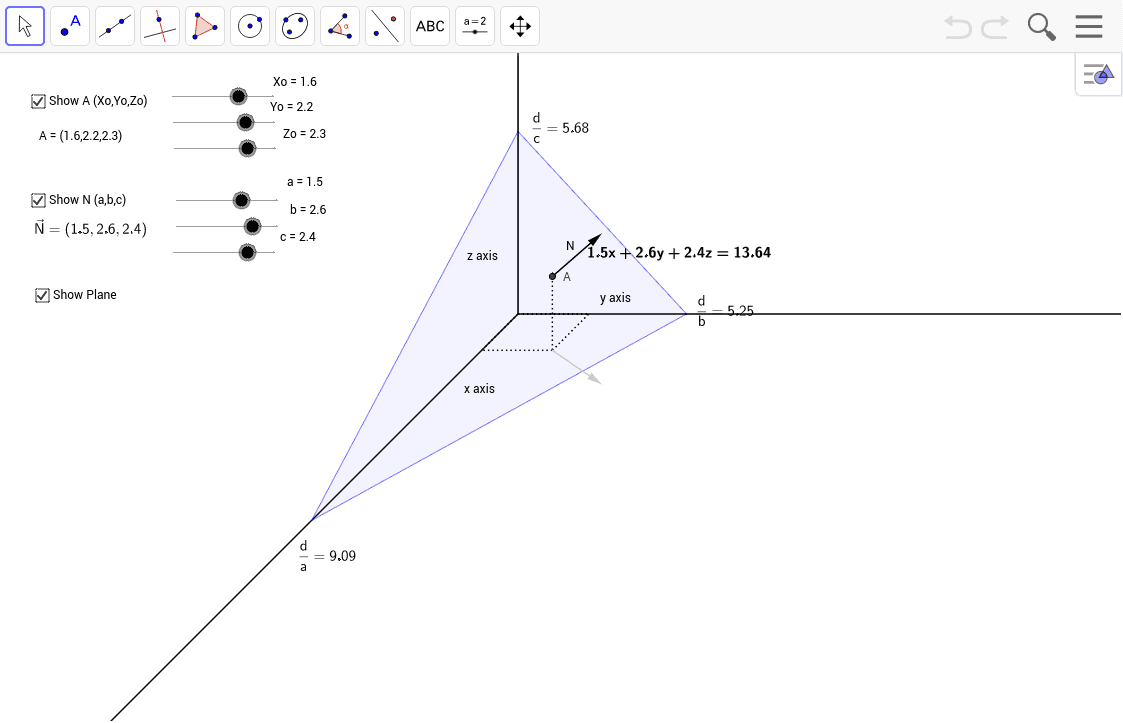
This tool demonstrates the relationships between planes, points, and vectors in three-dimensional space. It involves core mathematical concepts such as 3D vectors, coordinate representation of points, plane equations, and vector operations. Construction highlights the use of GeoGebra commands like Ray, Segment, Vector, and Polygon. Suitable for high school and above students exploring solid geometry.
GeoGebra Commands & Parameters
Ray((0, 0), (1, 0)) → jRay((0, 0), (-1, -1)) → iRay((0, 0), (0, 1)) → kSegment(A, A - (0, Zo)) → b_1Segment(A - (0, Zo), A - (0, Zo) - (Yo, 0)) → c_1Segment(A - (0, Zo), A - (0, Zo) + (0.707 * Xo, 0.707 * Xo)) → dSegment((0, 0), (Yo, 0)) → eSegment((0, 0), (-0.707 * Xo, -0.707 * Xo)) → fVector(A, A + (b - 0.707 * a, c - 0.707 * a)) → NVector(A - (0, Zo), A - (0, Zo) + (b - 0.707 * a, -0.707 * a)) → vPolygon((yi, 0), (0, zi), (-0.707 * xi, -0.707 * xi)) → poly1, h, l, m
AI Drawing Prompt Reference
Draw a 3D space with points, vectors, and planes. Start by drawing three axes: rays j, i, and k from the origin in the positive x, negative x, and positive y directions, respectively. Then, draw vectors b_1, c_1, and d from point A, and vectors e and f. Next, construct vectors N and v, and finally, use these vectors to form a triangle.
The prompt above was compiled from the original drawing commands and is for reference only.