
2D Vectors & Riemann Sum Visualization
Loading the math board and drawing, please wait…
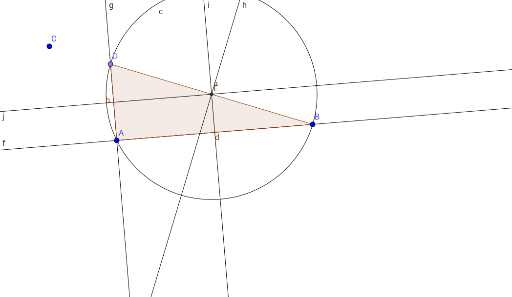
This example dynamically demonstrates the geometric interpretation of 2D vectors, linear equations, and Riemann sums, visually constructing the concept of integration. Key math concepts include vector operations, linear equation solving, Riemann sums, and introductory calculus. GeoGebra commands and objects used in construction are Line, OrthogonalLine, Point, Polygon, LineBisector, Intersect, and Circle. Suitable for high school students and math enthusiasts exploring the intersection of vectors, calculus, and geometric constructions.
GeoGebra Commands & Parameters
Line(A, B) → fOrthogonalLine(A, f) → gPoint(g) → DPolygon(D, A, B) → poly1, b, d, aLineBisector(a) → hLineBisector(d) → iLineBisector(b) → jIntersect(h, i) → ECircle(E, B) → c
AI Drawing Prompt Reference
Visualize 2D vectors and Riemann sums, demonstrating the geometric interpretation of vectors, linear equations, and Riemann sums to illustrate the concept of integration. Start by drawing a line segment, then draw a perpendicular line to it. Mark the intersection point and form a triangle with this point and the line segment. Next, draw the angle bisectors of the three sides of the triangle. Finally, draw a circle centered at the intersection of the angle bisectors with a radius equal to the distance from one endpoint of the segment to this intersection point.
The prompt above was compiled from the original drawing commands and is for reference only.