
2 System of Equations Solver (Interactive)
Loading the math board and drawing, please wait…
In collections
Special Systems of Equations
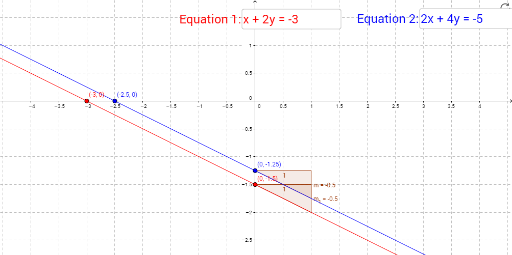
① This example demonstrates an interactive solver for a system of two linear equations, allowing users to modify the equations via input fields and observe the intersection point in real time. ② The core mathematical concept is the geometric interpretation of linear systems—the solution corresponds to the intersection of two lines, involving slope, intercept, and standard line equations. ③ Construction highlights: Textfield commands create two input boxes (inputBox1, inputBox2) for user-entered equations; Intersect computes the intersection point A; Slope obtains the slopes (m, m_1); displayed elements include equation text (FormulaText) and coordinates (xofred, yofred, xofblue, yofblue). ④ Suitable for middle school to high school students learning algebra and coordinate geometry, as well as for classroom demonstrations by teachers.
GeoGebra Commands & Parameters
Textfield(a) → inputBox1Textfield(b) → inputBox2Intersect(a, b) → AIntersect(a, y = 0) → xofredIntersect(a, x = 0) → yofredIntersect(b, y = 0) → xofblueIntersect(b, x = 0) → yofblueSlope(b) → mSlope(a) → m_1
AI Drawing Prompt Reference
Create an interactive system of linear equations solver with two input boxes for users to enter equations, displaying the intersection point of two lines in real time, and labeling the slope of each line and its intercepts with the axes. First draw two lines based on the input equations, then calculate the intersection point, display the equations in the input boxes, show the slopes above the lines, and mark the intercept coordinates on the x and y axes.
The prompt above was compiled from the original drawing commands and is for reference only.