
编写一元一次不等式应用题
几何画板及绘图内容加载中,请稍等……
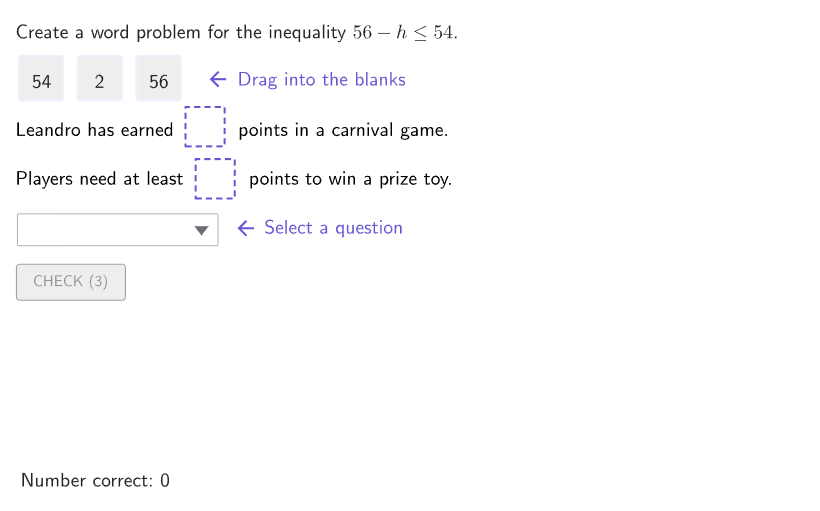
本范例通过创建游乐园一天中的实际应用题,演示如何根据一元一次不等式编写应用题。涉及的核心数学概念是一元一次不等式及其在实际情境中的应用。构造过程中用到了GeoGebra命令如Shuffle、Element、RemoveUndefined、Zip、Append、If、Polygon、Corner、centerBox、Text、Sequence、IndexOf、SelectedIndex、onboardingTextOffset,以及对象randomNames、randomXVals、possibleOrdersA、randomCase、randomYVals、space2、space1、countQuestion、name、movingIndex、P3、P2、P1、movingPoints、PMove、valY、validX、valX、valDiff、homeIndices、textStrCurrent、boxText、currentLocations、questionA3、questionC3、questionD3、caseNum、expectedAns、order、studentAns、questionA1、questionA2、questionB2、questionB1、questionB3、questionC1、questionC2、questionD1、questionD2、currentQuestions。适合6-8年级学生学习如何将数学概念应用于实际问题。
GeoGebra 命令及参数
Shuffle({"Anara", "Leandro", "Viktoria", "Mari", "Elias", "Domenic"}) → randomNames, {"Leandro", "Anara", "Domenic", "Elias", "Mari", "Viktoria"}Shuffle(Sequence[42, 55]) → randomXVals, {54, 42, 46, 49, 47, 51, 44, 50, 45, 48, 52, 55, 43, 53}Shuffle({{1, 2, 3}, {1, 3, 2}, {2, 1, 3}, {2, 3, 1}, {3, 1, 2}, {3, 2, 1}}) → possibleOrdersA, {{1, 3, 2}, {3, 1, 2}, {2, 1, 3}, {3, 2, 1}, {1, 2, 3}, {2, 3, 1}}Shuffle(Sequence[1, 4]) → randomCase, {3, 2, 1, 4}Shuffle({46, 48, 50, 52, 54, 56}) → randomYVals, {56, 50, 54, 48, 52, 46}Element(movingPoints, movingIndex) → PMoveElement(randomYVals, Mod[countQuestion, Length[randomYVals]] + 1) → valYRemoveUndefined(Zip[If[A < valY, A], A, randomXVals]) → validXElement(validX, Mod[countQuestion, Length[validX]] + 1) → valXElement(possibleOrdersA, Mod[countQuestion, Length[possibleOrdersA]] + 1) → homeIndicesZip(Element[{("" * valX), ("" * valY), ("" * valDiff)}, A], A, homeIndices) → textStrCurrentZip(Text[("" * A), B, true, true, 0, 0], A, textStrCurrent, B, movingPoints) → boxTextElement(randomCase, Mod[countQuestion, Length[randomCase]] + 1) → caseNumElement({{1, 2}, {2, 1}, {1, 2}, {2, 1}}, caseNum) → expectedAnsElement(possibleOrdersA, Mod[countQuestion, Length[possibleOrdersA]] + 1) → orderZip(homeIndices(IndexOf[A, currentLocations]), A, {1, 2}) → studentAnsElement({{questionA1, questionA2, questionA3}, {questionB1, questionB2, questionB3}, {questionC1, questionC2, questionC3}, {questionD1, questionD2, questionD3}}, caseNum) → currentQuestionsAppend("$\text\phantom{this is an empty line}$", Zip[(("$\text{" * currentQuestions(A)) * " }$"), A, order]) → selectQuestionIf(SelectedIndex[selectQuestion] ≠ 1, order(SelectedIndex[selectQuestion] - 1), NaN) → selectedQuestionElement(positions, caseNum) → boxAnchorsIf(caseNum < 5, "", "^2") → powerAppend(studentAns, selectedQuestion) → inputCurrentPolygon(Zip[PixelsToPoint[Corner[1], Corner[3], Corner[5], A], A, {(pixelsLeft, pixelsTop), (pixelsLeft, y(Corner[5]) - pixelsBottom), Corner[5] - (pixelsRight, pixelsBottom), (x(Corner[5]) - pixelsRight, pixelsTop)}]) → borderBoxCorner(5) → layoutAppSizecenterBox(innerSize, innerSize, P1) → box1centerBox(innerSize, innerSize, P2) → box2centerBox(innerSize, innerSize, P3) → box3centerBox(innerSize, innerSize, PMove) → highlightBoxZip(HOME, A, movingPoints) → allHomeText(("" * boxText(movingIndex)), If[Defined[PMove], PMove, (300, 300)], false, true, 0, 0) → textHighlightSequence((("SetFixed(box" * A) * ",false,enableInput)"), A, 1, Length[movingPoints]) → cmdFixBoxesSequence((((((((("SetValue(P" * A) * ",If(currentLocations(") * A) * ")==HOME,homeLocations(") * A) * "),boxAnchors(currentLocations(") * A) * "))))"), A, 1, Length[movingPoints]) → cmdOrganizecenterBox(boxWidth, boxHeight, boxAnchors(1)) → frame1centerBox(boxWidth, boxHeight, boxAnchors(2)) → frame2Sequence(HomeAnchor + (((A * 1.5) * boxWidth), 0), A, 0, Length[movingPoints] - 1) → homeLocationsIndexOf(true, Zip[IsInRegion[PMove, A], A, {frame1, frame2}]) → locationPMoveElement({{questionA1, questionA2, questionA3}, {questionB1, questionB2, questionB3}, {questionC1, questionC2, questionC3}, {questionD1, questionD2, questionD3}}, caseNum) → line3OptionsSelectedIndex(selectQuestion) → testcenterBox(boxWidth, boxWidth, boxAnchors(locationPMove)) → highlightFrameonboardingTextOffset(Corner[onboardingText, 1], Corner[onboardingText, 3], onboardingCase, Corner[1], Corner[3], Corner[5]) → OnboardingTextOffsetZip(expandQuad[Vertex[A, 1], Vertex[A, 2], Vertex[A, 3], Vertex[A, 4], (pulsing * 7), Corner[1], Corner[3], Corner[5]], A, {box1, box2, box3}) → pulsingObjects
AI 绘图提示语参考
制作一个“摁按钮解一元一次不等式”的练习界面风格图形:先生成若干随机姓名、横纵坐标数值与题目排列顺序,用作动态文本内容。画出两块等大小的矩形题框并居中布局,同时在其中一块显示高亮外框与阴影提示框。再在高亮位置放入一个移动点对应的文字高亮(来源于随机的选项文本),并在上方用带空行的公式/选项文本展示当前题目;下方放置供输入的答题字符串。用一条外边框围出整个题框区域,在高亮时叠加选中边框,并让文字依框内容变化。
以上提示语为根据原始绘图命令整理而来,仅供参考。