
金字塔体积与Cavalieri原理演示
几何画板及绘图内容加载中,请稍等……
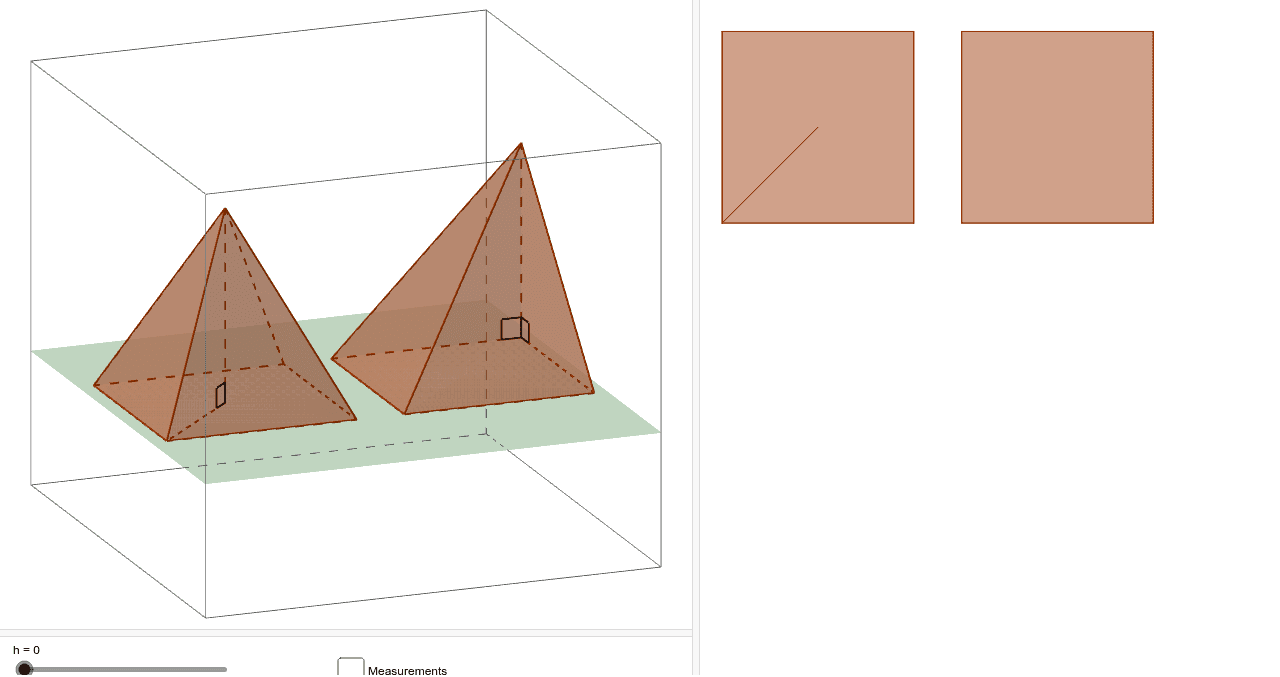
该范例演示了Cavalieri原理在两个等底等高金字塔体积计算中的应用。核心数学概念包括体积、相似比和几何作图。作图要点涉及使用GeoGebra命令如Pyramid、Plane、Segment、Angle、Intersect和Polygon来构造金字塔对象。适合高中生或大学低年级学生用于理解立体几何和体积计算。
GeoGebra 命令及参数
Pyramid((-10, 0, 0), (-2, 0, 0), (-2, 8, 0), (-10, 8, 0), (-10, 0, 8)) → e, face1, edge5, edge6, edge7, edge8, face2, face3, face4, face5, edge1, edge2, edge3, edge4Pyramid((0, 0, 0), (8, 0, 0), (8, 8, 0), (0, 8, 0), (4, 4, 8)) → a, face6, edge13, edge14, edge15, edge16, face7, face8, face9, face10, edge9, edge10, edge11, edge12Plane((0, 0, h), (5, 5, h), (5, (-5), h)) → dSegment((4, 4, 0), (4, 4, 8)) → bSegment((4, 4, 0), (8, 8, 0)) → cAngle((-2, 0, 0), (-10, 0, 0), (-10, 0, 8)) → αAngle((-10, 8, 0), (-10, 0, 0), (-10, 0, 8)) → βAngle((8, 8, 0), (4, 4, 0), (4, 4, 8)) → γIntersect(edge14, d) → AIntersect(edge15, d) → BIntersect(edge16, d) → CIntersect(edge13, d) → DIntersect(edge6, d) → EIntersect(edge7, d) → FIntersect(edge8, d) → GIntersect(edge5, d) → HPolygon(A, B, C, D) → poly1, a_1, b_1, c_1, d_1Polygon(E, F, G, H) → poly2, e_1, f, g, h_1
AI 绘图提示语参考
请绘制两个等底等高的金字塔。第一个金字塔的底面在x轴上从-10到-2,底面在y轴上从0到8,高度为8。第二个金字塔的底面在x轴上从0到8,底面在y轴上从0到8,高度为8。在两个金字塔的侧面,绘制一个平面,该平面通过点(0,0,h)、(5,5,h)和(5,-5,h)。然后,从两个金字塔的顶点画垂直线段,并与平面相交,得到四个点。连接这些点形成一个四边形。最后,绘制两个四边形,分别代表两个金字塔的侧面与平面的交线。
以上提示语为根据原始绘图命令整理而来,仅供参考。