
用平衡杆可视化代数方程:理解方程与解的关联
几何画板及绘图内容加载中,请稍等……
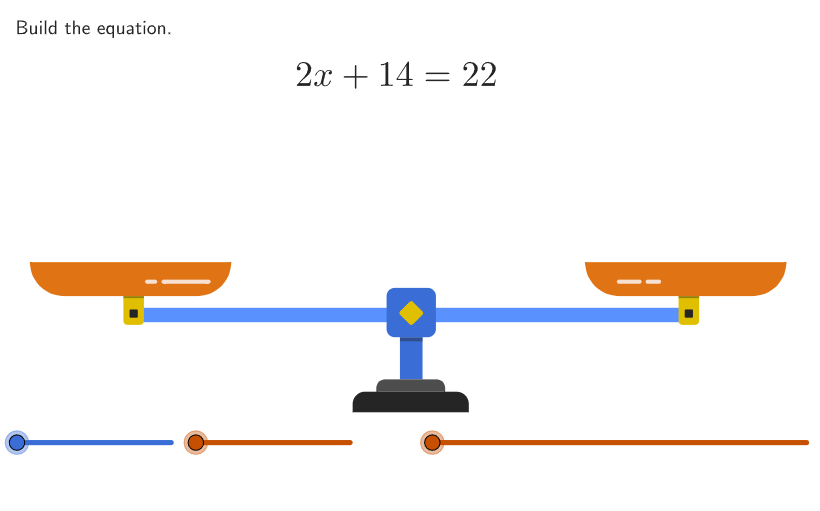
这个范例通过构建平衡杆模型,展示代数方程的解与模型之间的联系。核心数学概念包括两步线性方程和不等式的求解,以及在数轴上绘制不等式解集。作图要点涉及使用GeoGebra命令如Shuffle、Element、If、PointToPixels等来创建动态平衡模型。适合中学阶段(6-8年级)学生用于理解方程求解过程和几何直观。
GeoGebra 命令及参数
Shuffle(Sequence[2, 15]) → randomXVal, {12, 10, 4, 2, 8, 5, 3, 15, 6, 13, 7, 14, 9, 11}Element(randomXVal, Mod[countQuestion, Length[randomXVal]] + 1) → xValIf(diffStudent ≤ -10, ((-pi)) / 10, If[diffStudent > 10, pi / 10, (diffStudent / 10 * pi / 10)]) → rotationAnglePointToPixels(Corner[1], Corner[3], Corner[5], CenterP) → CenterPixelsPixelsToPoint(Corner[1], Corner[3], Corner[5], CenterPixels + (-270, 0)) → MidLeftRotate(MidLeft, rotationAngle, CenterP) → LeftRotatePointToPixels(Corner[1], Corner[3], Corner[5], LeftRotate) → PixelLeftPixelsToPoint(Corner[1], Corner[3], Corner[5], PixelLeft + (-90, -51.5)) → StartLeftRemoveUndefined(Flatten[Sequence[Sequence[If[i + (5 * j) < studentUnitsLeft, StartLeft + (x(LeftRotate) - x(StartLeft), 0) + ((unitWidth * i), (unitWidth * j))], i, 0, 4], j, 0, 10]]) → pointsLeftPixelsToPoint(Corner[1], Corner[3], Corner[5], CenterPixels + (270, 0)) → MidRightRotate(MidRight, rotationAngle, CenterP) → RightRotatePointToPixels(Corner[1], Corner[3], Corner[5], RightRotate) → PixelRightPixelsToPoint(Corner[1], Corner[3], Corner[5], PixelRight + (-90, -51.5)) → StartRightFlatten(Sequence[Sequence[StartLeft + ((i * widthX), (j * widthX)), i, 0, 2], j, 0, 1]) → possiblePointsLeftXShuffle(Sequence[2, 6]) → randomNumX, {5, 4, 2, 3, 6}Element(randomNumX, Mod[countQuestion, Length[randomNumX]] + 1) → numXSequence(StartLeftStage2 + ((A * (1.2 * widthX)), 0), A, 0, numX - 1) → pointsXDestinationIf(animateStep2 < 2, 0, If[animateStep2 > 3, 1, animateStep2 - 2]) → animate2BZip(Translate[A, (animate2B * (B - A))], A, possiblePointsLeftX, B, pointsXDestination) → pointsXMoveIf(animateStep2 < 3, 0, If[animateStep2 > 4, 1, animateStep2 - 3]) → animate2CShuffle(Sequence[1, 15]) → randomUnitsLeft, {11, 12, 14, 9, 8, 4, 5, 2, 6, 15, 13, 10, 1, 3, 7}Element(randomUnitsLeft, Mod[countQuestion, Length[randomUnitsLeft]] + 1) → expectedUnitsLeftSequence(StartRightStage2 + (0, A), A, 0, xVal - 1) → pointsFinalRightFlatten(Sequence[Sequence[StartRightStage2 + ((i * unitWidth), (j * unitWidth)), i, 0, numX - 1], j, 0, xVal - 1]) → pointsRightStage2Zip(A + (((x(A) - x(StartRightStage2)) / unitWidth * 0.5), 0), A, pointsRightStage2) → pointsRightStage3Flatten(Sequence[Sequence[StartRightStage2 + ((i * unitWidth), (j * unitWidth)), i, 0, 9], j, 0, 10]) → possiblePointsRightRemoveUndefined(Flatten[Sequence[Sequence[If[i + (10 * j) < studentUnitsRight, StartRight + ((unitWidth * i), (unitWidth * j))], i, 0, 9], j, 0, 10]]) → pointsRightTake(pointsRight, (numX * xVal) + 1) → pointsRightSubtractedRemove(pointsRight, pointsRightSubtracted) → pointsRightAfterSubtractionRemoveUndefined(Zip[If[x(A) ≥ x(StartRightStage2) + (unitWidth * numX), A], A, pointsRightAfterSubtraction]) → pointsRightToMoveRemove(pointsRightAfterSubtraction, pointsRightToMove) → pointsStationaryIf(animateStep2 < 1, 0, If[animateStep2 > 2, 1, animateStep2 - 1]) → animate2AZip(Translate[A, (animate2B * (B - A))], A, pointsRightStage2, B, pointsRightStage3) → pointsMoveStage2Polygon(Zip[PixelsToPoint[Corner[1], Corner[3], Corner[5], A], A, {(pixelsLeft, pixelsTop), (pixelsLeft, y(Corner[5]) - pixelsBottom), Corner[5] - (pixelsRight, pixelsBottom), (x(Corner[5]) - pixelsRight, pixelsTop)}]) → borderBoxCorner(5) → layoutAppSizeRotate(CenterP + (armRadius, 0), rotationAngle, CenterP) → RightArmEndIf(correct, {0, 103 / 255, 88 / 255}, {37 / 255, 37 / 255, 37 / 255}) → colorEqnIf(animate2A ≤ 0.5, {230 / 255, 107 / 255, 158 / 255}, If[0.5 < animate2A < 1, {199 / 255, 80 / 255, 0}, {230 / 255, 107 / 255, 158 / 255}]) → colorStage2Sequence(Sequence[If[i + (3 * j) < studentX, boxTool[widthX, widthX, StartLeft + ((widthX * i), (widthX * j))]], i, 0, 2], j, 0, 1) → boxesStudentXTake(pointsRightStage2, Length[pointsRightStage2] - Length[pointsRightToMove] + 1) → pointsRightMoveDestinationsZip(boxTool[unitWidth, unitWidth, A], A, pointsRightSubtracted) → fadingBoxes1Zip(Translate[boxTool[unitWidth, unitWidth, A], (animate2A * (B - A))], A, pointsRightToMove, B, pointsRightMoveDestinations) → moveBoxesZip(Translate[boxTool[unitWidth, unitWidth, A], (animate2B * (B - A))], A, pointsRightStage2, B, pointsRightStage3) → moveBoxes2If(animateStep1 ≟ 0, pointsRight, If[animate2A ≟ 0, pointsRightAfterSubtraction, If[animate2B ≟ 0, pointsStationary, If[animate2C ≟ 0, pointsMoveStage2, pointsFinalRight]]]) → currentPointsRightZip(boxTool[unitWidth, unitWidth, A], A, currentPointsRight) → boxesRightSolutionRemove(pointsMoveStage2, pointsFinalRight) → pointsToFade2Zip(boxTool[unitWidth, unitWidth, A], A, pointsToFade2) → fadingBoxes2Remove(pointsXMove, {StartLeftStage2}) → pointsToFadeXZip(boxTool[widthX, widthX, A], A, pointsToFadeX) → fadingBoxesXZip(boxTool[widthX, widthX, A], A, If[animate2C ≟ 0, pointsXMove, {StartLeftStage2}]) → boxesXSolnFlatten(Sequence[Sequence[If[i + (5 * j) < expectedUnitsLeft, StartLeft + ((5.5 * unitWidth), 0) + ((i * unitWidth), (j * unitWidth))], i, 0, 4], j, 0, 2]) → pointsLeftUnitsZip(boxTool[unitWidth, unitWidth, A], A, pointsLeftUnits) → fadingBoxesLeftZip(boxTool[unitWidth, unitWidth, A], A, pointsLeft) → boxesStudentLeftZip(boxTool[unitWidth, unitWidth, A], A, pointsRight) → boxesStudentRightZip(boxTool[unitWidth, unitWidth, A], A, pointsRight) → boxesRightFrameIf(0.5 < animate2A < 1, {245 / 255, 224 / 255, 210 / 255}, {245 / 255, 224 / 255, 210 / 255}) → colorStage2XMax(floor((animate2C * 10)), 1) → fadeIndex
AI 绘图提示语参考
绘制一个用于演示代数方程求解的动态“平衡梁”建模画面:在固定画布中央放置一个旋转的支点中心与两侧摆臂,摆臂末端带有格子化的计量单位,左臂与右臂围绕中心随同一角度对称旋转。用像素到坐标的映射把梁两端的起始位置与中点定义好,并在左侧生成由多层小方块构成的“单位箱”阵列,随后根据不同动画阶段将部分箱体平移、淡出或移动到右侧目标位置。右侧同样生成可选位置与最终停放位置,并包围一个表示左右约束/边界的多边形框。画面整体配色随阶段与正确性变化,左侧格子数量与右侧数量存在约束关系,体现两步线性等式与不等式解在数轴上的转化直觉。
以上提示语为根据原始绘图命令整理而来,仅供参考。