
用量角器测量角度
几何画板及绘图内容加载中,请稍等……
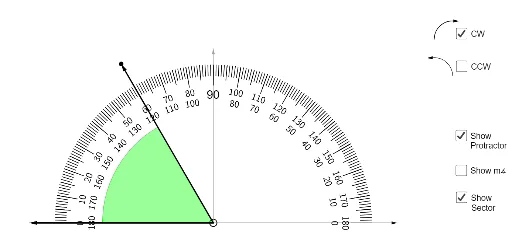
① 本范例演示了如何使用量角器(半圆仪)测量一个角的大小,通过可视化交互展示角度读数的过程。② 核心数学概念是角度的度量,涉及角的顶点、边以及角度数值的读取,同时隐含了角度与圆弧、扇形的关系。③ 作图要点:从构造摘要看,使用了GeoGebra的点(Point)、向量(Vector)、序列(Sequence)、旋转文本(RotateText)、文本(Text)、圆(Circle)、半圆(Semicircle)、圆扇形(CircleSector)、圆弧(CircleArc)和角度(Angle)命令,创建了量角器的半圆刻度、角度标记以及动态文本显示。④ 适合小学高年级或初中低年级学生学习几何入门,也可用于教师课堂演示,帮助学生直观理解量角器的使用方法和角度概念。
GeoGebra 命令及参数
Point(xAxis) → APoint(xAxis) → BVector(A, B) → uVector(B, A) → vSequence(Segment[((4 * cos(t)), (4 * sin(t))), ((4.3 * cos(t)), (4.3 * sin(t)))], t, 0°, 180°, 1°) → l1Sequence(Segment[((3.9 * cos(t)), (3.9 * sin(t))), ((4.3 * cos(t)), (4.3 * sin(t)))], t, 0°, 180°, 5°) → l2RotateText("0", 90°) → text1RotateText("10", (-(80°))) → text2RotateText("20", (-(70°))) → text3RotateText("30", (-(60°))) → text4RotateText("40", (-(50°))) → text5RotateText("50", (-(40°))) → text6RotateText("60", (-(30°))) → text7RotateText("70", (-(20°))) → text8RotateText("80", (-(10°))) → text9Text(90) → text10Circle((0, 0), 0.1) → cRotateText("100", 10°) → text11RotateText("110", 20°) → text12RotateText("120", 30°) → text13RotateText("130", 40°) → text14RotateText("170", 78°) → text20RotateText("160", 68°) → text17RotateText("150", 57°) → text16RotateText("140", 47°) → text15RotateText("180", 90°) → text18Circle((0, 0), 3.5) → dCircle((0, 0), 3.2) → eRotateText("0", 90°) → text19RotateText("10", 80°) → text21RotateText("20", 70°) → text22RotateText("30", 60°) → text23RotateText("40", 50°) → text24RotateText("50", 40°) → text25RotateText("60", 30°) → text26RotateText("70", 20°) → text27RotateText("80", 10°) → text28RotateText("100", (-(10°))) → text29RotateText("110", (-(20°))) → text30RotateText("130", (-(41°))) → text32RotateText("120", (-(31°))) → text31RotateText("140", (-(49°))) → text33RotateText("150", (-(58°))) → text34RotateText("160", (-(68°))) → text35RotateText("170", (-(78°))) → text36RotateText("180", (-(90°))) → text37Sequence(Segment[((3.75 * cos(t)), (3.75 * sin(t))), ((4.3 * cos(t)), (4.3 * sin(t)))], t, 0°, 180°, 10°) → l3Semicircle((-5, 0), (5, 0)) → fPoint(f) → FVector((0, 0), (0, 4.75)) → wPoint(w) → GVector(G, F) → aCircle(C, 3) → gPoint(a) → ICircleSector(C, I, H) → hPoint(g) → JCircleSector(C, J, I) → kCircleArc(K, M, L) → pPoint(p) → OVector(O, P) → bCircleArc(S, Q, R) → qVector(R, T) → jVector(C, B) → mVector(C, A) → nAngle(B, C, F) → α