
球面上的三角形投影
几何画板及绘图内容加载中,请稍等……
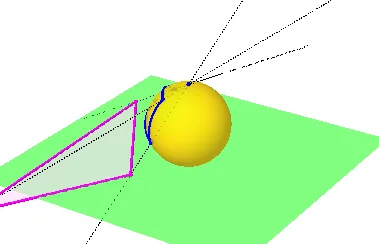
这个范例演示了三角形在滚动球面上的投影现象。涉及的核心数学概念包括球面几何、投影变换、多边形构造等。作图要点使用了GeoGebra的Sphere(球体)、Plane(平面)、OrthogonalPlane(正交平面)、IntersectPath(路径交点)、PointIn(点在路径上)、CircleArc(圆弧)、Point(点)、Rotate(旋转)、Line(直线)、Intersect(交点)、Segment(线段)、Polygon(多边形)等命令和对象。适合高中及以上学段,用于学习空间几何与投影变换。
GeoGebra 命令及参数
Sphere((0, 0, 1), 1) → aPlane(yAxis, zAxis) → bPlane(xAxis, zAxis) → cOrthogonalPlane(B, zAxis) → dIntersectPath(c, d) → fIntersectPath(b, d) → gIntersectPath(c, b) → hPointIn(a) → CPointIn(a) → DCircleArc(B, C, D) → ePointIn(a) → ECircleArc(B, C, E) → kPoint(k) → FPoint(e) → GCircleArc(B, F, G) → pRotate(e, i, f) → e'Rotate(p, i, f) → p'Rotate(k, i, f) → k'Rotate(F, i, f) → F'Rotate(G, i, f) → G'Rotate(C, i, f) → C'Line(A, C') → jLine(A, F') → lLine(A, G') → mIntersect(j, xOyPlane) → HIntersect(l, xOyPlane) → IIntersect(m, xOyPlane) → JSegment(H, J) → nSegment(J, I) → qSegment(I, H) → rPolygon(H, J, I) → t1, i_1, h_1, j_1
AI 绘图提示语参考
在一个球体上,构建一个平面与球体相切,并在此平面上生成一个三角形。将此三角形投影到球体表面,形成另一个三角形。接着,将球体沿一个轴旋转,观察投影三角形的变化。最后,将旋转后的投影三角形投影回平面,形成最终的图形。
以上提示语为根据原始绘图命令整理而来,仅供参考。