
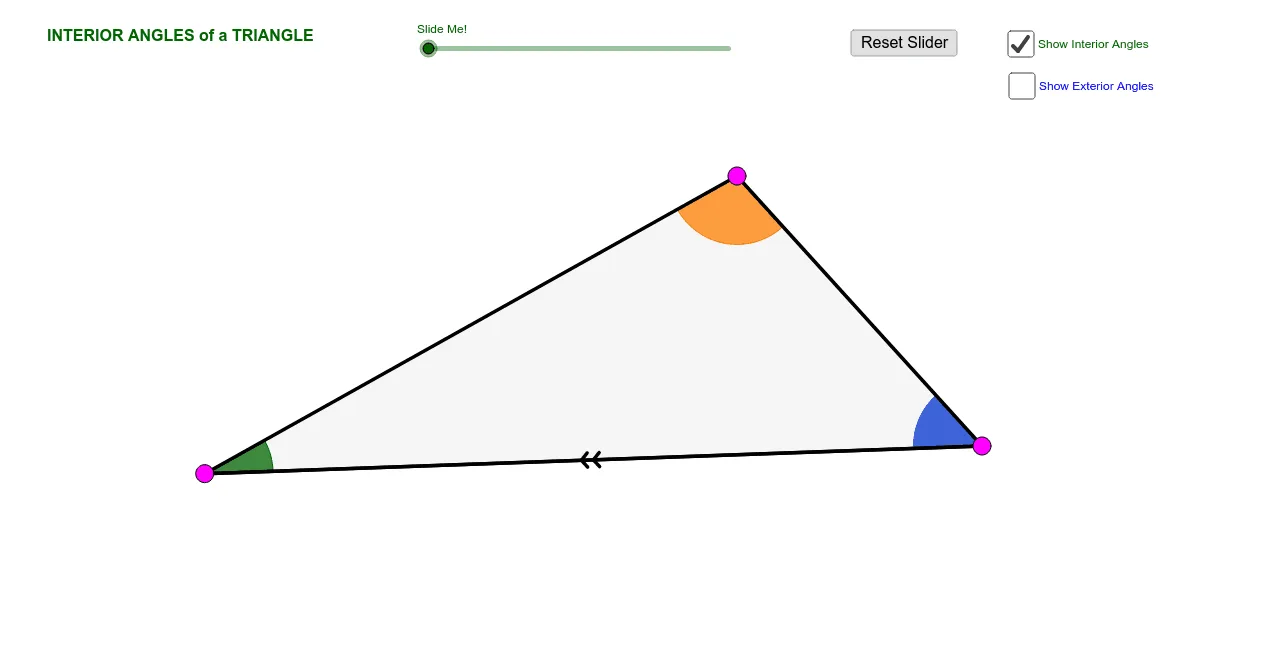
三角形内角和与外角和定理动态演示(II)
几何画板及绘图内容加载中,请稍等……
所属专题
Polygons & Angles
Polygons & Angles
Polygons & Angles
Geometry: Polygons & Angles
Geometry: Polygons & Angles
本范例动态演示三角形内角和定理与外角性质的几何关系。核心数学概念涵盖三角形内角和为 180 度、外角等于不相邻两内角之和。作图要点基于 GeoGebra 命令,包括使用 Ray 和 Segment 构建边,Angle 测量角度,Polygon 定义三角形,并结合 Rotate 与 Translate 实现角度变换与验证。适合初中阶段学生学习几何证明,或教师用于课堂互动演示,直观理解角度守恒与变换规律。
GeoGebra 命令及参数
Ray(A, B) → aRay(B, C) → bRay(C, A) → cPoint(a) → D_1Point(b) → E_1Point(c) → F_1Ray(A, F_1) → dRay(B, D_1) → eRay(C, E_1) → fPoint(e) → DPoint(f) → EPoint(d) → FAngle(B, A, C) → αAngle(C, B, A) → βAngle(A, C, B) → γAngle(F, A, B) → δAngle(D, B, C) → εAngle(E, C, A) → ζCircle(A, 1.5) → gCircle(B, 1.5) → hCircle(C, 1.5) → kIntersect(g, c, 1) → GIntersect(g, a, 1) → HIntersect(g, c, 2) → IIntersect(h, b, 1) → JIntersect(h, a, 1) → KIntersect(h, a, 2) → LIntersect(k, b) → M, NIntersect(k, c) → O,CircleSector(A, H, G) → pCircleSector(B, J, K) → qCircleSector(C, O, M) → rCircleSector(C, N, O) → sCircleSector(B, L, J) → tCircleSector(A, I, H) → c_1Line(C, a) → iVector(B, C) → uVector(A, C) → vTranslate(q, u) → q'Segment(B, C) → lDilate(C, If[0 < j ≤ 1, j, 0], B) → C'Vector(B, C') → wTranslate(q, w) → q'_1Rotate(q'_1, If[0 < j, (((-j) * 180))°, 180*°], C') → d_1Mirror(q', C) → q''Dilate(A, If[1 < j ≤ 2, 2 - j, 0], C) → C'_1Vector(A, C'_1) → mTranslate(p, m) → p'Dilate(C, If[0 < n ≤ 1, n, 0], B) → C'_2Dilate(A, If[1 < n ≤ 2, 2 - n, 0], C) → A'Vector(B, C'_2) → u_1Vector(A, A') → v_1If(0 < n ≤ 1, Translate[t, u_1], Translate[t, u]) → e_1If(1 < n ≤ 2, Translate[c_1, v_1], Translate[c_1, v]) → f_1Polygon(A, B, C) → poly1, c_2, a_2, b_1Line(A, B) → g_1Segment(C, B) → j_1Ray(B, C) → k_1Midpoint(B, C) → PSegment(C, P) → l_1Segment(P, B) → m_1If(0 < j < 1, Rotate[B, ((j * 180))°, P]) → QIf(0 < j < 1, Rotate[q, ((j * 180))°, P]) → p_1If(0 < j < 1, Segment[Rotate[A, ((j * 180))°, P], Rotate[B, ((j * 180))°, P]]) → r_1Rotate(A, 180*°, P) → A'_1Rotate(B, 180*°, P) → B'Segment(A'_1, B') → s_1Segment(C, B) → t_1Segment(B, A) → q_1Segment(B, A) → b_2Midpoint(A, C) → RSegment(A, R) → d_2Segment(R, C) → e_2Segment(A, C) → h_2If(1 < j ≤ 2, Rotate[p, (((-(j - 1)) * 180))°, R]) → f_2Segment(A, C) → i_2If(1 < j ≤ 2, Segment[Rotate[A, (((-(j - 1)) * 180))°, R], Rotate[C, (((-(j - 1)) * 180))°, R]]) → j_2If(0 < j ≤ 1, Segment[Rotate[C, ((j * 180))°, P], Rotate[B, ((j * 180))°, P]]) → k_2If(1 < j ≤ 2, Segment[Rotate[B, (((-(j - 1)) * 180))°, R], Rotate[A, (((-(j - 1)) * 180))°, R]]) → i_1Ray(B, C) → n_1Ray(A, B) → g_2Ray(C, A) → l_2
AI 绘图提示语参考
绘制一个三角形ABC,通过点A、B、C分别作射线a、b、c。在射线上取点D、E、F,然后通过点A、B、C和点D、E、F构造角度α、β、γ、δ、ε、ζ。接着画圆心在A、B、C三点的圆,并在圆上找到交点G、H、I、J、K、L、M、N、O。利用这些交点构造扇形p、q、r、s、t、c_1。通过点C作直线i,利用向量u、v构造新的射线和扇形。最后通过旋转、镜像和缩放操作,构造出新的扇形d_1和q'',以及新的点C'_1和扇形p'。
以上提示语为根据原始绘图命令整理而来,仅供参考。