
圆的切线构造与演示
几何画板及绘图内容加载中,请稍等……
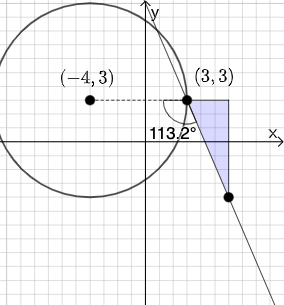
①本范例演示了如何通过 GeoGebra 构造圆的切线及其相关几何元素;②涉及的核心数学概念包括圆、切线、角度、斜率等;③作图要点提炼自 GeoGebra 命令:PointIn, Line, Polygon, Segment, Slope, Textfield, Mode, If, Circle, Angle 等,用于精确绘制和计算;④适合高中数学教学,用于帮助学生理解切线的性质和作图方法。
GeoGebra 命令及参数
PointIn(e) → APointIn(e) → BPointIn(e) → DLine(A, B) → fPolygon(A, C, B) → t1, b_1, a_1, c_1Segment(B, C) → gSegment(C, A) → hSlope(f) → iTextfield(k) → InputBox2Textfield(j) → InputBox1Mode(l1) → l2If(Length[l2] ≟ 0, "You have no repeated digits!", "You have repeated digits.") → text5Circle(D, A) → pSegment(D, A) → qAngle(B, A, D) → αIf(α ≟ pi / 2, "Line is tangent to circle.", "Line is not tangent to circle.") → text1Textfield(s) → InputBox3Textfield(t) → InputBox4If(j / k ≟ i, "√", "X") → text6If(Slope[q] ≟ s / t, "√", "X") → text7
AI 绘图提示语参考
画一个圆和一条直线,直线与圆相切。圆上有点A和D,直线经过A和B。构造时,先画圆,再画直线,然后验证直线是否与圆相切。
以上提示语为根据原始绘图命令整理而来,仅供参考。