
动态圆与切线问题
几何画板及绘图内容加载中,请稍等……
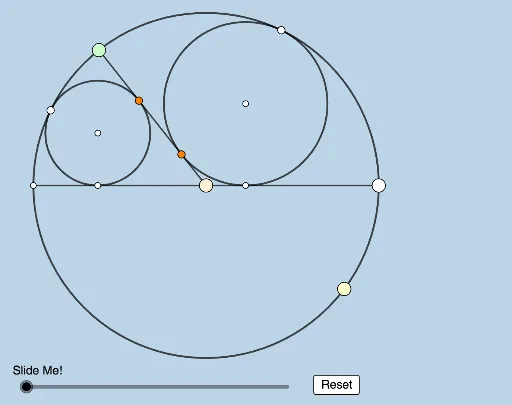
本范例展示了 Antonio Gutierrez 提出的圆与切线问题的动态演示。核心数学概念包括圆的性质和切线的定义。通过使用 GeoGebra 的 Circle, Point, Ray, Intersect, Semicircle, Segment, Angle, Rotate, Line, OrthogonalLine, Dilate, Vector, Translate, Polygon 命令,可以动态修改和观察图形的变化。适合高中几何学习者和教师使用。
GeoGebra 命令及参数
Circle(O, B_1) → cPoint(c) → ARay(A, O) → fIntersect(c, f, 2) → G_1Semicircle(G_1, A) → dPoint(d) → BSegment(B, O) → gSegment(O, A) → hAngle(A, O, B) → αRotate(A, (0.5 * α), O) → CRay(O, C) → iLine(B, A) → jIntersect(j, i) → DCircle(C, O) → eCircle(A, C) → kLine(A, O) → nCircle(C, Segment[O, A]) → pCircle(A, Segment[A, O]) → qIntersect(p, q, 1) → ELine(A, E) → lCircle(E, Segment[A, D]) → rIntersect(r, l, 2) → FLine(F, C) → mIntersect(n, m) → GLine(E, G) → sIntersect(s, i) → HCircle(H, C) → tRotate(B, (π - α) / 2, O) → B'Angle(B, O, B') → βRay(O, B') → aSegment(B, G_1) → bIntersect(a, b) → ICircle(G_1, Segment[G_1, O]) → c_1Circle(B, Segment[G_1, O]) → d_1Circle(B, Segment[O, B]) → e_1Circle(B', Segment[O, B]) → f_1Intersect(e_1, f_1, 2) → JLine(B, J) → g_1Circle(J, Segment[B, I]) → h_1Intersect(h_1, g_1, 2) → KRay(B, O) → i_1Ray(K, B') → j_1Intersect(i_1, j_1) → LRay(L, J) → k_1Intersect(a, k_1) → MCircle(M, B') → p_1OrthogonalLine(M, n) → l_1OrthogonalLine(H, n) → m_1OrthogonalLine(M, g) → n_1OrthogonalLine(H, g) → q_1Intersect(l_1, n) → NIntersect(m_1, n) → PIntersect(g, q_1) → QIntersect(n_1, g) → RLine(C, P) → r_1Line(B, G_1) → s_1Line(B', N) → t_1Intersect(s_1, t_1) → SLine(B, A) → a_1Intersect(r_1, a_1) → TDilate(B, If[0 < v ≤ 1, 1 - v, 0], G_1) → B'_1Segment(B, B'_1) → b_1Dilate(B', If[1 < v ≤ 2, 2 - v, 0], S) → B''Segment(B', B'') → f_2Dilate(S, If[2 < v ≤ 3, 3 - v, 0], N) → S'Segment(S, S') → g_2Dilate(B, If[3 < v ≤ 4, 4 - v, 0], A) → B'_2Segment(B, B'_2) → h_2Dilate(C, If[4 < v ≤ 5, 5 - v, 0], T) → C'Segment(C, C') → i_2Dilate(T, If[5 < v ≤ 6, 6 - v, 0], P) → T'Segment(T, T') → j_2Dilate(S, If[7 < v ≤ 8, 8 - v, 0], R) → S'_1Segment(S, S'_1) → k_2Dilate(R, If[8 < v ≤ 9, 9 - v, 0], T) → R'Segment(R, R') → l_2Dilate(S, If[9 < v ≤ 10, 10 - v, 0], Q) → S'_2Vector(S, S'_2) → wTranslate(S, w) → S'_3Translate(S'_1, w) → USegment(S'_3, U) → m_2Dilate(R, If[10 < v ≤ 11, 11 - v, 0], S) → R'_1Vector(R, R'_1) → u_1Translate(R, u_1) → R'_2Translate(R', u_1) → R''Segment(R'_2, R'') → n_2Polygon(S, Q, T, R) → q1, s_2, q_2, t_2, r_2Segment(G_1, A) → p_2
AI 绘图提示语参考
画两个相切的圆,其中一个圆的圆心在另一个圆上移动,并动态展示它们的关系。从第一个圆开始,画出一条射线,与圆交于一点,再以该点为圆心画一个半圆。接着,旋转射线与半圆的交点,得到新的圆心,并画出相应的圆和射线。继续交点、旋转、画圆的过程,形成一系列相切的圆。最后,连接关键点,画出辅助线和新的圆,展示动态变化和几何关系。
以上提示语为根据原始绘图命令整理而来,仅供参考。