
表格、图像与线性方程
几何画板及绘图内容加载中,请稍等……
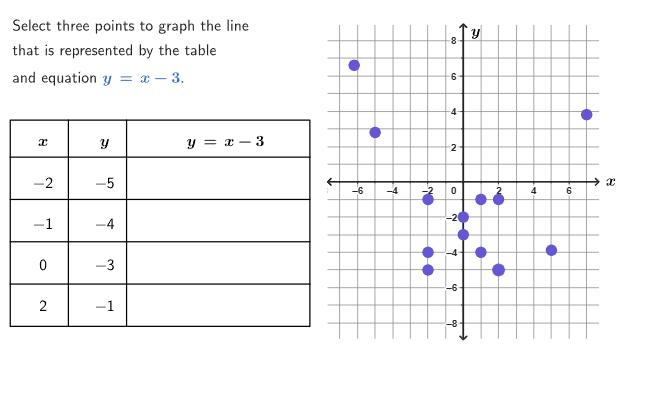
本范例通过表格、图像和代数方程的关系,帮助学生理解线性函数的图像绘制。使用表格中的有序对绘制线性函数图像,涉及 GeoGebra 命令包括 Shuffle, Element, Zip, Sequence, Sort, Point, TableText 等。适合初中6-8年级学生学习。
GeoGebra 命令及参数
Shuffle({1, 2, 3, 4}) → goodPtsPos, {4, 3, 1, 2}Shuffle({-1, 1, -2, 2}) → mList, {-1, 1, -2, 2}Shuffle(Sequence[t, t, -4, 3] \ {0}) → bList, {-4, -3, -1, 3, 1, -2, 2}Element(mList, Mod[mbCount, Length[mList]] + 1) → mElement(bList, Mod[mbCount, Length[bList]] + 1) → bZip((xList(n), yList(n)), n, goodPtsPos) → goodPtsSequence((bad1XList(n), r1Bad(bad1XList(n))), n, 1, Length[bad1XList]) → bad1PtsSequence((bad2XList(n), r2Bad(bad2XList(n))), n, 1, Length[bad2XList]) → bad2PtsSort(allPoints) → sortedPtsCorner(5) → AppSizePolygon((-7.7, -8.9), (7.7, -8.9), (7.7, 8.9), (-7.7, 8.9)) → peep, f, g, h, iSegment((-7.69, 0), (7.69, 0)) → axisXSegment((0, -8.95), (0, 8.95)) → axisYIf(firstCol ∧ x(LastClicked) ≟ -2, yRef, secondCol ∧ x(LastClicked) ≟ -1, yRef + 52, thirdCol ∧ x(LastClicked) ≟ 0, yRef + (2 * 52), fourthCol ∧ x(LastClicked) ≟ 2, yRef + (3 * 52), 151) → yPosSubstElement(allPulsingPoints, pulsingIndexList(pulsingIndex)) → pulsingPointcirclePixels(pulsingPoint, 7 + (7 * pulsing), Corner[1], Corner[3], Corner[5]) → pulsingObjectSum({clickedP1, clickedP2, clickedP3}) → countClickedPoint({-25.7, -8.2}) → T1Polygon({T1, T2, T3, T4}) → fullTableSegment(V11, V41) → vertCol1Segment(V12, V42) → vertCol2Segment(H4, H3) → headLineSegment(L11, L12) → horLine1Segment(L21, L22) → horLine2Segment(L31, L32) → horLine3Polygon({L11, L12, H3, H4}) → box1Polygon({L21, L22, L12, L11}) → box2Polygon({L31, L32, L22, L21}) → box3Polygon({T1, T2, L32, L31}) → box4Zip(IndexOf[A, allPoints], A, sortedPts) → tabValuesSequence(((((((("\bold{" * yList(A)) * "}=") * m) * "\cdot\bold{(") * xList(A)) * ")}") * If[b ≟ 0, "", b > 0, ("+" * b), ("-" * abs(b))]), A, 1, 4) → textVerifyAllSequence(("" * If[Defined[IndexOf[sortedPts(A), goodPts]], (((((("Plugging \(" * sortedPts(A)) * "\) into the equation of line \(") * r) * " \), we get \(") * textVerifyAll(goodPtsPos(IndexOf[sortedPts(A), goodPts]))) * " \)"), (((("The point \(" * sortedPts(A)) * "\) does not belong to line \(") * r) * "\). ")]), A, 1, 13) → altTabPointsSequence(false, A, 1, 13) → allFalseSequence((((("SetFixed(Tab" * A) * ",true,!pointsClicked(") * A) * "))"), A, 1, 13) → cmdLockAppend("\bold{\(x\)}", Zip[(("\mathsf{" * A) * "}"), A, xList]) → col1Append("\bold{\(y\)}", Zip[(("\mathsf{" * A) * "}"), A, yList]) → col2Zip(pointsClicked(IndexOf[(A, B), sortedPts]), A, xList, B, yList) → clickedRowsAppend((("\bold{\(" * textLine) * "\)}"), Zip[(("\math{" * If[clickedRows(A), B, "\hspace{200px}"]) * "}"), A, {1, 2, 3, 4}, B, {textVerifyLine1, textVerifyLine2, textVerifyLine3, textVerifyLine4}]) → col3TableText(col1, col2, col3, "vc", 75, 50) → dataSequence({(("SetColor(Tab" * A) * ", colorCorrect)"), (("SetValue(pointsClicked," * A) * ",true)"), (("SetValue(LastClicked," * sortedPts(A)) * ")")}, A, 1, 13) → cmdCorrectSequence({(("SetColor(Tab" * A) * ", colorWrong)"), (("SetPointStyle(Tab" * A) * ",1)"), (("SetValue(pointsClicked," * A) * ",true)"), "SetValue(LastClicked,(?,?))"}, A, 1, 13) → cmdWrongSequence(Defined[IndexOf[sortedPts(A), goodPts]], A, 1, 13) → isSolutionPtIndexOf((xList(1), yList(1)), sortedPts) → indexRow1IndexOf((xList(2), yList(2)), sortedPts) → indexRow2IndexOf((xList(3), yList(3)), sortedPts) → indexRow3IndexOf((xList(4), yList(4)), sortedPts) → indexRow4Polygon({T1, T2, T3, T4}) → box0Point({-35, -5}) → T0
AI 绘图提示语参考
这是一个展示线性函数、表格和坐标图的图形。图中包含坐标轴、由点构成的线性函数图、表格形式的x和y值列表,以及点阵标记。线性函数图由表格中的有序点绘制而成,坐标轴用于定位这些点。表格以文本形式呈现,点阵用于标记关键点。图形整体布局为:先绘制坐标轴,再绘制线性函数图,接着呈现表格和点阵,最后将点阵和表格组合在一个矩形框内。
以上提示语为根据原始绘图命令整理而来,仅供参考。