
平方数
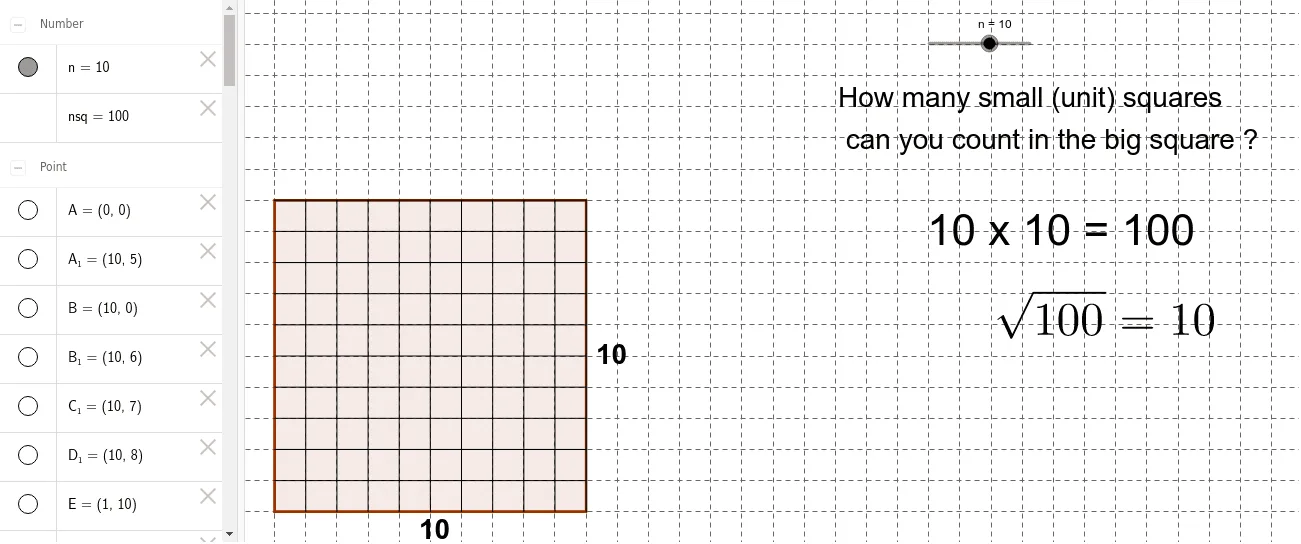
几何画板及绘图内容加载中,请稍等……
这个范例展示了平方数的图形表示。它涉及的核心数学概念是平方数。通过使用GeoGebra命令如Polygon、Point、Segment等,可以构造出一系列的正方形,每个正方形的边长依次为1, 2, 3, ...,从而直观地展示平方数的增长规律。适合初中及以上学生学习平方数的概念及其几何意义。
GeoGebra 命令及参数
Polygon(A, B, 4) → poly1, a, b, c, d, C, DPoint(Circle[A1, n]) → ESegment(A1, E) → ePoint(Circle[A2, n]) → FSegment(A2, F) → fPoint(Circle[A3, n]) → GSegment(A3, G) → gPoint(Circle[A4, n]) → HSegment(A4, H) → hPoint(Circle[A5, n]) → ISegment(A5, I) → iPoint(Circle[A6, n]) → JSegment(A6, J) → jPoint(Circle[A7, n]) → KSegment(A7, K) → kPoint(Circle[A8, n]) → LSegment(A8, L) → lPoint(Circle[A9, n]) → MSegment(A9, M) → mPoint(Circle[A10, n]) → NSegment(A10, N) → pPoint(Circle[A11, n]) → OSegment(A11, O) → qPoint(Circle[A12, n]) → PSegment(A12, P) → rPoint(Circle[A13, n]) → QSegment(A13, Q) → sPoint(Circle[A14, n]) → RSegment(A14, R) → tPoint(Circle[A15, n]) → SSegment(A15, S) → a_1Point(Circle[A16, n]) → TSegment(A16, T) → b_1Point(Circle[B1, n]) → USegment(B1, U) → c_1Point(Circle[B2, n]) → VSegment(B2, V) → d_1Point(Circle[B3, n]) → WSegment(B3, W) → e_1Point(Circle[B4, n]) → ZSegment(B4, Z) → f_1Point(Circle[B5, n]) → A_1Segment(B5, A_1) → g_1Point(Circle[B6, n]) → B_1Segment(B6, B_1) → h_1Point(Circle[B7, n]) → C_1Segment(B7, C_1) → i_1Point(Circle[B8, n]) → D_1Segment(B8, D_1) → j_1Point(Circle[B9, n]) → E_1Segment(B9, E_1) → k_1Point(Circle[B10, n]) → F_1Segment(B10, F_1) → l_1Point(Circle[B11, n]) → G_1Segment(B11, G_1) → m_1Point(Circle[B12, n]) → H_1Segment(B12, H_1) → n_1Point(Circle[B13, n]) → I_1Segment(B13, I_1) → p_1Point(Circle[B14, n]) → J_1Segment(B14, J_1) → q_1Point(Circle[B15, n]) → K_1Segment(B15, K_1) → r_1Point(Circle[B16, n]) → L_1Segment(B16, L_1) → s_1
AI 绘图提示语参考
绘制一系列边长依次为1、2、3等自然数的正方形,从第一个正方形开始,每个正方形的一个顶点与前一个正方形的对应顶点重合,并沿同一方向旋转排列,形成螺旋状展开的图形。每个正方形的边用线段表示,并在每个正方形的外侧顶点处添加一个点,这些点位于以该顶点为圆心、边长为半径的圆上。整体呈现从中心向外扩展的方形螺旋,展示平方数逐层增大的几何模式。
以上提示语为根据原始绘图命令整理而来,仅供参考。