
用模型解方程:可视化平衡与代数步骤
几何画板及绘图内容加载中,请稍等……
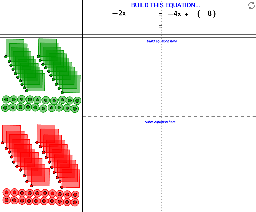
① 这个范例通过一个交互式几何模型,直观演示了如何构建并求解一元方程,将抽象的代数运算转化为可视化的图形操作。② 核心数学概念包括方程、等式性质、移项与合并同类项,以及根(解)的几何意义;同时涉及减法、指数函数和四边形等基础图形元素。③ 作图要点:使用GeoGebra命令如Point、Circle、Polygon、Ray、Intersect等创建图形,并利用CreatePositiveBag、CreatePositiveMarble、CreateNegativeBag、CreateNegativeMarble、CountIf、Random等命令模拟正负“袋子”和“弹珠”的计数与随机生成,从而构建方程两边的平衡模型;对象包括n、B系列、N系列、listNegBags、A、j等,通过交互操作改变数量来求解。④ 适合初中至高中阶段学生学习代数方程,也可用于教师课堂演示,帮助学生理解方程求解的每一步骤,培养从具体模型到抽象符号的过渡能力。
GeoGebra 命令及参数
Point(n) → BPoint(j) → ACircle(M_6, a) → cCircle(A_6, b) → dPoint(d) → C_1Polygon(A_6, C_1, 4) → poly1, e, f, g, h, D_1, E_1CreatePositiveBag(b, A_1) → poly2CreatePositiveBag(b, A_5) → poly3CreatePositiveBag(b, A_3) → poly4CreatePositiveBag(b, A_4) → poly5CreatePositiveBag(b, A_2) → poly6CreatePositiveBag(b, A_7) → poly7CreatePositiveBag(b, A_8) → poly8CreatePositiveBag(b, A_9) → poly9CreatePositiveBag(b, A_10) → poly10CreatePositiveMarble(a, M_1) → kCreatePositiveMarble(a, M_4) → pCreatePositiveMarble(a, M_5) → qCreatePositiveMarble(a, M_10) → rCreatePositiveMarble(a, M_9) → sCreatePositiveMarble(a, M_3) → tCreatePositiveMarble(a, M_2) → c_1CreatePositiveMarble(a, M_8) → d_1CreatePositiveMarble(a, M_7) → e_1CountIf((x > x(A)) ∧ (x < x(B)), listPosBags) → PositiveBagsCountIf((x > x(A)) ∧ (x < x(B)), listPosMarbles) → PositiveMarblesCircle(N_4, a) → f_1CreateNegativeMarble(a, N_1) → g_1CreateNegativeMarble(a, N_2) → h_1CreateNegativeMarble(a, N_3) → k_1CreateNegativeMarble(a, N_5) → p_1CreateNegativeMarble(a, N_6) → q_1CreateNegativeMarble(a, N_7) → r_1CreateNegativeMarble(a, N_8) → s_1CreateNegativeMarble(a, N_9) → t_1CreateNegativeMarble(a, N_10) → c_2CreatePositiveBag(b, B_3) → poly11CreateNegativeBag(b, B_7) → poly12CreateNegativeBag(b, B_6) → poly13CreateNegativeBag(b, B_10) → poly14CreateNegativeBag(b, B_9) → poly15CreateNegativeBag(b, B_8) → poly16CreateNegativeBag(b, B_5) → poly17CreateNegativeBag(b, B_4) → poly18CreateNegativeBag(b, B_2) → poly19CreateNegativeBag(b, B_1) → poly20CountIf((x > x(A)) ∧ (x < x(B)), listNegMarbles) → NegativeMarblesCountIf((x > x(A)) ∧ (x < x(B)), listNegBags) → NegativeBagsCountIf(x > x(B), listNegMarbles) → NegativeMarblesRightCountIf(x > x(B), listPosBags) → PositiveBagsRightRandom(-4, 5) → ValueofXCountIf(x > x(B), listNegBags) → NegativeBagsRightCountIf(x > x(B), listPosMarbles) → PositiveMarblesRightCreatePositiveBag(b, A_11) → poly21CreatePositiveBag(b, A_18) → poly22CreatePositiveBag(b, A_12) → poly23CreatePositiveBag(b, A_17) → poly24CreatePositiveBag(b, A_15) → poly25CreatePositiveBag(b, A_20) → poly26CreatePositiveBag(b, A_16) → poly27CreatePositiveBag(b, A_14) → poly28CreatePositiveBag(b, A_13) → poly29CreatePositiveBag(b, A_19) → poly30CreatePositiveMarble(a, M_11) → d_2CreatePositiveMarble(a, M_14) → e_2CreatePositiveMarble(a, M_12) → f_2CreatePositiveMarble(a, M_15) → g_2CreatePositiveMarble(a, M_13) → h_2CreatePositiveMarble(a, M_16) → k_2CreatePositiveMarble(a, M_17) → p_2CreatePositiveMarble(a, M_18) → q_2CreatePositiveMarble(a, M_19) → r_2CreatePositiveMarble(a, M_20) → s_2CreateNegativeBag(b, B_11) → poly31CreateNegativeBag(b, B_12) → poly32CreateNegativeBag(b, B_13) → poly33CreateNegativeBag(b, B_14) → poly34CreateNegativeBag(b, B_15) → poly35CreateNegativeBag(b, B_16) → poly36CreateNegativeBag(b, B_17) → poly37CreateNegativeBag(b, B_18) → poly38CreateNegativeBag(b, B_19) → poly39CreateNegativeBag(b, B_20) → poly40CreateNegativeMarble(a, N_11) → t_2CreateNegativeMarble(a, N_12) → c_3CreateNegativeMarble(a, N_13) → d_3CreateNegativeMarble(a, N_14) → e_3CreateNegativeMarble(a, N_15) → f_3CreateNegativeMarble(a, N_16) → g_3CreateNegativeMarble(a, N_17) → h_3CreateNegativeMarble(a, N_18) → k_3CreateNegativeMarble(a, N_19) → p_3CreateNegativeMarble(a, N_20) → q_3Random(-4, 4) → SeedBagLeftRandom(-4, 4) → SeedBagRightRandom(-5, 5) → SeedMarbleLeftIntersect(j, a_1) → CIntersect(n, a_1) → DRay(C, D) → b_1
AI 绘图提示语参考
画一个天平模型来表示线性方程的解。首先,创建两个点A和n作为方程的两边。然后,围绕A和n分别画两个圆c和d,并在d上创建点C。接着,使用A和C创建一个四边形,并在四边形内部创建一些正方形和圆形来表示正数和负数的‘袋子’和‘弹珠’。最后,通过计数和随机生成来模拟正数和负数的分布,展示方程的解。
以上提示语为根据原始绘图命令整理而来,仅供参考。