
四舍五入到十位或百位
几何画板及绘图内容加载中,请稍等……
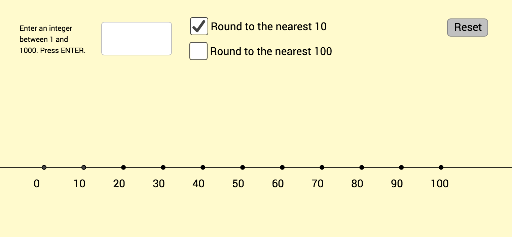
①本范例演示如何使用 GeoGebra 对数值进行四舍五入到最近的十位或百位;②涉及的核心数学概念包括数值近似、四舍五入规则;③作图要点——从下方『构造摘要』提炼用到了 Line, Textfield, If, Text, Translate, Sequence 等命令和对象;④适合初中数学教学,帮助学生理解数值近似的概念和操作方法。
GeoGebra 命令及参数
Line(A, K) → fTextfield(inputtext) → InputBox1If(roundHundreds ≟ true, Sequence[Text[(10 * i), Element[list1, i / 10 + 1] + (adjusthorizontal, adjustvertical)], i, 0, 100, 10], Sequence[Text[(100 * inputHundreds) + i, Element[list1, i / 10 + 1] + (adjusthorizontal, adjustvertical)], i, 0, 100, 10]) → LabelsOriginalText(inputnumber, PointToLocate + (adjusthorizontal, adjustvertical + 0.75)) → text1If(roundHundreds ≟ true, (inputnumber / 100, y(A)), ((inputnumber - (100 * inputHundreds)) / 10, y(A))) → PointDestinationIf(roundTens ≟ true, {inputnumber - inputOnes, inputnumber - inputOnes + 10}, {(100 * inputHundreds), (100 * inputHundreds) + 100}) → NewBounds1If(roundTens ≟ true, {Element[list1, inputTens + 1], Element[list1, inputTens + 2]}, {Element[list1, inputHundreds + 1], Element[list1, inputHundreds + 2]}) → list4Translate(MinPoint, Vector[(slideit * Vector[Element[list4, 1], A])]) → MinPoint'Translate(MaxPoint, Vector[(slideit * Vector[Element[list4, 2], K])]) → MaxPoint'If(roundTens ≟ true, Sequence[Text[Element[NewBounds1, 1] + i, Element[list1, i + 1] + (adjusthorizontal, adjustvertical)], i, 0, 10], Sequence[Text[Element[NewBounds1, 1] + (10 * i), Element[list1, i + 1] + (adjusthorizontal, adjustvertical)], i, 0, 10]) → LabelsNewIf(roundTens ≟ true, (x(A) + inputOnes, y(A)), (x(A) + ((10 * inputTens) + inputOnes) / 10, y(A))) → PointDestinationNewTranslate(L, Vector[PointDestination, PointDestinationNew]) → L'Translate(PointToLocate, Vector[(slideit1 * Vector[PointToLocate, PointDestination])]) → PointToLocate'Translate(PointToLocate', Vector[(slideit * Vector[PointToLocate', L'])]) → PointToLocate''Sequence((x(A) + i, y(A)), i, 0, 10) → list2Text(Element[NewBounds1, 1], MinPoint' + (adjusthorizontal, adjustvertical)) → boundlowerText(Element[NewBounds1, 2], MaxPoint' + (adjusthorizontal, adjustvertical)) → boundupperText(inputnumber, PointToLocate' + (adjusthorizontal, adjustvertical + 0.75)) → text4Text(inputnumber, PointToLocate'' + (adjusthorizontal, adjustvertical + 0.75)) → text5If(inputnumber - Element[NewBounds1, 1] < Element[NewBounds1, 2] - inputnumber, Element[NewBounds1, 1], Element[NewBounds1, 2]) → roundwinnerIf(inputnumber - Element[NewBounds1, 1] > Element[NewBounds1, 2] - inputnumber, Element[NewBounds1, 1], Element[NewBounds1, 2]) → roundloser
AI 绘图提示语参考
绘制一个数轴,从0到100,每隔10或100个单位标记一个点。用户可以输入一个数字,然后根据输入的数字和用户选择的四舍五入方式(到10或100),在数轴上找到并标记出最接近的两个点,以及输入数字的位置。数轴上还会显示输入数字以及最接近的两个点的数值。
以上提示语为根据原始绘图命令整理而来,仅供参考。