
滚动硬币问题:圆沿圆弧滚动时的旋转角与期望值
几何画板及绘图内容加载中,请稍等……
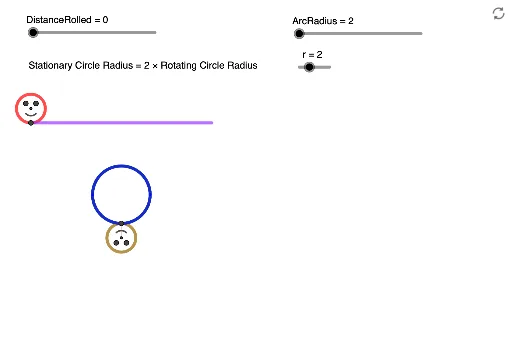
① 本范例演示一个硬币(红色圆)沿另一条圆弧轨道滚动时,其自身旋转角度与滚动距离之间的关系,并探讨随机滚动后的期望旋转角。② 核心数学概念包括圆的滚动(无滑动滚动)、旋转角与弧长关系、圆周角与圆心角、余弦定理、期望值计算,以及一般四边形中的角度关系。③ 作图要点:使用GeoGebra的Rotate、OrthogonalLine、Angle、Intersect、Circle、Line、Segment、If、Point、CircleArc等命令,构造了红色圆、绿色圆、棕色圆、圆弧轨道、圆心连线、垂线、交点、弧上点、半圆等对象,并通过滑块或参数控制滚动距离,动态显示旋转角α、β、δ、ε、η等。④ 适合高中或大学低年级学生学习圆滚动几何、旋转与角度测量,以及概率期望在几何问题中的应用,也可用于数学建模或探究性学习。
GeoGebra 命令及参数
Rotate(ArcMiddle, (-ArcAngle), ArcCentre) → ArcRightRotate(ArcMiddle, ArcAngle, ArcCentre) → ArcLeftOrthogonalLine(RedCentre, xAxis) → VLineThruRedCentreRotate(PointOnStraight, (-DistanceRolled), RedCentre) → RedEdgePointAngle(RedEdgePoint, RedCentre, PointOnStraight) → αOrthogonalLine(GreenCentre, xAxis) → VLineThruGreenCentreIntersect(GreenCircle, VLineThruGreenCentre, 1) → ARotate(A, ((-DistanceRolled)) / r, GreenCentre) → A'Angle(A', GreenCentre, A) → βCircle(A', 1) → eIntersect(Arc, VLineThruGreenCentre, (6.283185307179586, -3)) → DAngle(ArcMiddle, ArcCentre, ArcLeft) → δAngle(ArcRight, ArcCentre, ArcMiddle) → εRotate(ArcLeft, (-(Mod[DistanceRolled, ((2 * π) * r)] / ArcRadius)), ArcCentre) → PointOnArcAngle(PointOnArc, ArcCentre, ArcLeft) → ζLine(PointOnArc, ArcCentre) → LineArcCentreBrownCircleCircle(PointOnArc, 1) → cIntersect(c, LineArcCentreBrownCircle, 1) → BrownCentreCircle(BrownCentre, 1) → BrownCircleRotate(PointOnArc, (-DistanceRolled), BrownCentre) → BrownEdgePointAngle(BrownEdgePoint, BrownCentre, PointOnArc) → ηLine(ArcCentre, xAxis) → HLineThruArcCentreSegment(BrownCentre, BrownEdgePoint) → BrownCircleLineIf(DistanceRolled ≥ ((2 * π) * r), DistanceRolled - ((2 * π) * r), DistanceRolled) → DistanceModRotate(RedEdgePoint, 135°, RedCentre) → RedEdgePoint'Angle(RedEdgePoint, RedCentre, RedEdgePoint') → γCircle(RedCentre, 0.5) → RedInnerCircleRotate(RedEdgePoint, 135°, RedCentre) → RedEdgePoint'_1Angle(RedEdgePoint, RedCentre, RedEdgePoint'_1) → θRotate(RedEdgePoint, (-(135°)), RedCentre) → RedEdgePoint'_2Angle(RedEdgePoint'_2, RedCentre, RedEdgePoint) → ιRotate(RedEdgePoint, 45°, RedCentre) → RedEdgePoint'_3Angle(RedEdgePoint, RedCentre, RedEdgePoint'_3) → κLine(RedCentre, RedEdgePoint'_3) → hOrthogonalLine(RedCentre, h) → jIntersect(RedInnerCircle, h, 1) → RedCircleLeftEyeIntersect(RedInnerCircle, j, 2) → RedCircleRightEyeIntersect(RedInnerCircle, j, 1) → RedCircleSmileLeftPoint(h) → RedCircleSmileRightCircleArc(RedCentre, RedCircleSmileLeft, RedCircleSmileRight) → RedCircleSmileSegment(RedEdgePoint, RedCentre) → RedCircleLineRotate(BrownEdgePoint, 45°, BrownCentre) → BrownEdgePoint'Angle(BrownEdgePoint, BrownCentre, BrownEdgePoint') → λLine(BrownEdgePoint', BrownCentre) → kOrthogonalLine(BrownCentre, k) → lCircle(BrownCentre, 0.5) → BrownInnerCircleIntersect(BrownInnerCircle, k, 2) → BrownCircleLeftEyeIntersect(BrownInnerCircle, l, 1) → BrownCircleRightEyeIntersect(BrownInnerCircle, l, 2) → BrownCircleSmileLeftPoint(k) → BrownCircleSmileRightCircleArc(BrownCentre, BrownCircleSmileLeft, BrownCircleSmileRight) → BrownCircleSmile
AI 绘图提示语参考
画一个红色圆圈沿着弧形轨道无滑动滚动,展示其旋转角度与滚动距离的关系,并探索随机滚动下的预期旋转角度。包含红色、绿色和棕色圆圈,弧形轨道,中心线,垂线,交点,弧上的点,半圆,以及用于控制滚动距离的动态滑块。显示角度α、β、δ、ε、η,并利用旋转、垂线、交点等几何变换构建图形。
以上提示语为根据原始绘图命令整理而来,仅供参考。