
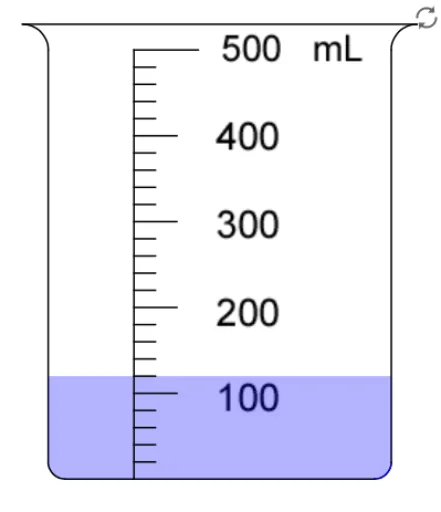
读量杯刻度
几何画板及绘图内容加载中,请稍等……
本范例演示如何读取量杯上的刻度。涉及的核心数学概念包括比例和单位换算。通过使用GeoGebra命令如Segment, CircleArc, Sequence等,可以动态展示量杯刻度的变化。适合初中及以上学生学习体积测量。
GeoGebra 命令及参数
Segment((-2.3, 5.3), (2.3, 5.3)) → aCircleArc((2.3, 5), (2.3, 5.3), (2, 5)) → dCircleArc((-2.3, 5), (-2, 5), (-2.3, 5.3)) → eSegment((2, 0.2), (2, 5)) → cSegment((-2, 0.2), (-2, 5)) → bCircleArc((1.8, 0.2), (1.8, 0), (2, 0.2)) → fCircleArc((-1.8, 0.2), (-2, 0.2), (-1.8, 0)) → gSegment((-1.8, 0), (1.8, 0)) → hSegment((-1, 0), (-1, 5)) → iSegment((-1, 5), (-0.25, 5)) → jSequence(Segment[(-1, (5 * k / NumMark)), (-0.5 + If[NumMark ≟ 10 ∧ Mod[k, 2] ≟ 0, 0.25, 0], (5 * k / NumMark))], k, 1, NumMark - 1) → list1Polygon((-2, 0.2), (-1.8, 0), (1.8, 0), (2, 0.2), (2, (5 * level / ((NumMark * SubMark)))), (-2, (5 * level / ((NumMark * SubMark))))) → poly1, k, l, m, n, p, qCircleArc((-1.8, 0.2), (-2, 0.2), (-1.8, 0)) → arcLCircleArc((1.8, 0.2), (1.8, 0), (2, 0.2)) → arcRSequence(Sequence[Segment[(-1, (5 * i / NumMark) + (5 * j / ((NumMark * SubMark)))), (-0.75, (5 * i / NumMark) + (5 * j / ((NumMark * SubMark))))], j, 1, 4], i, 0, NumMark - 1) → list2Segment((0, 9.3), (2, 9.3)) → Segment[(0, 9.5), (2, 9)]Segment((-1.5, 5), (0, 5)) → rSegment((0.5, 5), (2, 5)) → sSegment((2.5, 5), (4, 5)) → tSequence(Segment[(i, 5), (i, 5.5)], i, -1.5, 2.5, 2) → list3Sequence(Segment[(i, 5), (i, 5.5)], i, 0, 4.5, 2) → list4Sequence(Segment[(0.5 + (1.5 * i / 10), 5), (0.5 + (1.5 * i / 10), 5.3)], i, 2, 8, 2) → list6Sequence(Segment[(2.5 + (1.5 * i / 4), 5), (2.5 + (1.5 * i / 4), 5.3)], i, 1, 3) → list7Polygon((0.5, 4.5), (0.5, 5.5), (2, 5.5), (2, 4.5)) → poly3, e_1, f_1, g_1, h_1Polygon((2.5, 4.5), (2.5, 5.5), (4, 5.5), (4, 4.5)) → poly4, i_1, j_1, k_1, l_1Polygon((-1.5, 4.5), (-1.5, 5.5), (0, 5.5), (0, 4.5)) → poly2, a_1, b_1, c_1, d_1If(Litre, (level / ((NumMark * SubMark)) * MaxV / 1000), (level / ((NumMark * SubMark)) * MaxV)) → VolIf(Vol ≟ Input, true, false) → correctSequence(Segment[(-1.5 + (1.5 * i / 10), 5), (-1.5 + (1.5 * i / 10), 5.2 + If[i ≟ 5, 0.1, 0])], i, 1, 9) → list8Sequence(Segment[(-1.5 + (1.5 * i / 10), 5), (-1.5 + (1.5 * i / 10), 5.25 + If[i ≟ 5, 0.15, 0])], i, 1, 9) → list5Text("1000 mL") → text1000mLText("750") → text750Text("500") → text500Text("250") → text250Text("400") → text2L400Text("800") → text2L800Text("1200") → text2L1200Text("1600") → text2L1600Text("2000 mL") → text2000mLText("1L 600mL") → text1L600mLText("1L 200mL") → text1L200mLText("400mL") → text2L400mLText("800mL") → text2L800mLText(("800" * If[Litre, "mL", ""])) → text800Text(("600" * If[Litre, "mL", ""])) → text600Text(("400" * If[Litre, "mL", ""])) → text400Text(("200" * If[Litre, "mL", ""])) → text200Text(("500" * If[Litre, "mL", ""])) → text2L500Text(If[eng, "L", "升"]) → textLText(If[Vol_{mL} ≥ 1000 ∧ Litre, ((((Div[Vol_{mL}, 1000] * " ") * textL) * " ") * If[Mod[Vol_{mL}, 1000] > 0, ((Mod[Vol_{mL}, 1000] * " ") * textmL), ""]), ((Vol_{mL} * " ") * textmL)]) → text4Point(y = y(I)) → JSegment(I, J) → m_1Text(If[eng, "4 Marks", "4 個刻度"], (2.6, 4.6)) → text8Text(If[eng, "5 Marks", "5 個刻度"], (0.6, 4.6)) → text7Text(If[eng, "10 Marks", "10 個刻度"], (-1.5, 4.6)) → text3