
三维坐标系中的点
几何画板及绘图内容加载中,请稍等……
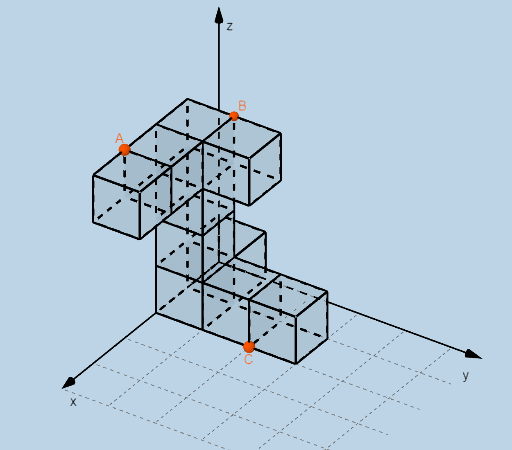
本范例演示了在三维坐标系中如何定义和操作点。涉及的核心数学概念包括坐标系的表示、点的位置确定以及向量运算。通过使用GeoGebra的Dilate(缩放)、Distance(距离)、Vector(向量)、Textfield(文本框)、Point(点)、Intersect(交点)、Cube(立方体)等命令和对象,可以直观展示点的变换和空间关系。适合高中及以上学生用于学习立体几何和向量分析,帮助理解三维空间中的点、向量及几何体。
GeoGebra 命令及参数
Dilate(D, If[0 < d ≤ 1, 1 - d, 0], A_{5}) → D'Dilate(A_{5}, If[1 < d ≤ 2, 2 - d, 0], B_{5}) → A'Dilate(B_{5}, If[2 < d ≤ 3, 3 - d, 0], C_{3}) → B'Distance(D, D') → distanceDD'Distance(A_{5}, A') → distanceAA'Distance(B_{5}, B') → distanceBB'Vector(D, D') → uVector(A_{5}, A') → vVector(B_{5}, B') → wTextfield(a) → InputBox1Textfield(b) → InputBox2Textfield(c) → InputBox3Point(xAxis) → EPoint(Circle[F, Distance[E, F], Segment[E, F]]) → GPoint(yAxis) → HPoint(Circle[H, Distance[D, H], Segment[D, H]]) → IPoint(yAxis) → OPoint(Circle[O, Distance[H, O], Segment[H, O]]) → PPoint(yAxis) → VPoint(Circle[V, Distance[O, V], Segment[O, V]]) → WPoint(yAxis) → E_1Point(Circle[E_1, Distance[V, E_1], Segment[V, E_1]]) → F_1Point(Circle[P, Distance[I, P], Segment[I, P]]) → R_2Intersect(xAxis, yAxis) → JPoint(xAxis) → KPoint(Circle[K, Distance[J, K], Segment[J, K]]) → LCube(J, K, L) → h, M, FlächeLMSR, FlächeNQRS, KanteJM, KanteJK, KanteKL, KanteLM_{1}, KanteJN, KanteMS, KanteNS, KanteNQ_{1}, N, KanteKQ, KanteQR, KanteLR, KanteRS, Q, R, S, FlächeJKLM, FlächeJMSN, FlächeJKQN, FlächeKLRQPoint(xAxis) → TPoint(Circle[T, Distance[K, T], Segment[K, T]]) → UCube(K, T, U) → i, Z, Fläche4, Fläche5, KanteKZ, KanteKT, KanteTU, KanteUZ, Kante1, Kante4, Kante6, Kante5, A_1, Kante2, Kante7, Kante3, Kante8, B_1, C_1, D_1, FlächeKTUZ, Fläche2, Fläche1, Fläche3Point(xAxis) → G_1Point(Circle[G_1, Distance[T, G_1], Segment[T, G_1]]) → H_1Cube(T, G_1, H_1) → j, I_1, Fläche10, Fläche11, Kante10, Kante9, Kante12, Kante14, Kante11, Kante16, Kante18, Kante17, J_1, Kante13, Kante19, Kante15, Kante20, K_1, L_1, M_1, Fläche6, Fläche8, Fläche7, Fläche9Point(xAxis) → N_1Point(Circle[N_1, Distance[G_1, N_1], Segment[G_1, N_1]]) → O_1Point(Circle[Q, Distance[N, Q], Segment[N, Q]]) → U_1Point(Circle[J_1, Distance[A_1, J_1], Segment[A_1, J_1]]) → C_2Cube(A_1, J_1, C_2) → m, D_2, Fläche28, Fläche29, Kante45, Kante44, Kante47, Kante49, Kante46, Kante51, Kante53, Kante52, E_2, Kante48, Kante54, Kante50, Kante55, F_2, G_2, H_2, Fläche24, Fläche26, Fläche25, Fläche27Point(Circle[L, Distance[M, L], Segment[M, L]]) → V_2Point(Circle[U, Distance[L, U], Segment[L, U]]) → D_3Point(Circle[D_3, Distance[V_2, D_3], Segment[V_2, D_3]]) → P_3Intersect(Kante53, Kante46) → P_1Point(Kante52) → Q_1Point(Circle[Q_1, Distance[P_1, Q_1], Segment[P_1, Q_1]]) → R_1Cube(P_1, Q_1, R_1) → k, S_1, Fläche16, Fläche17, Kante22, Kante21, Kante24, Kante26, Kante23, Kante28, Kante30, Kante29, T_1, Kante25, Kante31, Kante27, Kante32, V_1, W_1, Z_1, Fläche12, Fläche14, Fläche13, Fläche15Point(Circle[V_1, Distance[T_1, V_1], Segment[T_1, V_1]]) → A_2Cube(T_1, V_1, A_2) → l, B_2, Fläche22, Fläche23, Kante34, Kante33, Kante36, Kante38, Kante35, Kante40, Kante42, Kante41, I_2, Kante37, Kante43, Kante39, Kante56, J_2, K_2, L_2, Fläche18, Fläche20, Fläche19, Fläche21Point(Circle[A_2, Distance[K_2, A_2], Segment[K_2, A_2]]) → M_2Cube(K_2, A_2, M_2) → n, N_2, Fläche34, Fläche35, Kante60, Kante57, Kante58, Kante62, Kante61, Kante64, Kante66, Kante65, O_2, Kante59, Kante67, Kante63, Kante68, P_2, Q_2, S_2, Fläche30, Fläche33, Fläche31, Fläche32Point(Circle[M_2, Distance[N_2, M_2], Segment[N_2, M_2]]) → T_2Cube(N_2, M_2, T_2) → o, U_2, Fläche40, Fläche41, Kante72, Kante69, Kante70, Kante74, Kante73, Kante76, Kante78, Kante77, W_2, Kante71, Kante79, Kante75, Kante80, Z_2, A_3, B_3, Fläche36, Fläche39, Fläche37, Fläche38Point(Kante73) → AIntersect(Kante72, Kante69) → E_3Point(Circle[E_3, Distance[A, E_3], Segment[A, E_3]]) → F_3Intersect(Kante3, KanteUZ) → L_3Point(Circle[C, Distance[L_3, C], Segment[L_3, C]]) → N_3Cube(L_3, C, N_3) → q, O_3, face11, face12, edge14, edge13, edge16, edge18, edge15, edge20, edge22, edge21, Q_3, edge17, edge23, edge19, edge24, R_3, S_3, T_3, face7, face9, face8, face10Point(Kante38) → U_3Intersect(Kante56, Kante40) → BPoint(Circle[B, Distance[U_3, B], Segment[U_3, B]]) → W_3Cube(U_3, B, W_3) → r, Z_3, face17, face18, edge26, edge25, edge28, edge30, edge27, edge32, edge34, edge33, A_4, edge29, edge35, edge31, edge36, B_4, C_4, D_4, face13, face15, face14, face16Intersect(edge17, edge16) → G_3Point(Circle[H_3, Distance[G_3, H_3], Segment[G_3, H_3]]) → I_3Cube(G_3, H_3, I_3) → p, J_3, face5, face6, edge2, edge1, edge4, edge6, edge3, edge8, edge10, edge9, K_3, edge5, edge11, edge7, edge12, E_4, F_4, G_4, face1, face3, face2, face4
AI 绘图提示语参考
在三维坐标系中先给定一条用于定位的直线与两条坐标轴方向,用它们的交点作为空间参考点,分别在由坐标轴给出的平面内作以参考点为圆心、由相应距离确定半径的圆并取圆与直线/段的交点来得到多组三维点。以这些点为相邻顶点构成立方体序列:先用三点确定一个立方体,再沿另一组由圆得到的点再构建相邻立方体。同步取立方体各条边的交点与圆上对应点,继续生成后续立方体,使所有立方体共享相同的空间基准位置与逐步延伸的顶点链。最后在关键距离与结构处添加可输入的数值框,并可标注由向量变化得到的三段方向。
以上提示语为根据原始绘图命令整理而来,仅供参考。