
Open Middle: Slope and Points Exercise
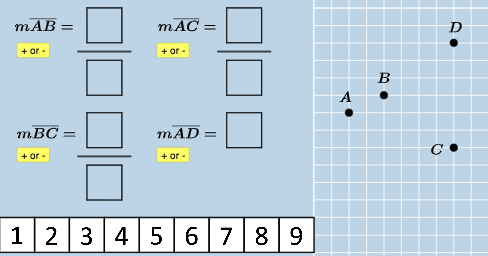
几何画板及绘图内容加载中,请稍等……
所属专题
Slope
This interactive GeoGebra exercise is designed to help students explore the concept of slope through point coordinates. It presents a coordinate plane with multiple points and lines, where students must adjust or select points to satisfy given slope conditions. The core mathematical concepts include coordinate geometry, slope definition (Δy/Δx), linear equations, and point-line relationships. The construction uses GeoGebra commands such as Polygon, If, Intersect, Line, Min, nCr, and Segment, creating multiple point objects (A, B, C, H, P, etc.) and line objects (f, g, h, i, etc.), with dynamic updates via conditional logic and intersection calculations. This resource is suitable for middle school to high school students learning analytic geometry and linear functions, particularly in an Open Middle format that encourages multiple solution paths and critical thinking.
GeoGebra 命令及参数
Polygon(A0, B, 4) → poly0, f, g, h, i, A, CPolygon(A3, H, 4) → poly3, j, k, l, m, E, GPolygon(A7, P, 4) → poly7, n, p, q, r, I, KPolygon(A1, D, 4) → poly1, s, t, a, b, M, OPolygon(A6, N, 4) → poly6, c, d, e, f_1, Q, SPolygon(A2, H2, 4) → poly2, k_1, l_1, m_1, n_1, W, ZPolygon(A8, A8 + (2, 0), 4) → poly8, g_1, h_1, i_1, j_1, U, VPolygon(A9, T, 4) → poly9, p_1, q_1, r_1, s_1, A_1, B_1Polygon(A4, J, 4) → poly4, t_1, a_1, b_1, c_1, C_1, D_1Polygon(A5, L, 4) → poly5, d_1, e_1, f_2, g_2, E_1, F_1Polygon(K_1, L_1, 4) → poly10, l_2, m_2, n_2, p_2, M_1, N_1Polygon(O_1, P_1, 4) → poly12, q_2, r_2, s_2, t_2, Q_1, R_1Polygon(S_1, T_1, 4) → poly13, a_2, b_2, c_2, d_2, U_1, V_1Polygon(C_2, D_2, 4) → poly15, i_3, j_3, k_3, l_3, E_2, F_2Polygon(G_2, H_2, 4) → poly16, m_3, n_3, p_3, q_3, I_2, J_2Polygon(G_{3}, H_{3}, 4) → poly17, m_{4}, n_{4}, p_{4}, q_{4}, I_{3}, J_{3}Polygon(C_{3}, D_{3}, 4) → poly14, i_{4}, j_{4}, k_{4}, l_{4}, E_{3}, F_{3}If(aleft > aright, "Left side is bigger.", aleft < aright, "Right side is bigger", "Both sides are equal!") → text9Intersect(h_2, eq1) → R_2Intersect(f_3, eq2) → S_2Polygon(A_2, B_2, R_2) → t1, i_2, j_2, k_2Polygon(A_2, B_2, S_2) → t2, e_2, g_3, h_3Line(A_2, B_2) → r_3Min(y(A_2), y(B_2)) → oIf(o ≟ y(A_2), t1, t2) → t3nCr(4, 2) → wSegment((-13.5, 9.5), (-10.5, 9.5)) → s_3Segment((-13.5, 3.5), (-10.5, 3.5)) → t_3Segment((-5.5, 9.5), (-2.5, 9.5)) → a_3If(o_1 ≟ 0, p15 / p10, ((-p15)) / p10) → u_2If(u_1 ≟ 0, p12 / p13, ((-p12)) / p13) → v_2If(w_1 ≟ 0, p17 / p14, ((-p17)) / p14) → w_2If(o_2 ≟ 0, p16, (-p16)) → b_3
AI 绘图提示语参考
在坐标平面上绘制多个四边形,使它们通过可移动的顶点形成不同的几何构造。在平面上标记若干控制点,分别连接成四边形线条,并在适当位置添加水平或垂直方向的线段。建立条件逻辑关系,根据某些点的坐标数值大小比较显示对应的文字说明(如“左边更大”、“右边更大”或“两边相等”)。通过交点命令计算特定线条的交点坐标,并基于这些交点进一步构造新的四边形区域。整个图形应体现坐标几何、斜率概念以及点线之间的动态关系,适合展示函数与几何的交互。
以上提示语为根据原始绘图命令整理而来,仅供参考。