
负数乘法与实际应用:通过步行场景理解负数乘法规则
几何画板及绘图内容加载中,请稍等……
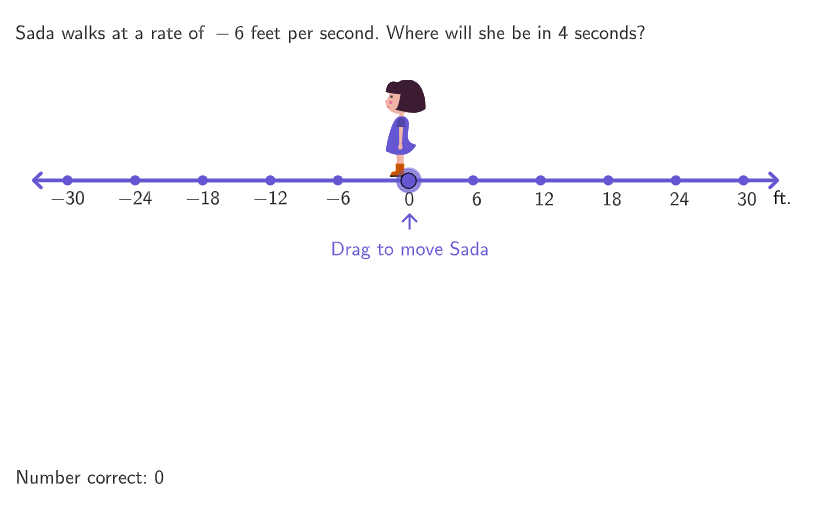
本范例通过步行场景演示负数乘法的数学概念,帮助学生理解负数乘法的实际意义。核心数学概念包括负数乘法规则、数轴表示和符号运算。作图要点包括使用GeoGebra命令如Shuffle、Element、If、Textfield等构建动态图形。适合小学高年级(6-8年级)学生用于数感培养和数学思维训练。
GeoGebra 命令及参数
Shuffle(Sequence[-10, 10] \ {0, 1, -1}) → randomList1, {-6, -3, 7, 8, 2, -5, 6, -2, -7, -4, 5, 10, 4, -10, -8, 3, 9, -9}Element(randomList1, Mod[countQuestion, Length[randomList1]] + 1) → randomNum1Shuffle(Sequence[-5, 5] \ {-1, 0, 1, randomNum1, (-randomNum1)}) → randomList2, {4, 3, -4, -5, 5, 2, -2, -3}Element(randomList2, Mod[countQuestion, Length[randomList2]] + 1) → randomNum2If(randomNum1 ≥ 0, If[randomNum2 ≥ 0, 1, 3], If[randomNum2 ≥ 0, 2, 4]) → correctTextIf(randomNum1 ≤ 0, ((-wid), 0.05), (wid, 0.05)) → ATextfield(input1) → InputBox1Textfield(input2) → InputBox2Corner(5) → AppSizeSequence(16 + (ii * (167 + 8)), ii, 0, 3) → xoptions, {16, 191, 366, 541}Sequence((ii, 0), ii, -5, 5) → PointsSequence((-maxX) + (maxX / 5 * ii), ii, 0, 10) → scale, {-30, -24, -18, -12, -6, 0, 6, 12, 18, 24, 30}Translate(A, (0, hei)) → A'If(randomNum1 ≤ 0, E, F) → C1If(randomNum1 ≤ 0, F, E) → C2Translate(C1, Vector[A, A']) → C3If(slideToAnimate ≟ 0, 1, Mod[abs(slideToAnimate), 4] + 2) → numImgTranslate(If[randomNum1 ≤ 0, A, B], ((E - If[randomNum1 ≤ 0, A, B]) * timer)) → CIf(randomNum1 ≤ 0, C, D) → D1If(randomNum1 ≤ 0, D, C) → D2If(timer ≟ 1 ∨ timer ≟ 0, 1, Mod[(timer * 10), 4] + 2) → numImg2Zip(Text[(If[AA ≥ 0, "\hspace{7}", ""] * AA), BB - (0, 0.02), true, true, 0, -1], AA, scale, BB, Points) → l1Segment((-5.5, 0), (5.5, 0)) → numberLineText("\textsf{ft.}", (5.85, -0.2), true, true, -1, 0) → text2Translate(D1, Vector[A, A']) → D3Sort(Sequence[(((ii * lengtVec) * sgn((randomNum1 * randomNum2))), -0.5), ii, 0, abs(randomNum2)]) → vectorEndpointsZip(Vector[If[randomNum1 ≤ 0, QQ, PP], If[randomNum1 ≤ 0, PP, QQ]], PP, vectorEndpoints, QQ, Take[vectorEndpoints, 2]) → vectorsListText((((("$" * abs(randomNum2)) * "\text{ seconds, }") * positiveProd) * "\text{ feet}$"), Midpoint[vectorEndpoints(1), vectorEndpoints(-1)], true, true, 0, -1) → text4Text((If[slideToAnimate ≥ 0, "\hspace{7}", ""] * slideToAnimate), Midpoint[C1, C2] + (0, (10 / 9 * y(C3))), true, true, 0, 0) → text1Translate(hGuideLine, Vector[(Vector[Corner[4], Corner[1]] / 500 * 16)]) → hGuideLine'onboardingTextOffset(Corner[onboardingText_{1}, 1], Corner[onboardingText_{1}, 3], onboardingCase_{1}, Corner[1], Corner[3], Corner[5]) → OnboardingTextOffset_{1}circlePixels((0.05, 0), 9 + (7 * pulsing), Corner[1], Corner[3], Corner[5]) → pulsingObject
AI 绘图提示语参考
画一个数轴,标出正负数,展示两个负数相乘的行走场景。随机选择两个负数,用箭头表示行走方向和距离,根据乘法规则计算结果,并用文本标注。动态展示行走过程,包括起点、终点和乘积,帮助理解负数乘法的实际意义。
以上提示语为根据原始绘图命令整理而来,仅供参考。