
平行线与截线形成的角的度量
几何画板及绘图内容加载中,请稍等……
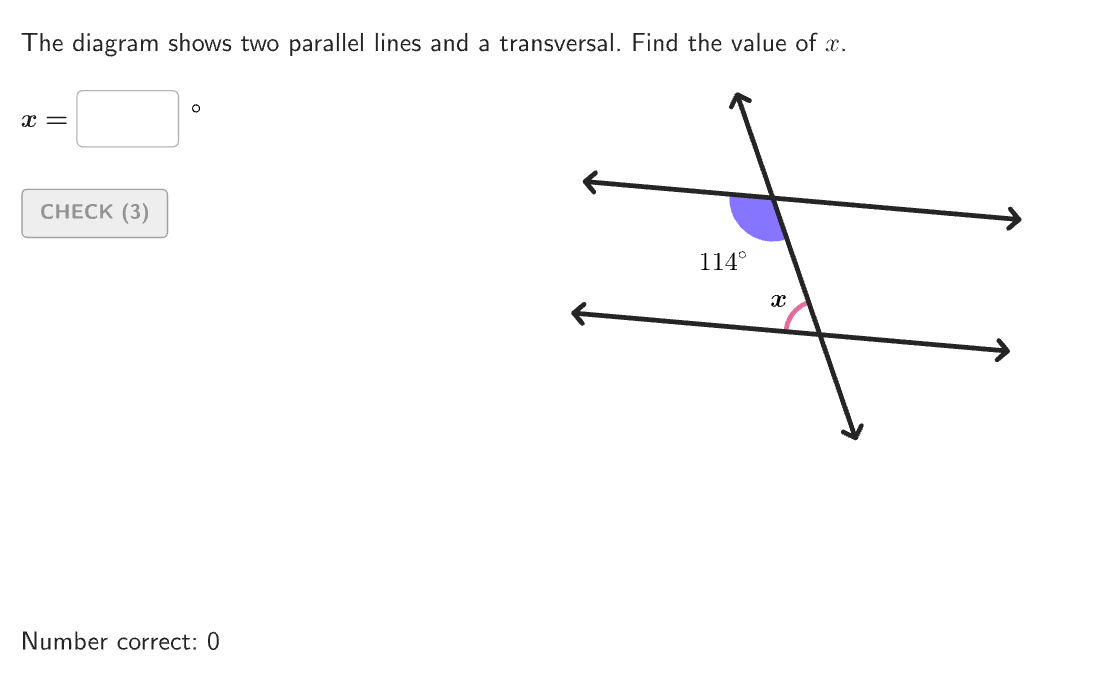
本范例演示了如何通过应用角对之间的关系来确定由平行线与截线形成的角的度量。它涉及的角度关系包括同位角、内错角、同旁内角和对应角。通过使用GeoGebra命令如Sequence、Take、Segment等,可以动态地展示这些角的关系。适合初中6-8年级学生学习几何中的角度和相似性概念。
GeoGebra 命令及参数
Sequence(Random[0, 99] / 100, A, 1, 200) → allRandomSeeds, {0.51, 0.38, 0.7, 0.31, 0.1, 0.13, 0.6, 0.77, 0.58, 0.9, 0.4, 0.36, 0.98, 0.81, 0.29, 0.74, 0.73, 0.34, 0.67, 0.84, 0, 0.59, 0.42, 0.08, 0.72, 0.35, 0.33, 0.02, 0.38, 0.23, 0.35, 0.75, 0.64, 0.4, 0.98, 0.15, 0.88, 0.62, 0.69, 0.74, 0.93, 0.94, 0.04, 0.13, 0.74, 0.32, 0.11, 0.63, 0.04, 0.07, 0.43, 0.23, 0.33, 0.93, 0.98, 0.77, 0.66, 0.99, 0.74, 0.57, 0.09, 0.1, 0.48, 0.87, 0.07, 0.05, 0.15, 0.98, 0.61, 0.15, 0.2, 0.44, 0.87, 0.28, 0.34, 0.6, 0.5, 0.16, 0.91, 0.47, 0.92, 0.4, 0.66, 0.07, 0.14, 0.02, 0.61, 0.9, 0.89, 0.71, 0.35, 0.11, 0.86, 0.72, 0.53, 0.32, 0.48, 0.46, 0.34, 0.93, 0.6, 0.48, 0.08, 0.76, 0.48, 0.12, 0.07, 0.47, 0.54, 0.97, 0.79, 0.9, 0.39, 0.52, 0.05, 0.49, 0.24, 0.12, 0.56, 0.35, 0.53, 0.8, 0.56, 0.44, 0.21, 0.17, 0.48, 0.94, 0.07, 0.18, 0.97, 0.19, 0.22, 0.72, 0.35, 0.63, 0.72, 0.62, 0.42, 0.1, 0.37, 0.06, 0.69, 0.48, 0.11, 0.71, 0.95, 0.85, 0.66, 0.4, 0.14, 0.2, 0.98, 0.33, 0.93, 0.96, 0.73, 0.28, 0.71, 0.86, 0.31, 0.7, 0.9, 0.82, 0.98, 0.57, 0.51, 0.24, 0.03, 0.95, 0.71, 0.58, 0.27, 0.13, 0.46, 0.5, 0.3, 0.54, 0.28, 0.83, 0.77, 0.54, 0.93, 0.45, 0.96, 0.27, 0.71, 0.78, 0.11, 0.35, 0.59, 0.58, 0.58, 0.92, 0.73, 0.4, 0.57, 0.1, 0.56, 0.75}Take(allRandomSeeds, randIndex, randIndex + numRandoms - 1) → currentRandomSeedsSegment((-3.3, 1), (3.3, 1)) → startSeg1Segment((-3.3, -1), (3.3, -1)) → startSeg2If(randOdds ≟ 1, 1 + floor((currentRandomSeeds(1) * 3)), 4) → randRelationshipIf(-20 + floor((currentRandomSeeds(2) * 40)) + randomAngle ≟ 90, -20 + floor((currentRandomSeeds(2) * 40)) + 1, -20 + floor((currentRandomSeeds(2) * 40))) → randomRotRotate(startSeg1, randomRot°) → parallelSeg1Vertex(parallelSeg1, 2) → Seg1P2Vertex(parallelSeg1, 1) → Seg1P1Rotate(startSeg2, randomRot°) → parallelSeg2Vertex(parallelSeg2, 2) → Seg2P2Vertex(parallelSeg2, 1) → Seg2P1Rotate(Segment[(-3.3, 0), (3.3, 0)], randomRot°) → startSegBaseMidpoint(startSegBase) → RotPointRotate(startSegBase, randomAngle°, RotPoint) → transversalIntersect(parallelSeg1, transversal) → Int1Intersect(parallelSeg2, transversal) → Int2Vertex(transversal, 2) → Seg1T2Vertex(transversal, 1) → Seg1T1Element(allRels, randRelationship, randomPosition) → indAngle2PixelsToDistance(8, Corner[1], Corner[3], Corner[5]) → pix8Angle(angleChoice(1), angleChoice(2), angleChoice(3)) → angle1Line(Seg1P1, Seg1P2) → parallelLine1Line(Seg2P1, Seg2P2) → parallelLine2If(randRelationship < 4, angle1, 180° - angle1) → correctAnglePolygon({(-5, -6.5), (-5, 6.5), (6, 6.5), (6, -6.5)}) → viewboxonboardingTextOffset(Corner[onboardingText, 1], Corner[onboardingText, 3], onboardingCase, Corner[1], Corner[3], Corner[5]) → OnboardingTextOffsetTextfield(input1) → InputBox1Corner(5) → layoutAppSizeAngle(angleChoice2(1), angleChoice2(2), angleChoice2(3)) → angle2If(Mod[randomPosition, 2] ≟ 0, 1, -1) → sideAngleLRIf(Mod[indAngle2, 2] ≟ 0, 1, -1) → sideXLRIf(randomPosition ≤ 2 ∨ 5 ≤ randomPosition ≤ 6, 1, -1) → sideAngleTBIf(indAngle2 ≤ 2 ∨ 5 ≤ indAngle2 ≤ 6, 1, -1) → sideXTBRotate(Segment[(-3.3, 0), (3.3, 0)], randomAngle°) → transversalStartIntersect(startSeg1, transversalStart) → Int1StartIntersect(startSeg2, transversalStart) → Int2StartIf(randomPosition ≤ 4, Int1Start, Int2Start) → PointAngleIf(indAngle2 ≤ 4, Int1Start, Int2Start) → PointXIf(sideAngleTB ≟ 1, Seg1T2, Seg1T1) → PointEndAngleYIf(randomPosition ≤ 4, If[sideAngleLR ≟ 1, Seg1P2, Seg1P1], If[sideAngleLR ≟ 1, Seg2P2, Seg2P1]) → PointEndAngleXAngleLabelPosition(angleChoice(2), angleChoice(1), angleChoice(3), angleDims(1) + pix8, angleDims(2) + pix8) → PtAngleAngleLabelPosition(angleChoice2(2), angleChoice2(1), angleChoice2(3), xDims(1) + pix8, xDims(2) + pix8) → PtXIf(Defined[Intersect[transversal, bottomLine]], Intersect[transversal, bottomLine], Seg1T1) → bottomIntIf(Defined[Intersect[transversal, topLine]], Intersect[transversal, topLine], Seg1T2) → topIntSegment(topInt, bottomInt) → transversalDisplayIf(randomPosition ≤ 4, Int1, Int2) → AnimationStartCircle(Int1, If[randomAngle ≟ 90, 0.45, 0.6]) → circleTopCircle(Int2, If[randomAngle ≟ 90, 0.45, 0.6]) → circleBottomIf(randomPosition ≤ 4, circleTop, circleBottom) → circleChoice1If(randRelationship ≟ 1, circleChoice1, If[randomPosition ≤ 4, circleBottom, circleTop]) → circleChoice2CircleSector(PtsArc1(1), PtsArc1(2), PtsArc1(3)) → Arc1aCircleSector(PtsArc2(1), PtsArc2(2), PtsArc2(3)) → Arc2aCircleSector(PtsArc1(1), PtsArc1(3), PtsArc1(2)) → Arc1bCircleSector(PtsArc2(1), PtsArc2(3), PtsArc2(2)) → Arc2bIf(Arc1a > (pi * 0.6^(2) / 2), Arc1b, Arc1a) → Arc1If(Arc2a > (pi * 0.6^(2) / 2), Arc2b, Arc2a) → Arc2If(randRelationship ≟ 1, AnimationStart, randomPosition ≤ 4, Int2, Int1) → EndAnimation1If(randRelationship ≟ 1, 0, randRelationship ≠ 3, animationSlider, animationSlider < 0.5, (animationSlider * 2), 1) → animationSlider1If(Mod[randRelationship, 2] ≟ 0, 0, randRelationship ≟ 1, animationSlider, animationSlider < 0.5, 0, animationSlider ≥ 0.5, ((animationSlider - 0.5) * 2), 1) → animationSlider2PartitionPoint(AnimationStart, EndAnimation1, animationSlider1, 1) → AnimationPoint1Translate(Arc1, Vector[AnimationStart, AnimationPoint1]) → animation1ArcIf(randRelationship ≟ 1, Arc1, Arc2) → arcToRotateRotate(arcToRotate, (180° * If[randRelationship ≟ 1, animationSlider, 1 - animationSlider2]), EndAnimation1) → animation2ArcPolygon({PtsArc1(1), PtsArc1(2), Mirror[PtsArc1(1), Segment[PtsArc1(2), PtsArc1(3)]], PtsArc1(3)}) → square1Polygon({PtsArc2(1), PtsArc2(2), Mirror[PtsArc2(1), Segment[PtsArc2(2), PtsArc2(3)]], PtsArc2(3)}) → square2Translate(square1, Vector[AnimationStart, AnimationPoint1]) → animation1SquareIf(randRelationship ≟ 1, square1, square2) → squareToRotateRotate(squareToRotate, (180° * If[randRelationship ≟ 1, animationSlider, 1 - animationSlider2]), EndAnimation1) → animation2Square
AI 绘图提示语参考
绘制两条平行线和一条截线,展示它们相交形成的角度。平行线由两个水平线段组成,截线从上方斜向穿过平行线。交点处标记出对应角、内错角和同旁内角。图形中包含平行线段、截线、交点、角度标记和一条垂直线作为参考。构造顺序是先画平行线,再画截线,然后确定交点,最后标注角度关系。
以上提示语为根据原始绘图命令整理而来,仅供参考。