
散点图中的线性与非线性关系
几何画板及绘图内容加载中,请稍等……
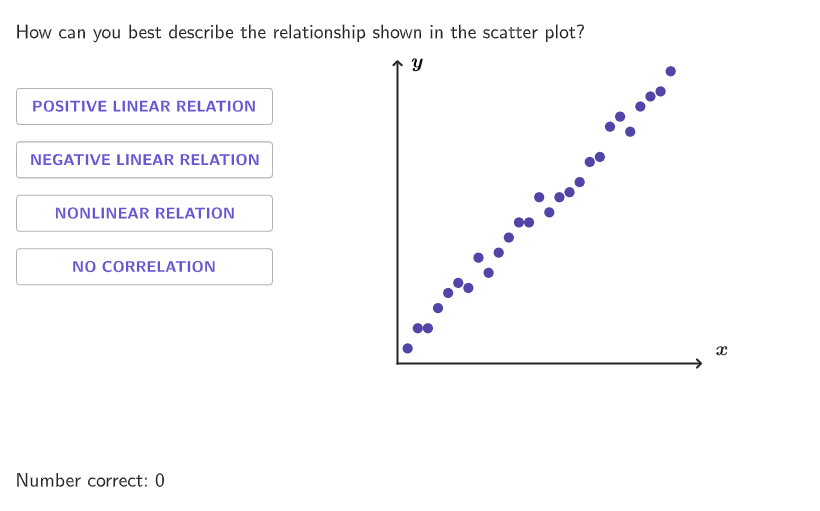
本范例通过散点图展示线性与非线性关系,帮助学生识别数据集中的线性与非线性趋势。使用了Shuffle, Element, If, Point, Append, Slope, Text, Translate等GeoGebra命令。适合6-8年级学生学习数据关系识别。
GeoGebra 命令及参数
Shuffle(Sequence[0, 1.25, 0.25]) → randomb, {0, 1.25, 0.5, 0.25, 0.75, 1}Shuffle(Flatten[Sequence[{1, 2, 3, 4}, ii, 1, 5]]) → randomList1, {1, 4, 3, 4, 1, 4, 4, 1, 3, 2, 2, 2, 2, 1, 4, 3, 3, 3, 2, 1}Element(randomList1, Mod[countQuestion, Length[randomList1]] + 1) → randomNum1Shuffle(Sequence[4] \ {randomNum1}) → RanPositionsOrder, {3, 2, 4}Shuffle(Sequence[0, 3, 0.1] \ {Element[Sequence[0, 3, 0.1], Mod[countQuestion, 5] + 1]}) → randomList2, {2.4000000000000004, 1.8000000000000007, 2.1, 0.5, 0.8999999999999999, 2, 0.7, 2.3000000000000003, 1, 0.7999999999999999, 0.1, 1.2000000000000002, 1.7000000000000006, 1.1, 1.4000000000000004, 1.6000000000000005, 1.5000000000000004, 2.5000000000000004, 1.3000000000000003, 0.4, 2.6000000000000005, 2.7000000000000006, 1.9000000000000008, 2.2, 2.8000000000000007, 3, 0.2, 0.6, 2.900000000000001, 0.30000000000000004}Shuffle(Sequence[2, 4]) → randomn, {4, 3, 2}Shuffle(Sequence[0.5, 3, 0.25]) → randomm, {0.5, 1.75, 2, 1, 1.5, 2.25, 0.75, 2.75, 1.25, 2.5, 3}Shuffle(Flatten[Sequence[Sequence[0, 0.25, 0.05], ii, 1, 5]]) → randomErrors, {0.15000000000000002, 0, 0.25, 0.2, 0, 0.05, 0.05, 0, 0.1, 0.25, 0.05, 0.2, 0, 0.15000000000000002, 0.25, 0.05, 0, 0.15000000000000002, 0.1, 0.15000000000000002, 0.1, 0.2, 0.1, 0.25, 0.2, 0.25, 0.15000000000000002, 0.2, 0.1, 0.05}If(randomNum1 ≠ 1, 3 - Element[randomb, Mod[countQuestion, Length[randomb]] + 1], Element[randomb, Mod[countQuestion, Length[randomb]] + 1]) → interceptPoint(yAxis) → FAppend(randomNum1, RanPositionsOrder) → RanPosOrderCompletElement(randomn, Mod[countQuestion, 3] + 1) → coeffnSlope(Line[G, H]) → slopeText((((intercept * "-") * slope) * "x")) → expressionQ11Text((((intercept * "+") * slope) * "y")) → expressionQ1Translate(Polygon[{F, F - (0, hei), F + (wid, (-hei)), F + (wid, 0)}], (0, -0.07)) → dropareaTableText(Append[Flatten[Sequence[{"\hspace{-10}y", "\hspace{-10}\times"}, i, 1, coeffn - 1]], "\hspace{-10}y"]) → tableQ9Element(randomList2, Mod[countQuestion, 15] + 1) → randomNum2Textfield(input1) → InputBox1Textfield(input2) → InputBox2Corner(5) → layoutAppSizeonboardingTextOffset(Corner[onboardingText, 1], Corner[onboardingText, 3], onboardingCase, Corner[1], Corner[3], Corner[5]) → OnboardingTextOffsetSequence((3 + ini, 1.35 + (ii * 0.55) - hei), ii, 0, 3) → l2Sort(l2, RanPosOrderComplet) → PositionsOrderVertex(droparea, 2) → PZip((("\textsf{" * TT) * "}"), TT, {"POSITIVE LINEAR RELATION", "NEGATIVE LINEAR RELATION", "NONLINEAR RELATION", "NO CORRELATION"}) → OptionsSegment((0, 0), (3, 0)) → fakexAxisSegment((0, 0), (0, 3)) → fakeyAxisTranslate(vGL, Vector[(Vector[Corner[1], Corner[2]] / 800 * 32)]) → vGL'KeepIf(0.1 ≤ y(PP) ≤ 2.9, PP, Zip[(ii, (slope * ii) + intercept + ee), ii, randomList2, ee, randomErrors]) → linCoScatterKeepIf(0.1 ≤ y(PP) ≤ 2.9, PP, Zip[(ii, f1(ii) + ee), ii, randomList2, ee, randomErrors]) → nonlinScatterText("\bold{x}", (3.2, -0.07), true, true, 0, 1) → labelxText("\bold{y}", (0.2, 3), true, true, 0, 0) → labelyFitLineY(linCoScatter) → flinPolygon({(0.05, 0.05), (2.95, 0.05), (2.95, 2.95), (0.05, 2.95)}) → q1KeepIf(0.1 ≤ y(PP) ≤ 2.9, PP, Zip[(ii, (1.5 * sin((1000 * ii))) + 1.5 + ee), ii, randomList2, ee, randomErrors]) → noCorScatter2Mirror(noCorScatter2, y = 1.5) → noCorScatterFitSin(nonlinScatter) → fitsinFitPoly(nonlinScatter, If[nonLinop ≤ 2, 2, 3]) → fitquadText(Element[Options, 4], (0, 0), true, true) → text4Text(Element[Options, 3], (0, 0), true, true) → text3Text(Element[Options, 2], (0, 0), true, true) → text2Text(Element[Options, 1], (0, 0), true, true) → text1Translate(p, Vector[(Vector[Corner[4], Corner[1]] / 500 * 16)]) → p'
AI 绘图提示语参考
在坐标平面上生成三类散点分布,用同一组坐标轴与标题标签帮助判断相关性:其一为线性正相关,点围绕一条向上趋势的直线;其二为线性负相关(同样是直线趋势但斜率为负),用另一组散点表示;其三为非线性散点,点呈弯曲趋势(可用正弦或二次多项式的平滑曲线拟合并展示)。在图中加入两条坐标轴标注为 x 与 y,并在角落放置选项文字:POSITIVE LINEAR RELATION、NEGATIVE LINEAR RELATION、NONLINEAR RELATION、NO CORRELATION,用文字定位强调对比判断。散点范围限定在大致 0.1 到 2.9 的方框内,叠加误差让点有离散感。
以上提示语为根据原始绘图命令整理而来,仅供参考。