
Klecksaufgabe飞墨面积练习:用多边形分割与测量做面积单位换算
几何画板及绘图内容加载中,请稍等……
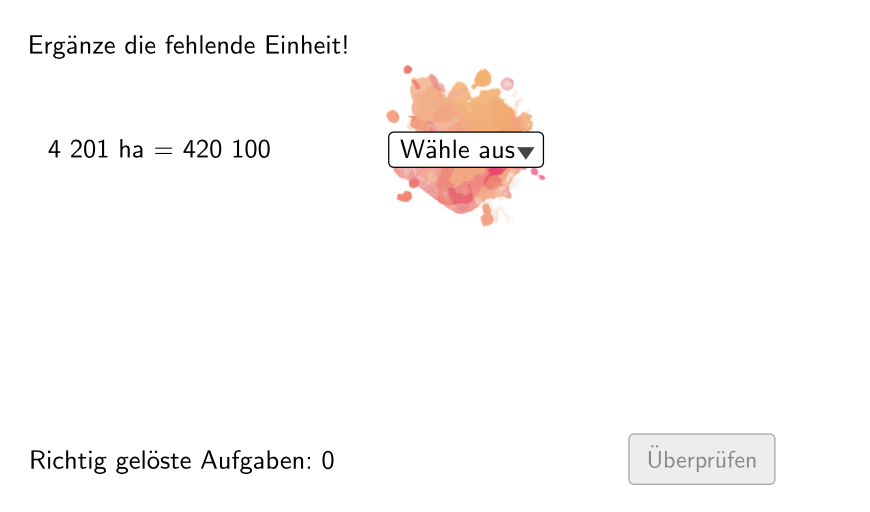
这个范例用“飞墨/墨迹式”的随机多边形分割任务,引导学生根据图形面积进行测量与单位换算。核心数学概念包括:面积的度量与单位换算(适配平方单位)、多边形顶点/角点的构造、随机点生成与几何对象的拼接、以及通过对象索引与条件选择来控制分割与输出。作图要点:利用 Join、Polygon 构建多边形区域;用 Point/Corner 类对象来确定顶点;通过 Shuffle 与 If 对点序列进行随机打乱并按条件处理;借助 IndexOf、Append、Remove、Element 来从列表中选择/修改元素并动态更新图形;再用 Textfield 与 NumberSeperation(用于显示/分离数值信息)呈现测量结果。适合5-6年级用于面积测量的入门练习,或作为几何作图与面积单位换算的课堂互动活动。
GeoGebra 命令及参数
Join(Sequence[Shuffle[{1, 2, 3, 4, 5, 6}], i, 1, 20]) → ListeBeispielCountElement(ListeBeispielCount, Mod[questionCount, 100]) → BeispielCountJoin(Sequence[Shuffle[{true, false}], i, 1, 50]) → ListeWWGroßAufKleinElement(ListeWWGroßAufKlein, Mod[questionCount, 100]) → großAufKleinIf(allowDecimalNumbers, Element[If[großAufKlein, ListeKommaGroßAufKlein, ListeKommaKleinAufGroß], BeispielCount], Element[If[großAufKlein, ListeGroßAufKlein, ListeKleinAufGroß], BeispielCount]) → BeispielElement(Beispiel, 2) → einheit2IndexOf(SelectedElement[LL], LL) → EinheitGewähltShuffle(Sequence[Random[111, 9999], i, 1, 100]) → randomNosForX, {4688, 4201, 4177, 6715, 8901, 7902, 5887, 855, 5789, 2089, 903, 159, 9080, 4730, 9040, 8596, 8748, 5941, 7322, 3190, 1147, 3113, 5312, 6660, 517, 4213, 5255, 5761, 9699, 9077, 2038, 5443, 250, 7630, 1440, 649, 7580, 7724, 7432, 6430, 4366, 7697, 1351, 2354, 8836, 2124, 839, 3919, 3150, 4427, 1404, 7115, 7189, 2649, 4009, 1967, 3253, 5362, 3099, 430, 2440, 5556, 9417, 6578, 9858, 7670, 8216, 9734, 3179, 8862, 972, 2595, 6841, 8346, 6907, 2469, 7094, 4221, 7576, 943, 6542, 459, 2529, 4476, 2256, 3013, 4484, 1278, 7091, 8644, 3083, 8877, 6593, 1630, 5832, 2713, 7239, 757, 2489, 4239}Append(true, Sequence[If[randomNosForX(i) ≟ randomNosForX(i - 1), false, true], i, 2, 100]) → stayXRemove(Sequence[If[stayX(i), randomNosForX(i), 0], i, 1, 100], Sequence[0, i, 1, 100]) → randomNosForXwithoutRepeatElement(randomNosForXwithoutRepeat, Mod[questionCount, Length[randomNosForXwithoutRepeat]] + 1) → numXwithoutRepeatElement(Beispiel, 1) → einheit1If(großAufKlein, Element[Beispiel, 4], 1 / Element[Beispiel, 4]) → faktorCorrectShuffle(Sequence[Random[1, 3], i, 1, 100]) → ListeFaktoren, {1, 1, 1, 3, 1, 1, 1, 2, 2, 1, 3, 2, 2, 1, 3, 1, 3, 3, 2, 1, 3, 3, 2, 3, 2, 2, 1, 1, 1, 2, 1, 1, 2, 3, 3, 1, 1, 3, 1, 2, 3, 2, 1, 2, 2, 3, 3, 3, 1, 2, 2, 1, 1, 1, 1, 2, 1, 1, 1, 1, 3, 3, 3, 2, 1, 3, 1, 2, 1, 1, 2, 3, 1, 1, 2, 3, 1, 3, 2, 1, 1, 2, 2, 1, 2, 2, 1, 2, 3, 2, 1, 3, 3, 1, 1, 2, 1, 1, 2, 3}Element(ListeFaktoren, Mod[questionCount, 100]) → positionFaktor0Element(Element[Beispiel, 3], positionFaktor0) → faktor0NumberSeperation(num) → NumSeperatedNumberSeperation(numCorrect) → TextNumCorrectTextfield(aInput) → InputBox1Textfield(bInput) → InputBox2Polygon(PtopLeftCornerFeedback, PtopRightCornerFeedback, PbottomRightCornerFeedback, PbottomLeftCornerFeedback) → rectangleCorrect, ptopleftcornerfeedback, ptoprightcornerfeedback, pbottomrightcornerfeedback, pbottomleftcornerfeedbackElement(randomNosForX, Mod[questionCount, 100] + 1) → numXCorner(Text2, 3) → ACorner(Text2, 2) → D
AI 绘图提示语参考
绘制一个随机生成的多边形区域,展示面积测量和单位转换练习。多边形由四个随机选择的点构成,点按特定规则排列并随机化。显示两个单位之间的转换因子,并允许用户输入测量值进行计算。多边形区域使用不同颜色和线条样式突出显示,并标注关键点。整体设计应体现几何构造的动态性和随机性,适合五到六年级学生。
以上提示语为根据原始绘图命令整理而来,仅供参考。