
Isosceles Triangle Area
几何画板及绘图内容加载中,请稍等……
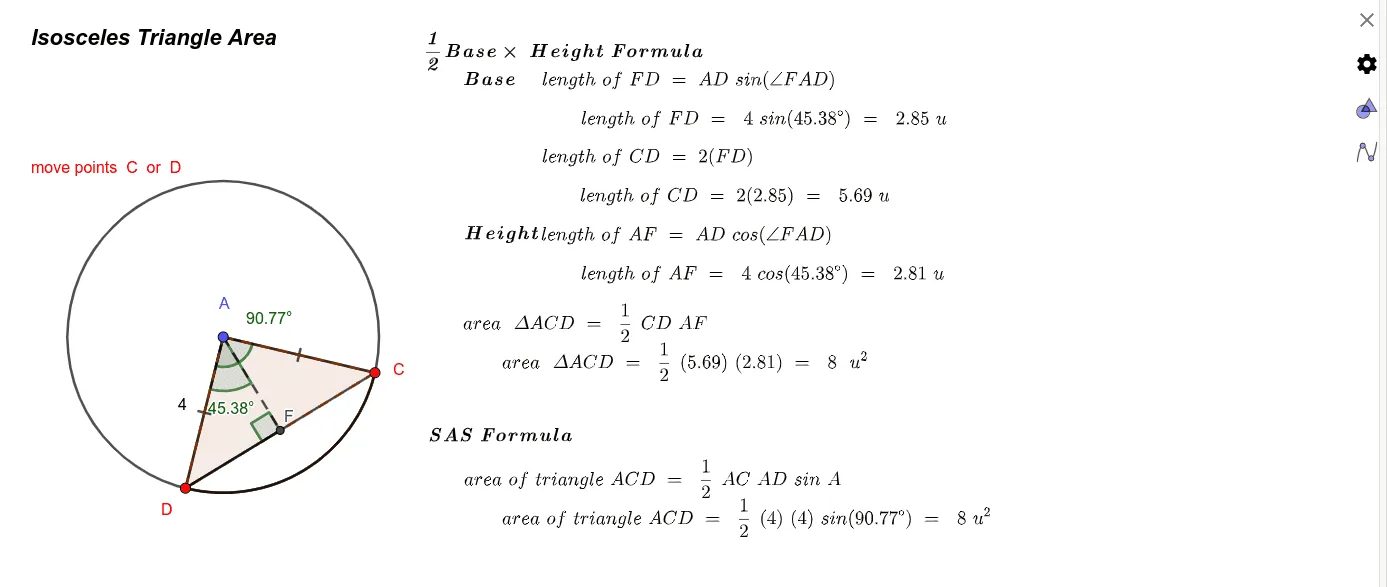
This GeoGebra example dynamically demonstrates the area of an isosceles triangle and its connections to circumcircle, orthocenter, and conic sections. Core mathematical concepts include properties of isosceles triangles, area formulas (base times height over two), trigonometric functions (sine, cosine) in area calculation, and relationships among orthocenter, circumcircle, and triangle elements. Construction highlights: using commands such as Circle, Point, CircleSector, Angle, Segment, Area, PointIn, CircleArc, Polygon, Intersect, and OrthogonalLine, the applet builds an isosceles triangle with auxiliary lines like angle bisectors and perpendiculars, allowing dynamic manipulation via sliders or point dragging to observe changes in area and angles. Suitable for middle and high school geometry classes, this resource helps students visualize area derivation, apply trigonometry, and explore dynamic geometry.
GeoGebra 命令及参数
Circle(A, B) → cPoint(c) → CPoint(c) → DCircleSector(A, D, C) → dAngle(D, A, C) → αSegment(A, C) → fSegment(A, D) → gArea(c) → aPointIn(c) → PointcCircleArc(A, D, C) → eSegment(D, C) → hPolygon(A, C, D) → t1, d_1, a_1, c_1Intersect(d, f, 1) → EOrthogonalLine(A, h) → iIntersect(i, h) → FSegment(A, F) → jAngle(D, A, F) → βSegment(F, D) → kAngle(A, F, D) → γ
AI 绘图提示语参考
画一个等腰三角形,并动态展示其面积与外接圆、垂心及圆锥曲线的关系。首先绘制等腰三角形,标注底边和顶点,然后画出外接圆和垂心。接着,通过动态调整顶角或底边长度,观察面积变化,并显示角平分线和垂线。最后,连接垂心与顶点,并标注相关角度,以帮助理解等腰三角形的性质和面积公式。
以上提示语为根据原始绘图命令整理而来,仅供参考。