
交互“魔法梯形”:验证梯形边长与高度变化下面积规律
几何画板及绘图内容加载中,请稍等……
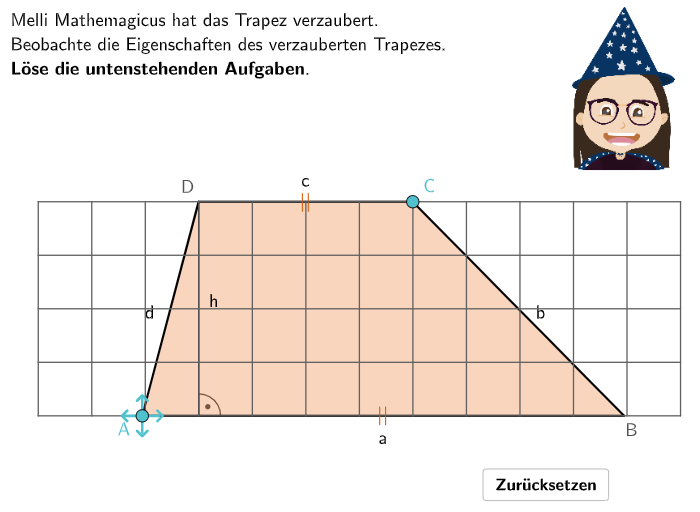
该范例通过可拖拽的“魔法梯形”让学习者观察:在改变顶点位置时,哪些量保持不变,以及面积如何随平行边与高度变化。核心数学概念包括梯形(特殊四边形)性质、平行边与高、梯形面积公式 A = (a + c)·h / 2,以及在几何变换下面积与度量之间的对应关系。作图与交互要点:使用 Polygon 构造梯形多边形;用 Point、Segment 表示顶点与边;通过 Shuffle 实现顶点可随机/可拖拽移动;用 Length 读取边长与高度相关量,并用 Text 展示问题、提示与反馈;利用 Midpoint、Ray、Intersect 等几何辅助得到高的度量;通过 Angle 用于构造/标注夹角相关的几何信息(若用于确定高的方向)。适合5-6年级学生用于面积公式理解与应用,也可作为课堂探究活动或单元复习中的交互练习。
GeoGebra 命令及参数
Textfield(input1) → InputBox1Textfield(input2) → InputBox2Polygon(PtopLeftCornerFeedback, PtopRightCornerFeedback, PbottomRightCornerFeedback, PbottomLeftCornerFeedback) → rectangleCorrect, rectangleCorrectS3, rectangleCorrectS4, rectangleCorrectS2, rectangleCorrectS1Shuffle(Sequence[Random[0, 10], i, 1, 100]) → randomNosForX, {10, 9, 2, 6, 5, 4, 2, 10, 6, 9, 7, 1, 1, 9, 0, 9, 7, 10, 10, 7, 1, 2, 8, 3, 10, 1, 6, 2, 4, 5, 0, 1, 8, 7, 0, 9, 8, 1, 4, 9, 3, 0, 0, 9, 6, 5, 2, 2, 1, 4, 8, 0, 7, 4, 10, 10, 0, 3, 1, 5, 7, 2, 0, 0, 9, 7, 7, 1, 5, 0, 5, 4, 2, 10, 0, 5, 2, 0, 2, 4, 6, 10, 2, 8, 0, 8, 2, 7, 9, 9, 5, 7, 10, 5, 5, 2, 2, 6, 4, 6}Element(randomNosForX, Mod[questionCount, 100] + 1) → numXShuffle(Sequence[Random[0, 10], i, 1, 100]) → randomNosForY, {2, 9, 10, 4, 5, 8, 9, 8, 6, 7, 2, 0, 7, 7, 4, 6, 2, 4, 8, 8, 4, 9, 1, 2, 7, 3, 5, 4, 10, 1, 2, 6, 9, 3, 7, 4, 3, 2, 3, 6, 5, 8, 5, 3, 7, 2, 0, 4, 6, 3, 7, 1, 2, 6, 2, 2, 5, 3, 0, 6, 4, 3, 7, 8, 3, 0, 6, 3, 10, 8, 8, 2, 10, 5, 5, 6, 5, 5, 7, 7, 9, 2, 5, 6, 10, 2, 0, 0, 6, 3, 3, 7, 9, 1, 5, 5, 7, 4, 7, 4}Element(randomNosForY, Mod[questionCount, 100] + 1) → numYAppend(true, Sequence[If[randomNosForX(i) ≟ randomNosForX(i - 1), false, true], i, 2, 100]) → stayXAppend(true, Sequence[If[randomNosForY(i) ≟ randomNosForY(i - 1), false, true], i, 2, 100]) → stayYRemove(Sequence[If[stayX(i), randomNosForX(i), 0], i, 1, 100], Sequence[0, i, 1, 100]) → randomNosForXwithoutRepeatRemove(Sequence[If[stayY(i), randomNosForY(i), 0], i, 1, 100], Sequence[0, i, 1, 100]) → randomNosForYwithoutRepeatElement(randomNosForXwithoutRepeat, Mod[questionCount, Length[randomNosForXwithoutRepeat]] + 1) → numXwithoutRepeatElement(randomNosForYwithoutRepeat, Mod[questionCount, Length[randomNosForYwithoutRepeat]] + 1) → numYwithoutRepeatDefined((input1 * input2)) → fixedSegment(StreckeUnten_1, StreckeUnten_2) → iPoint(i) → ASegment(StreckeOben_1, StreckeOben_2) → hPoint(h) → CPolygon(A, B, C, D) → q1, d, c, f_1, eMidpoint(A, B) → EMidpoint(C, B) → FMidpoint(A, D) → GMidpoint(D, C) → HText("\textsf{a}", E + (0, -0.4), false, true, 0, 0) → Text1Text("\textsf{b}", F + (0.4, 0), false, true, 0, 0) → Text2Text("\textsf{c}", H + (0, 0.4), false, true, 0, 0) → Text3Text("\textsf{d}", G + (-0.4, 0), false, true, 0, 0) → Text4Text("\textsf{||}", H + (0, 0.05), false, true, 0, 0) → Text5Text("\textsf{||}", E + (0, 0.05), false, true, 0, 0) → Text6Ray(D, Vector[(0, -1)]) → jRay(A, Vector[(0, 1)]) → kIntersect(j, Segment[A, B]) → HoeheP1Intersect(k, Segment[D, C]) → HoeheP2Segment(D, HoeheP1) → lSegment(A, HoeheP2) → mAngle(B, HoeheP1, D) → αAngle(B, A, HoeheP2) → βLength(Segment[A, B]) → aSequence(VR2 + (i, 0), i, 0, 12) → l2Sequence(VR2 + (0, i), i, 0, 4) → l3Sequence(Segment[l3(i), l3(i) + (12, 0)], i, 1, 5) → l4Sequence(Segment[l2(i), l2(i) + (0, 4)], i, 1, 13) → l5Sequence(Rotate[Segment[A, A + (0, laenge)], (90° * i), A], i, 0, 3) → l6
AI 绘图提示语参考
绘制一个梯形,其中上底a和下底c是平行的,高度h垂直于这两条底边。通过拖动梯形的顶点来改变梯形的形状,观察哪些测量值保持不变,以及面积如何变化。使用辅助线和标记来表示梯形的高和底边,同时显示梯形面积的计算公式:(a + c) * h / 2。
以上提示语为根据原始绘图命令整理而来,仅供参考。