
6.2.4课时:色彩混合
几何画板及绘图内容加载中,请稍等……
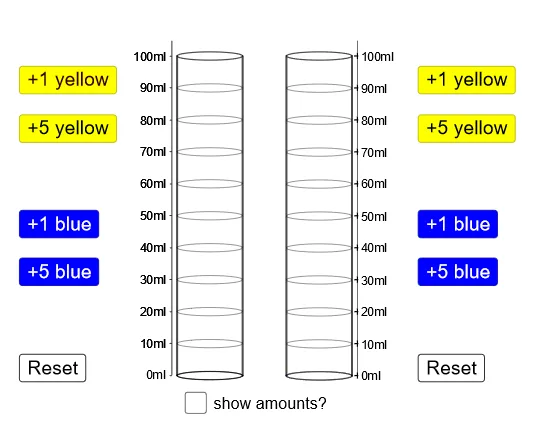
该范例演示了色彩混合的原理,涉及比例的概念。通过使用GeoGebra命令如Ellipse、Point、If、Segment等,可以构造出色彩混合的动态模型。适合初中生学习比例和色彩理论。
GeoGebra 命令及参数
Ellipse((1, 0), (2.5, 0), 1.5) → ePoint(e) → FIf(yellow + blue ≟ 0, 1, If[ratio ≤ 1, 0, (0.79 * ratio2^(2)) - (1.72 * ratio2) + 0.99]) → aIf(yellow + blue ≟ 0, 1, If[ratio ≥ 1, 1, (-0.85 * ratio^(2)) + (1.78 * ratio)]) → bIf(yellow + blue ≟ 0, 1, If[ratio ≥ 1, 0, (0.79 * ratio^(2)) - (1.72 * ratio) + 0.99]) → cPoint(e) → ESegment(F, (x(F), ht)) → fVector(F, G) → uTranslate(e, u) → e'Polygon(G, F, E, H) → poly2, g, f_1, e_1, hSegment(I, F) → iSegment(E, J) → jVector(F, I) → vEllipse((1, ht), (2.5, ht), 1.5) → pEllipse((1, 0), (2.5, 0), 1.5) → qSegment(H, E) → lEllipse((1, top), (2.5, top), 1.5) → kSegment(C, A) → mSegment(B, D) → nVector(A, C) → wVector(A, K) → rTranslate(B, r) → B'Polygon(K, A, B, B') → poly1, k_1, a_1, b_1, b'If(yellow2 + blue2 ≟ 0, 1, If[ratiox ≤ 1, 0, (0.79 * (1 / ratiox)^(2)) - (1.72 * 1 / ratiox) + 0.99]) → a2If(yellow2 + blue2 ≟ 0, 1, If[ratiox ≥ 1, 1, (-0.85 * ratiox^(2)) + (1.78 * ratiox)]) → b2If(yellow2 + blue2 ≟ 0, 1, If[ratiox ≥ 1, 0, (0.79 * ratiox^(2)) - (1.72 * ratiox) + 0.99]) → c2Vector(F, A) → dTranslate(q, d) → q'Translate(q, d) → q'_1Translate(q'_1, r) → sTranslate(q'_1, r) → tSegment(B', B) → g_1Segment(K, A) → h_1Sequence(Ellipse[(1, k), (2.5, k), 1.5], k, 10, 90, 10) → list1Translate(list1, d) → list1'Ray((8.5, 0), (8.5, 1)) → i_1Sequence((8.5, n), n, 0, 100, 10) → list2Point(i_1) → LSequence(Text[m + "ml", (8.65, m - 1.5)], m, 0, 100, 10) → list3Polygon(M, N, O, P) → poly3, m_1, n_1, o, p_1
AI 绘图提示语参考
绘制一个动态的色彩混合模型,包括两个椭圆,一个位于底部,另一个位于顶部。通过调整比例,改变椭圆的颜色。使用点和线段连接椭圆,展示不同比例下的色彩混合效果。最后,添加刻度线和文字标签,表示不同毫升的色彩混合量。
以上提示语为根据原始绘图命令整理而来,仅供参考。