
寻找正方形与其他矩形
几何画板及绘图内容加载中,请稍等……
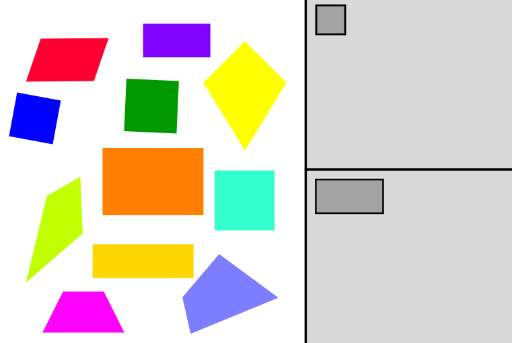
①本范例演示如何识别并分类正方形和矩形,并将它们拖拽到对应的灰色框中;②涉及的核心数学概念包括多边形属性、几何变换、解析几何;③作图要点——使用了Polygon(多边形)、Point(点)、Rotate(旋转)、Centroid(质心)、Ray(射线)、PointIn(点在对象内)、Segment(线段)、Mirror(镜像)、Line(直线)、Intersect(交点)、OrthogonalLine(垂线)、Circle(圆)等GeoGebra命令/对象;④适合初中及以上学生,用于几何图形识别与分类练习。
GeoGebra 命令及参数
Polygon(A, B, 4) → poly1, f, g, h, i, C, DPolygon(E, F, 4) → poly2, j, k, l, m, G, HPolygon(I, J, 4) → poly3, n, p, q, r, K, LPolygon(M, N, 4) → poly4, s, t, c, d, O, PPoint(xAxis) → QPoint(Circle[M_1, Segment[A_1, B_1]]) → N_1Rotate(N_1 + (Segment[B_1, C_1], 0), Angle[C_1 - B_1] + Angle[N_1 - M_1] - Angle[B_1 - A_1], N_1) → O_1Rotate(O_1 + (Segment[C_1, D_1], 0), Angle[D_1 - C_1] + Angle[O_1 - N_1] - Angle[C_1 - B_1], O_1) → P_1Polygon(M_1, N_1, O_1, P_1) → poly10, m_1, n_1, o_1, p_1Point(Circle[Q_1, Segment[U, V]]) → R_1Rotate(R_1 + (Segment[V, W], 0), Angle[W - V] + Angle[R_1 - Q_1] - Angle[V - U], R_1) → S_1Rotate(S_1 + (Segment[W, Z], 0), Angle[Z - W] + Angle[S_1 - R_1] - Angle[W - V], S_1) → T_1Polygon(Q_1, R_1, S_1, T_1) → poly11, q_2, r_2, s_2, t_2Point(Circle[U_1, Segment[Q, R]]) → V_1Rotate(V_1 + (Segment[R, S], 0), Angle[S - R] + Angle[V_1 - U_1] - Angle[R - Q], V_1) → W_1Rotate(W_1 + (Segment[S, T], 0), Angle[T - S] + Angle[W_1 - V_1] - Angle[S - R], W_1) → Z_1Polygon(U_1, V_1, W_1, Z_1) → poly12, u_1, v_1, w_1, z_2Point(Circle[E_1, 1]) → F_1Polygon(E_1, F_1, G_1, H_1) → poly5, e_1, f_1, g_1, h_1Centroid(poly1) → I_1Centroid(poly2) → J_1Centroid(poly3) → K_1Centroid(poly10) → L_1Centroid(poly11) → A_2Centroid(poly12) → B_2Point(Circle[Q_2, 1.4821605850919128]) → R_2Point(Circle[U_2, 1.4598630072715726]) → V_2Point(Circle[A_3, 1.1415778554264275]) → B_3Point(Circle[E_3, 0.6596969000988258]) → F_3Point(Circle[I_3, 1]) → J_3Ray((0, 0), (1, 0)) → i_1Point(e) → M_3Point(e) → N_3Polygon(M_3, N_3, O_3, P_3) → poly14, m_3, n_3, o_3, p_3PointIn(poly14) → Q_3Point(Circle[Q_3, 1]) → R_3Segment(Q_3, R_3) → j_1Mirror(R_3, Q_3) → S_3Point(Circle[R_3, 2]) → T_3Segment(R_3, T_3) → k_1Line(T_3, S_3) → l_1Line(R_3, l_1) → a_1Line(S_3, k_1) → b_1Intersect(a_1, b_1) → U_3Polygon(T_3, R_3, U_3, S_3) → poly15, t_3, r_3, u_3, s_3PointIn(poly14) → V_3Point(Circle[V_3, 2]) → W_3Segment(V_3, W_3) → q_1Line(W_3, V_3) → r_1Point(r_1) → Z_3OrthogonalLine(V_3, q_1) → s_1Circle(V_3, Z_3) → c_1Intersect(c_1, s_1) → A_4, B_4Polygon(W_3, B_4, Z_3, A_4) → poly6, w_3, b_4, z_3, a_4PointIn(poly14) → C_4Point(Circle[C_4, 0.6]) → D_4Segment(C_4, D_4) → t_1OrthogonalLine(D_4, t_1) → d_1Mirror(D_4, C_4) → E_4Line(E_4, d_1) → f_2Circle(D_4, E_4) → c_2Intersect(c_2, d_1) → F_4, G_4Circle(E_4, C_4) → d_2Intersect(d_2, f_2) → H_4, I_4Polygon(F_4, G_4, I_4, H_4) → poly9, f_4, g_4, i_4, h_4PointIn(poly14) → J_4Point(Circle[J_4, 2]) → K_4Segment(J_4, K_4) → g_2Point(Circle[J_4, 1]) → L_4Segment(J_4, L_4) → h_2Point(Circle[J_4, 1.5]) → M_4Segment(J_4, M_4) → i_2Point(Circle[J_4, 0.9]) → N_4Segment(J_4, N_4) → j_2Polygon(M_4, K_4, L_4, N_4) → poly8, m_4, k_4, l_4, n_4PointIn(poly14) → O_4Point(Circle[O_4, 2]) → P_4Segment(O_4, P_4) → k_2Point(Circle[O_4, 1.5]) → Q_4Segment(O_4, Q_4) → l_2Point(Circle[O_4, 1]) → R_4Segment(O_4, R_4) → m_2Point(Circle[O_4, 0.7]) → S_4Segment(O_4, S_4) → n_2Polygon(P_4, R_4, Q_4, S_4) → poly13, p_4, r_4, q_4, s_4
AI 绘图提示语参考
绘制一个包含多个正方形和矩形的几何练习图。先画出四个大小不同的正方形,分别放置在画布不同位置。再构造三个由旋转生成的平行四边形,每个由一条边和旋转角度确定。接着画一个由中心点和半径确定的圆,并在圆上取点构造一个正方形。为每个多边形添加中心点标记。最后,在其中一个正方形内部随机取点,以该点为圆心画圆,通过镜像和旋转构造一个菱形,并在另一个正方形内取点画圆。整体布局用于分类识别正方形和矩形。
以上提示语为根据原始绘图命令整理而来,仅供参考。