
用图形定位线性方程组解:验证交点满足两条直线
几何画板及绘图内容加载中,请稍等……
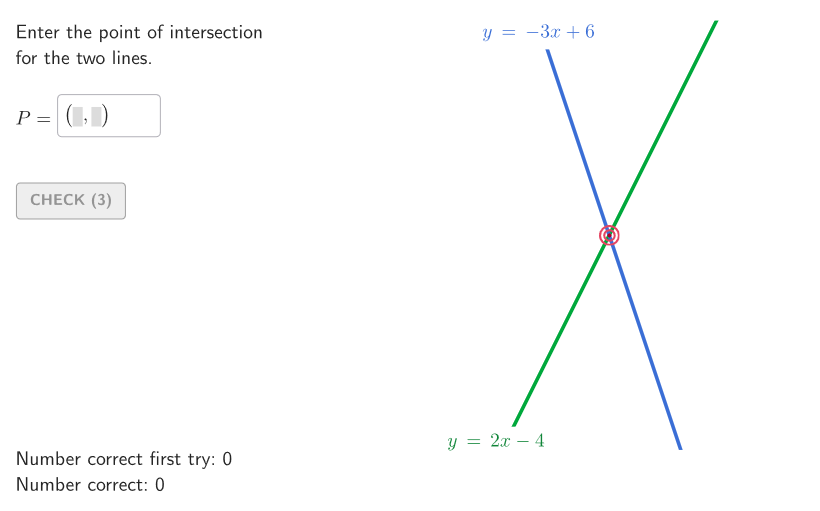
本范例通过在同一坐标平面中绘制两条直线,定位它们的交点并验证该交点同时满足两个线性方程。核心数学概念包括:二元一次方程、线性方程组的解、直线的交点与方程等价关系,以及“代入检验”思想(把交点的坐标代回两条方程)。作图与交互重点是:使用 Shuffle 进行参数或题目变体的打乱,利用 Element 选择/读取关键几何对象,并通过 Segment、Polygon、Corner 等对象完成线段/多边形与结构化标注;Textfield 与 Text 用于显示方程、步骤提示与解的文字;onboardingTextOffset 辅助引导呈现;同时借助 If 与 validate 机制对输入是否满足条件进行判定,使用 showanswer、showsolution、btnValidate、showhint 控制答案展示与提示流程。相关对象变量如 inputA/inputB/inputC 与 correct1/correct2 表示输入与检验结果。适合6—8年级学生用于图形法理解线性方程组求解,或课堂探究、练习与形成性测评用途。
GeoGebra 命令及参数
Shuffle(Join[Sequence[Sequence[(j, k), j, -7, 7, 1], k, -7, 7, 1]]) → allP, {(2, 0), (4, -7), (0, 7), (1, 2), (2, -7), (-7, -6), (-4, 6), (6, -7), (-5, -5), (-3, -6), (-2, -3), (-7, -5), (3, 3), (-5, 6), (-1, 4), (-4, -1), (5, -3), (-7, 0), (2, 5), (2, -6), (-4, -2), (3, 5), (7, -1), (6, 3), (-6, -2), (-6, -7), (1, -5), (5, 6), (1, 6), (-1, -3), (2, 2), (-3, -4), (1, -1), (-2, 3), (4, 7), (-1, 2), (-6, 3), (4, -4), (-7, 6), (-6, 0), (-7, -7), (-4, 2), (-5, -6), (-3, 7), (-5, 3), (3, 6), (2, -4), (-1, -7), (5, 2), (5, -7), (6, -4), (2, -3), (3, -5), (4, -3), (-5, 7), (7, 0), (6, 6), (0, 5), (-7, 3), (7, -6), (-3, -1), (-7, 5), (0, 0), (4, 4), (1, 1), (0, 3), (6, 0), (-1, -5), (5, 1), (-6, -4), (6, 4), (2, 4), (6, 7), (-1, 3), (4, 6), (7, 6), (1, 0), (-6, -1), (-3, 1), (7, 2), (4, 3), (1, -3), (3, -2), (-6, -6), (-6, -3), (-1, 5), (-6, 5), (6, 5), (6, -1), (-6, 6), (-2, 6), (-6, 7), (2, -2), (-6, 4), (-2, -5), (-4, 0), (-4, -6), (-2, 7), (-3, -3), (1, 4), (-5, -7), (-4, 5), (4, -1), (-3, 5), (-2, 5), (-2, -4), (-4, 3), (0, 2), (-7, 4), (7, -2), (5, 7), (-2, 4), (4, -5), (1, 7), (-7, -3), (-3, -5), (0, -6), (3, -1), (-6, 2), (7, 7), (5, -2), (-1, -6), (1, -6), (6, -6), (-5, -2), (6, 2), (-1, 7), (5, -1), (7, 1), (7, -5), (-2, -2), (-7, -2), (-4, 1), (5, -4), (3, 4), (5, -6), (-6, 1), (-1, -1), (-7, 1), (-5, -4), (0, 4), (-5, 2), (5, 0), (-1, 6), (3, -4), (-4, -7), (0, -5), (0, 1), (2, -1), (-7, -1), (-5, 0), (-4, 7), (-3, 6), (6, -5), (-5, 4), (1, -2), (1, -4), (5, -5), (-7, 2), (7, 3), (-6, -5), (5, 5), (-1, -2), (3, 7), (1, -7), (-3, -7), (5, 3), (-1, -4), (-2, -7), (4, 5), (-3, 0), (-5, -3), (-3, 4), (7, -7), (2, 3), (6, -3), (3, -7), (-3, 3), (4, 1), (0, -2), (-5, -1), (5, 4), (4, 0), (0, -1), (-5, 5), (1, 5), (-4, 4), (-3, -2), (1, 3), (2, -5), (-7, 7), (-4, -5), (3, 0), (-1, 1), (2, 7), (4, -2), (7, 4), (0, 6), (2, 1), (-2, 2), (-2, -6), (-2, 1), (6, -2), (0, -3), (-7, -4), (-2, -1), (7, -3), (4, 2), (0, -7), (0, -4), (3, 1), (7, -4), (3, 2), (-2, 0), (2, 6), (-5, 1), (-3, 2), (3, -6), (-4, -3), (3, -3), (7, 5), (4, -6), (-1, 0), (-4, -4), (6, 1)}Element(allP, Mod[countQuestion, Length[allP]] + 1) → SOLPShuffle(Sequence[t, t, -4, 4, 1]) → allM, {-3, 2, 3, -2, -4, 1, 4, 0, -1}Element(allM, Mod[m2Count, Length[allM]] + 1) → m2Element(allM, Mod[countQuestion, Length[allM]] + 1) → m1Textfield(inputB) → InputBoxBPolygon(Zip[PixelsToPoint[Corner[1], Corner[3], Corner[5], A], A, {(pixelsLeft, pixelsTop), (pixelsLeft, y(Corner[5]) - pixelsBottom), Corner[5] - (pixelsRight, pixelsBottom), (x(Corner[5]) - pixelsRight, pixelsTop)}]) → borderBoxCorner(5) → layoutAppSizeonboardingTextOffset(Corner[onboardingText, 1], Corner[onboardingText, 3], onboardingCase, Corner[1], Corner[3], Corner[5]) → OnboardingTextOffsetTextfield(STUDP) → InputBoxATextfield(inputC) → InputBoxCSegment((-10.8, 0), (10.8, 0)) → fakeXSegment((0, -10.8), (0, 10.8)) → fakeYPolygon(PC, Mirror[PC, yAxis], Mirror[PC, (0, 0)], Mirror[PC, xAxis]) → peep, bottomPeep, rightPeep, topPeep, leftPeepElement(RemoveUndefined[{Intersect[r1, topPeep], Intersect[r1, rightPeep], Intersect[r1, leftPeep]}], 1) → LR1Element(RemoveUndefined[{Intersect[r2, bottomPeep], Intersect[r2, leftPeep], Intersect[r2, rightPeep]}], 1) → LR2Zip({Segment[(k, -10.5), (k, 10.5)], Segment[(-10.5, k), (10.5, k)]}, k, -10…10) → squareGridSegmIf(x(LR2) > 5, (-6, 1), (-3, 1)) → OFFLR2If(x(LR1) > 5, (-6, -1), (-3, 0)) → OFFLR1
AI 绘图提示语参考
在一个坐标平面上绘制两条随机生成的直线,这两条直线的交点即为线性方程组的解。首先创建一个网格,然后随机选择两组坐标点作为两条直线的端点,并绘制出这两条直线。接着,在坐标轴上绘制两条辅助线段,并在这两条辅助线段上找到与两条直线相交的点。最后,通过这些交点验证两条直线的方程是否满足线性方程组的解。
以上提示语为根据原始绘图命令整理而来,仅供参考。