
分数操作与相对比例的几何作图范例
几何画板及绘图内容加载中,请稍等……
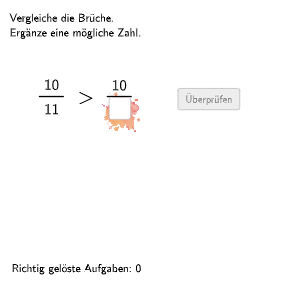
该范例演示了如何通过几何图形直观展示分数的相对比例和频率。核心数学概念包括分数作为相对比例和相对频率的理解,以及几何作图在数学教育中的应用。作图要点包括使用GeoGebra命令如Shuffle、Element、If、Textfield等来动态生成分数和图形。适合小学五年级至六年级学生,用于培养数感和分数运算能力。
GeoGebra 命令及参数
Shuffle(Sequence[Random[2, 13], i, 1, 100]) → randomNosForNenner2, {10, 3, 12, 12, 2, 12, 3, 2, 4, 6, 3, 12, 12, 11, 6, 3, 13, 12, 5, 6, 5, 13, 5, 13, 10, 3, 4, 11, 12, 3, 10, 12, 6, 6, 11, 3, 8, 7, 9, 9, 8, 9, 4, 9, 13, 10, 4, 11, 8, 7, 9, 2, 11, 4, 12, 13, 9, 4, 6, 2, 8, 4, 3, 3, 5, 8, 9, 13, 6, 5, 5, 7, 4, 9, 9, 10, 11, 5, 12, 9, 7, 2, 11, 3, 7, 7, 4, 8, 6, 8, 3, 8, 10, 6, 9, 13, 3, 9, 10, 9}Shuffle(Sequence[Random[2, 13], i, 1, 100]) → randomNosForNenner1, {3, 11, 12, 9, 9, 10, 2, 3, 10, 10, 5, 6, 2, 11, 2, 5, 6, 12, 9, 6, 7, 13, 3, 13, 8, 11, 2, 10, 5, 2, 12, 12, 6, 6, 12, 2, 8, 2, 13, 9, 3, 11, 4, 13, 8, 2, 2, 12, 6, 4, 2, 10, 9, 5, 5, 13, 10, 2, 9, 13, 12, 10, 8, 4, 5, 10, 9, 4, 4, 12, 11, 5, 7, 8, 11, 11, 13, 8, 11, 6, 2, 10, 3, 7, 11, 5, 3, 12, 7, 5, 4, 12, 5, 10, 11, 10, 6, 7, 7, 8}Element(randomNosForNenner2, Mod[questionCount, 100] + 1) → nenner2Element(randomNosForNenner1, Mod[questionCount, 100] + 1) → nenner1Element(randomNosForZaehler1, Mod[questionCount, 100] + 1) → zaehler1Element(randomNosForZaehler2, Mod[questionCount, 100] + 1) → zaehler2Element(randomNosForLay, Mod[questionCount, 100] + 1) → layShuffle(Sequence[Random[1, 4], i, 1, 100]) → randomNosForPos, {2, 4, 4, 4, 3, 2, 4, 2, 4, 3, 2, 3, 4, 1, 4, 2, 2, 1, 4, 1, 3, 2, 1, 4, 1, 3, 2, 2, 1, 2, 1, 3, 4, 2, 3, 2, 3, 2, 3, 4, 2, 4, 4, 3, 4, 4, 2, 2, 4, 2, 1, 2, 4, 4, 1, 3, 1, 3, 4, 3, 1, 4, 4, 4, 1, 3, 3, 2, 2, 4, 2, 1, 3, 1, 4, 3, 1, 3, 4, 4, 2, 3, 1, 4, 1, 4, 4, 2, 2, 1, 4, 2, 3, 3, 2, 1, 4, 2, 2, 1}Element(randomNosForPos, Mod[questionCount, 100] + 1) → posIf(lay ≟ 1 ∧ (pos ≟ 2 ∨ pos ≟ 4), zaehler1, zaehler2) → chosenZaehler2If(lay ≟ 3 ∧ (pos ≟ 1 ∨ pos ≟ 2), IPos2Oben, If[lay ≟ 3 ∧ (pos ≟ 3 ∨ pos ≟ 4), IPos2Oben, If[lay ≟ 2 ∧ (pos ≟ 1 ∨ pos ≟ 2), IPos1Oben, If[lay ≟ 2 ∧ (pos ≟ 3 ∨ pos ≟ 4), IPos1Oben, If[lay ≟ 1 ∧ pos ≟ 1, IPos1Oben, If[lay ≟ 1 ∧ pos ≟ 2, IPos1Oben, If[lay ≟ 1 ∧ pos ≟ 3, IPos2Oben, If[lay ≟ 1 ∧ pos ≟ 4, IPos2Oben]]]]]]]) → SelectedBackgroundPosShuffle(Sequence[Random[1, 2], i, 1, 100]) → randomNosForSymbol, {2, 2, 2, 1, 1, 1, 1, 2, 1, 1, 1, 1, 1, 1, 2, 1, 2, 1, 1, 2, 1, 1, 2, 2, 2, 2, 1, 2, 1, 2, 2, 2, 1, 1, 1, 2, 1, 2, 2, 1, 1, 1, 1, 2, 2, 1, 2, 1, 1, 1, 2, 2, 1, 1, 1, 2, 2, 1, 2, 1, 1, 2, 2, 1, 2, 2, 1, 2, 1, 2, 2, 1, 2, 1, 1, 1, 1, 2, 1, 2, 2, 2, 1, 2, 2, 1, 2, 2, 1, 2, 1, 1, 2, 1, 2, 2, 1, 2, 1, 2}Element(randomNosForSymbol, Mod[questionCount, 100] + 1) → ganzeZahlIf(lay ≟ 1 ∧ (pos ≟ 1 ∨ pos ≟ 3), nenner1, nenner2) → chosenNenner2Element(randomNosForSymbol, Mod[questionCount, 100] + 1) → chosenSymbolIf(lay ≟ 3 ∧ (pos ≟ 1 ∨ pos ≟ 2 ∨ pos ≟ 4), aInput / chosenNenner2 < ganzeZahl, If[lay ≟ 3 ∧ pos ≟ 3, chosenZaehler2 / aInput < ganzeZahl, If[lay ≟ 2 ∧ (pos ≟ 1 ∨ pos ≟ 2) ∨ lay ≟ 2 ∧ ganzeZahl ≟ 2, aInput / nenner1 > ganzeZahl, If[lay ≟ 2 ∧ (pos ≟ 3 ∨ pos ≟ 4) ∧ ganzeZahl ≟ 1, zaehler1 / aInput > ganzeZahl, If[lay ≟ 1 ∧ pos ≟ 1, aInput / nenner1 > dezimal2, If[lay ≟ 1 ∧ pos ≟ 2, zaehler1 / aInput > dezimal2, If[lay ≟ 1 ∧ pos ≟ 3, dezimal1 > aInput / chosenNenner2, If[lay ≟ 1 ∧ pos ≟ 4, dezimal1 > chosenZaehler2 / aInput]]]]]]]) → correct2Textfield(aInput) → InputBox1Textfield(bInput) → InputBox2If(lay ≟ 3 ∧ (pos ≟ 1 ∨ pos ≟ 2), aInput / chosenNenner2 > ganzeZahl, If[lay ≟ 3 ∧ (pos ≟ 3 ∨ pos ≟ 4), chosenZaehler2 / aInput > ganzeZahl, If[lay ≟ 2 ∧ (pos ≟ 1 ∨ pos ≟ 2), aInput / nenner1 < ganzeZahl, If[lay ≟ 2 ∧ (pos ≟ 3 ∨ pos ≟ 4), zaehler1 / aInput < ganzeZahl, If[lay ≟ 1 ∧ pos ≟ 1, aInput / nenner1 < dezimal2, If[lay ≟ 1 ∧ pos ≟ 2, zaehler1 / aInput < dezimal2, If[lay ≟ 1 ∧ pos ≟ 3, dezimal1 < aInput / chosenNenner2, If[lay ≟ 1 ∧ pos ≟ 4, dezimal1 < chosenZaehler2 / aInput]]]]]]]) → correct1If(chosenSymbol ≟ 1, correct1, correct2) → correctPolygon(PtopLeftCornerFeedback, PtopRightCornerFeedback, PbottomRightCornerFeedback, PbottomLeftCornerFeedback) → rectangleCorrect, ptopleftcornerfeedback, ptoprightcornerfeedback, pbottomrightcornerfeedback, pbottomleftcornerfeedbackCorner(text2, 3) → CornerText1Segment(C, D) → fSegment(C_{1}, D_{1}) → f_{1}If(lay ≟ 3 ∧ (pos ≟ 1 ∨ pos ≟ 2) ∧ (ganzeZahl ≟ 1 ∨ ganzeZahl ≟ 2), Pos2Oben, If[lay ≟ 3 ∧ (pos ≟ 3 ∨ pos ≟ 4) ∧ ganzeZahl ≟ 1, Pos2Unten, If[lay ≟ 3 ∧ (pos ≟ 3 ∨ pos ≟ 4) ∧ ganzeZahl ≟ 2, Pos2Oben, If[lay ≟ 2 ∧ (pos ≟ 1 ∨ pos ≟ 2), Pos1Oben, If[lay ≟ 2 ∧ (pos ≟ 3 ∨ pos ≟ 4) ∧ ganzeZahl ≟ 1, Pos1Unten, If[lay ≟ 2 ∧ (pos ≟ 3 ∨ pos ≟ 4) ∧ ganzeZahl ≟ 2, Pos1Oben, If[lay ≟ 1 ∧ pos ≟ 1, Pos1Oben, If[lay ≟ 1 ∧ pos ≟ 2, Pos1Unten, If[lay ≟ 1 ∧ pos ≟ 3, Pos2Oben, If[lay ≟ 1 ∧ pos ≟ 4, Pos2Unten]]]]]]]]]) → SelectedPosShuffle(Sequence[Random[1, 2], i, 1, 100]) → randomNosForGanzeZahl, {1, 2, 1, 1, 1, 1, 1, 1, 2, 2, 2, 2, 1, 1, 2, 2, 1, 1, 2, 1, 2, 1, 2, 1, 2, 1, 1, 2, 1, 1, 1, 1, 2, 1, 1, 2, 1, 1, 1, 2, 1, 1, 1, 2, 1, 2, 2, 1, 2, 2, 1, 1, 2, 1, 2, 1, 1, 2, 2, 1, 1, 1, 2, 1, 1, 1, 1, 1, 2, 1, 1, 2, 1, 2, 2, 1, 1, 1, 2, 1, 2, 2, 1, 1, 2, 1, 1, 2, 1, 1, 2, 1, 2, 1, 1, 1, 1, 1, 1, 1}If(lay ≟ 3 ∧ (pos ≟ 1 ∨ pos ≟ 2), (chosenNenner2 * ganzeZahl) + 1, If[lay ≟ 3 ∧ (pos ≟ 3 ∨ pos ≟ 4), floor(chosenZaehler2 / ganzeZahl) - 1, If[lay ≟ 2 ∧ (pos ≟ 1 ∨ pos ≟ 2), nenner1 - 1, If[lay ≟ 2 ∧ (pos ≟ 3 ∨ pos ≟ 4), zaehler1 + 2, If[lay ≟ 1 ∧ pos ≟ 1, chosenZaehler2 - 1, If[lay ≟ 1 ∧ pos ≟ 2, chosenNenner2 + 1, If[lay ≟ 1 ∧ pos ≟ 3, zaehler1 + 1, If[lay ≟ 1 ∧ pos ≟ 4, nenner1 - 1]]]]]]]) → sol1If(lay ≟ 3 ∧ (pos ≟ 1 ∨ pos ≟ 2), chosenNenner2 - 1, If[lay ≟ 3 ∧ (pos ≟ 3 ∨ pos ≟ 4), chosenZaehler2 + 1, If[lay ≟ 2 ∧ (pos ≟ 1 ∨ pos ≟ 2), (nenner1 * ganzeZahl) + 1, If[lay ≟ 2 ∧ (pos ≟ 3 ∨ pos ≟ 4), floor(zaehler1 / ganzeZahl) - 1, If[lay ≟ 1 ∧ pos ≟ 1, chosenZaehler2 + 1, If[lay ≟ 1 ∧ pos ≟ 2, chosenNenner2 - 1, If[lay ≟ 1 ∧ pos ≟ 3, zaehler1 - 1, If[lay ≟ 1 ∧ pos ≟ 4, nenner1 + 1]]]]]]]) → sol2Defined(aInput) → fixedIf(lay ≟ 3 ∧ (pos ≟ 1 ∨ pos ≟ 2), IPos2Oben, If[lay ≟ 3 ∧ (pos ≟ 3 ∨ pos ≟ 4) ∧ ganzeZahl ≟ 1, IPos2Unten, If[lay ≟ 3 ∧ (pos ≟ 3 ∨ pos ≟ 4) ∧ ganzeZahl ≟ 2, IPos2Oben, If[lay ≟ 2 ∧ (pos ≟ 1 ∨ pos ≟ 2), IPos1Oben, If[lay ≟ 2 ∧ (pos ≟ 3 ∨ pos ≟ 4) ∧ ganzeZahl ≟ 1, IPos1Unten, If[lay ≟ 2 ∧ (pos ≟ 3 ∨ pos ≟ 4) ∧ ganzeZahl ≟ 2, IPos1Oben, If[lay ≟ 1 ∧ pos ≟ 1, IPos1Oben, If[lay ≟ 1 ∧ pos ≟ 2, IPos1Unten, If[lay ≟ 1 ∧ pos ≟ 3, IPos2Oben, If[lay ≟ 1 ∧ pos ≟ 4, IPos2Unten]]]]]]]]]) → SelectedIPos
AI 绘图提示语参考
绘制一个用于分数运算教学的交互式图形界面。界面包含两个输入框,用于输入分子或分母。根据随机生成的分数和布局,在四个预设位置(上下左右)之一显示一个分数表达式,如“a/分母”或“分子/a”,并配有一个比较符号(大于或小于)和一个整数或小数。图形中有一个矩形区域表示答案反馈,当输入正确时显示绿色,错误时显示红色。分数和位置由随机数动态生成,每次刷新题目都会变化。
以上提示语为根据原始绘图命令整理而来,仅供参考。