
分数扩展与简化可视化练习
几何画板及绘图内容加载中,请稍等……
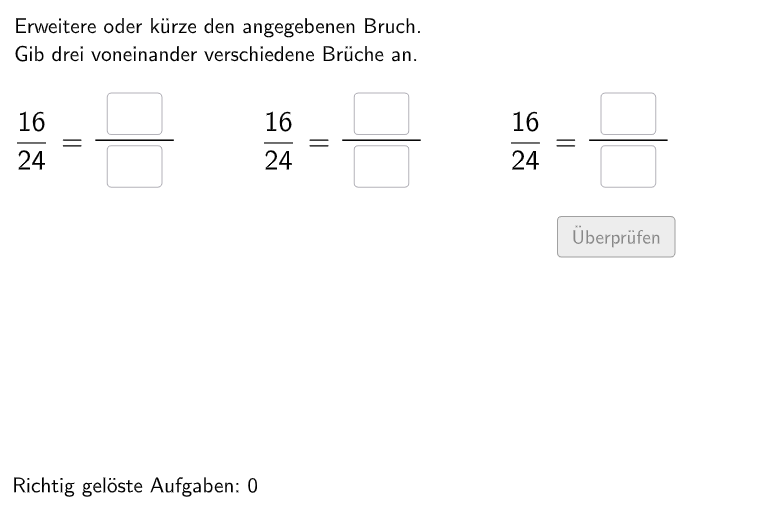
本范例是一个交互式分数运算练习,旨在帮助学生掌握分数的扩展(Erweitern)和简化(Kürzen)操作。范例通过随机生成扩展因子和分数题目,让学生直接在可视化界面中输入分子和分母进行练习。构造上使用了Shuffle命令随机排列题目顺序,Textfield和InputBox创建输入界面,Polygon和Segment绘制分数可视化图形,Corner确定图形位置,还使用了CircleArc和Vector辅助构图。整个练习包含多组随机分数题目,通过InputBox接收学生答案并即时反馈正确性。适合德国5-6年级(Schulstufe 5-6)学生使用,可用于课堂练习或课后巩固,训练学生的数感(number-sense)和分数运算能力。
GeoGebra 命令及参数
Shuffle(Sequence[Random[2, 10], i, 1, 100]) → randomNosForErweiterungsZahl, {4, 7, 8, 6, 6, 9, 10, 10, 10, 8, 5, 10, 2, 3, 7, 5, 7, 7, 4, 8, 3, 5, 3, 3, 9, 2, 2, 8, 5, 10, 7, 5, 10, 5, 9, 2, 5, 7, 9, 9, 8, 4, 8, 3, 6, 8, 5, 9, 3, 8, 7, 10, 2, 9, 2, 6, 5, 5, 4, 6, 8, 8, 3, 4, 8, 10, 4, 4, 2, 2, 7, 4, 7, 6, 6, 6, 2, 7, 4, 4, 7, 9, 2, 5, 4, 6, 2, 8, 3, 6, 5, 10, 4, 4, 9, 9, 2, 7, 9, 7}Element(randomNosForErweiterungsZahl, Mod[questionCount, 100] + 1) → erweiterungsZahlShuffle(Sequence[Random[2, 10], i, 1, 100]) → randomNosForX, {6, 8, 10, 6, 4, 8, 10, 8, 3, 3, 6, 8, 6, 2, 5, 10, 2, 10, 3, 4, 6, 7, 3, 5, 9, 7, 9, 7, 10, 3, 2, 8, 6, 7, 2, 3, 3, 8, 5, 5, 6, 8, 5, 8, 6, 9, 6, 8, 10, 6, 10, 2, 5, 5, 2, 6, 3, 7, 9, 9, 4, 8, 4, 2, 2, 4, 9, 5, 7, 2, 8, 5, 6, 8, 6, 8, 8, 7, 2, 8, 10, 9, 2, 3, 6, 10, 3, 5, 3, 10, 10, 2, 5, 2, 3, 10, 8, 3, 4, 4}Element(randomNosForX, Mod[questionCount, 100] + 1) → numXShuffle(Sequence[Random[1, numX - 1], i, 1, 100]) → randomNosForY, {1, 1, 2, 2, 2, 1, 1, 1, 2, 2, 2, 2, 2, 1, 2, 1, 2, 2, 1, 1, 1, 1, 2, 1, 2, 1, 1, 2, 2, 2, 1, 2, 1, 1, 2, 2, 1, 2, 2, 1, 2, 1, 1, 2, 2, 2, 1, 2, 2, 2, 1, 1, 1, 2, 2, 2, 1, 1, 1, 2, 2, 1, 1, 2, 2, 1, 2, 1, 2, 1, 1, 1, 2, 2, 1, 2, 1, 2, 2, 2, 2, 2, 1, 1, 1, 2, 2, 2, 1, 2, 2, 1, 2, 1, 2, 1, 1, 1, 2, 2}Element(randomNosForY, Mod[questionCount, 100] + 1) → numYTextfield(fInput) → InputBox6Textfield(eInput) → InputBox5Textfield(cInput) → InputBox3Textfield(dInput) → InputBox4Textfield(aInput) → InputBox1Textfield(bInput) → InputBox2Corner(frac1, 3) → Corner1Polygon(PtopLeftCornerFeedback, PtopRightCornerFeedback, PbottomRightCornerFeedback, PbottomLeftCornerFeedback) → rectangleCorrect, ptopleftcornerfeedback, ptoprightcornerfeedback, pbottomrightcornerfeedback, pbottomleftcornerfeedbackCorner(frac2, 3) → Corner2Corner(frac3, 3) → Corner3Segment(Corner1 + (-0.1, -0.6), Corner1 + (-0.2 + lengthFraction, -0.6)) → fSegment(Corner2 + (-0.1, -0.6), Corner2 + (-0.2 + lengthFraction, -0.6)) → gSegment(Corner3 + (-0.1, -0.6), Corner3 + (-0.2 + lengthFraction, -0.6)) → hDefined((((((aInput * bInput) * cInput) * dInput) * eInput) * fInput)) → fixedCircleArc(A, B, C) → cPoint(c) → DVector(D, E) → uCircleArc(F, G, H) → dPoint(d) → IVector(I, J) → vCircleArc(A_{1}, B_{1}, C_{1}) → c_{1}Point(c_{1}) → D_{1}Vector(D_{1}, E_{1}) → u_{1}CircleArc(F_{1}, G_{1}, H_{1}) → d_{1}Point(d_{1}) → I_{1}Vector(I_{1}, J_{1}) → v_{1}CircleArc(A_{2}, B_{2}, C_{2}) → c_{2}Point(c_{2}) → D_{2}Vector(D_{2}, E_{2}) → u_{2}CircleArc(F_{2}, G_{2}, H_{2}) → d_{2}Point(d_{2}) → I_{2}Vector(I_{2}, J_{2}) → v_{2}Polygon(PtopLeftCornerFeedback_{1}, PtopRightCornerFeedback_{1}, PbottomRightCornerFeedback_{1}, PbottomLeftCornerFeedback_{1}) → rectangleCorrect_{1}, ptopleftcornerfeedback_{1}, ptoprightcornerfeedback_{1}, pbottomrightcornerfeedback_{1}, pbottomleftcornerfeedback_{1}Polygon(PtopLeftCornerFeedback_{2}, PtopRightCornerFeedback_{2}, PbottomRightCornerFeedback_{2}, PbottomLeftCornerFeedback_{2}) → rectangleCorrect_{2}, ptopleftcornerfeedback_{2}, ptoprightcornerfeedback_{2}, pbottomrightcornerfeedback_{2}, pbottomleftcornerfeedback_{2}
AI 绘图提示语参考
创建一个交互式分数运算练习界面,包含随机生成的分数扩展和简化问题。界面有输入框供学生填写分子和分母,用多边形和线段可视化分数,通过随机排列的问题和即时反馈帮助学生练习分数运算,适合五、六年级学生使用。
以上提示语为根据原始绘图命令整理而来,仅供参考。