
二次方程根的图形解法
几何画板及绘图内容加载中,请稍等……
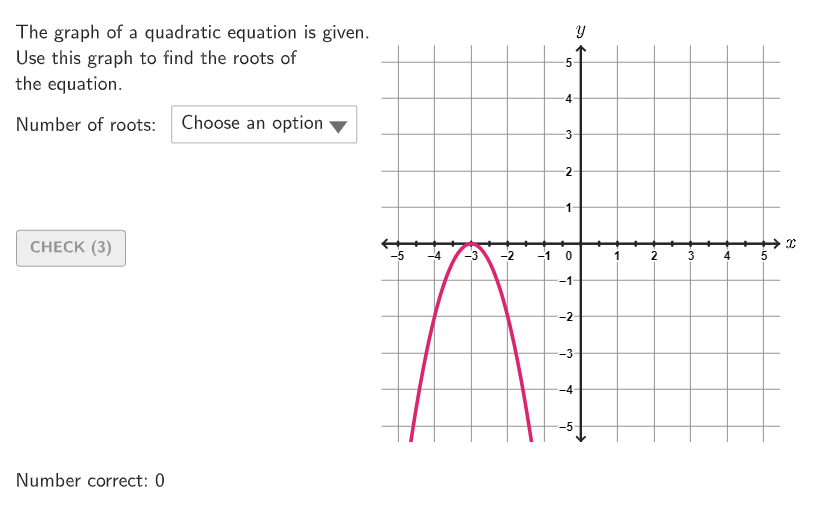
本活动演示如何通过绘制二次函数图像来找到其根。核心数学概念是二次方程的解与函数图像的交点关系。作图要点包括使用GeoGebra命令如Polynomial、Segment和PointToPixels来构造二次函数和坐标点。适合九至十二年级学生用于代数学习实践。
GeoGebra 命令及参数
Shuffle(Sequence[A / 100, A, 0, 100]) → allRandomSeeds, {0.26, 1, 0.33, 0.95, 0.89, 0.17, 0.14, 0.03, 0.92, 0.76, 0.56, 0.68, 0.11, 0.19, 0.22, 0, 0.13, 0.99, 0.07, 0.43, 0.74, 0.93, 0.12, 0.81, 0.59, 0.82, 0.94, 0.36, 0.6, 0.58, 0.4, 0.62, 0.7, 0.52, 0.38, 0.35, 0.29, 0.72, 0.9, 0.34, 0.91, 0.53, 0.46, 0.75, 0.18, 0.84, 0.61, 0.79, 0.23, 0.1, 0.16, 0.08, 0.88, 0.2, 0.25, 0.65, 0.67, 0.86, 0.45, 0.98, 0.5, 0.66, 0.39, 0.42, 0.78, 0.28, 0.32, 0.05, 0.8, 0.73, 0.55, 0.41, 0.69, 0.04, 0.37, 0.97, 0.71, 0.24, 0.01, 0.54, 0.85, 0.49, 0.63, 0.09, 0.77, 0.48, 0.3, 0.44, 0.47, 0.64, 0.21, 0.51, 0.31, 0.15, 0.02, 0.06, 0.27, 0.87, 0.83, 0.57, 0.96}Take(allRandomSeeds, randIndex, randIndex + numRandoms - 1) → currentRandomSeedsIf(currentRandomSeeds(3) ≤ 0.2, 0, If[currentRandomSeeds(3) ≤ 0.6, 1, 2]) → NumOfSolsIf(-4 + floor((currentRandomSeeds(2) * 8)) ≠ 0, -4 + floor((currentRandomSeeds(2) * 8)), 1) → yVKeepIf(abs(x) ≥ abs(yV) / (5 - abs(xV))^(2), Sequence[-5, 5] \ {0}) → coeffsAElement(coeffsA, Mod[floor((currentRandomSeeds(3) * 10)), Length[coeffsA]] + 1) → coeffASequence(xA + (0.5 * ii), ii, 1, Min[10 - (2 * xA), 6]) → xBPos, {-2.5, -2, -1.5, -1, -0.5, 0}Element(xBPos, xBind) → xBKeepIf(abs(x) ≤ 20 / (xB - xA)^(2), Sequence[-4, 4, If[Mod[Denominator[(xA * xB)], 2] ≟ 0 ∨ Mod[Denominator[xA + xB], 2] ≟ 0, 2, 1]] \ {0}) → coeffsA2Element(coeffsA2, Mod[floor((currentRandomSeeds(3) * 10)), Length[coeffsA2]] + 1) → coeffA2Zip((("$\textsf{" * tt) * " }$"), tt, options) → menuSelectedIndex(menu) → selectedOptionPolynomial(Element[{g0, g1, g2}, NumOfSols + 1]) → gRemoveUndefined({Root[g]}) → solsIf(Length[sols] ≥ 2, (abs(input2 - x(sols(1))) ≤ 0.1 ∨ abs(input2 - x(sols(2))) ≤ 0.1) ∧ input2 ≠ input1, ¬Defined[input2]) → correct3If(Length[sols] ≥ 1, abs(input1 - x(sols(1))) ≤ 0.1 ∨ abs(input1 - x(sols(2))) ≤ 0.1, ¬Defined[input1]) → correct2Take({selectedOption, input1, input2}, 1, selectedOption - 1) → inputCurrentTextfield(input1) → InputBox1Textfield(input2) → InputBox2Corner(5) → layoutAppSizesectorPixels(A, B, C, haloPixels + 40, Corner[1], Corner[3], Corner[5]) → pulsingObjectsectorPixels(A, B, C, 40, Corner[1], Corner[3], Corner[5]) → displayAnglePointToPixels(Corner[onboardingDisplayText, 2], Corner[1], Corner[3], Corner[5]) → layoutOnboardingonboardingTextOffset(Corner[onboardingText, 1], Corner[onboardingText, 3], onboardingCase, Corner[1], Corner[3], Corner[5]) → OnboardingTextOffsetPolygon({(-5.5, -5.5), (5.5, -5.5), (5.5, 5.5), (-5.5, 5.5)}) → q1LaTeX(g, true, true) → text1Segment((-5.42, 0), (5.415, 0)) → hSegment((0, -5.42), (0, 5.42)) → iText("\math{x}", (5.75, 0.075), true, true, 0, 0) → labelxText("\math{y}", (0, 5.9), true, true, 0, 0) → labelyTranslate(p, Vector[(Vector[Corner[1], Corner[4]] / 500 * 16)]) → p'Element({348, 282, 284, 300}, selectedOption) → xFB1Text(sols(2), sols(2), true, true, 1, If[If[NumOfSols ≟ 2, coeffA2 ≥ 0, coeffA ≥ 0], -1, 1]) → label2Text(sols(1), sols(1), true, true, If[NumOfSols ≟ 1, 0, -1], If[If[NumOfSols ≟ 2, coeffA2 ≥ 0, coeffA ≥ 0], -1, 1]) → label1Sequence(Segment[(ii, -0.05), (ii, 0.05)], ii, -5, 5, 0.5) → l1
AI 绘图提示语参考
绘制一个二次函数的图像,并找到其根。首先画出x和y轴,然后画一个开口向上的抛物线,确保它与x轴有两个交点。在抛物线与x轴的交点处标注根的值。
以上提示语为根据原始绘图命令整理而来,仅供参考。