
扩展给定的分母
几何画板及绘图内容加载中,请稍等……
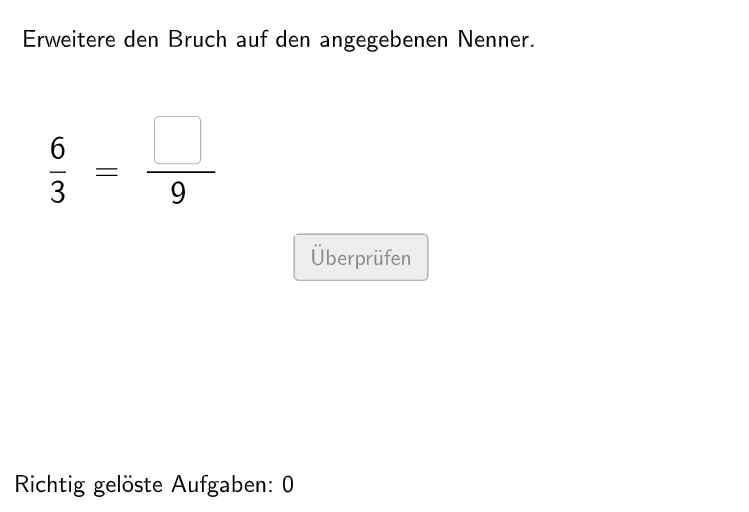
这个 GeoGebra 范例演示了如何扩展给定的分母。它涉及的核心数学概念是分数的扩展和简化。作图要点包括使用 Shuffle、Element、RandomElement 等 GeoGebra 命令/对象。这个范例适合 5-6 年级学生使用,帮助他们理解和操作分数的概念。
GeoGebra 命令及参数
Shuffle(Sequence[Random[1, 8], i, 1, 100]) → selectedNum, {5, 3, 1, 3, 3, 8, 2, 3, 3, 3, 6, 7, 4, 7, 4, 4, 2, 6, 4, 4, 4, 8, 1, 4, 2, 1, 8, 7, 7, 6, 2, 6, 7, 5, 3, 1, 7, 5, 3, 8, 1, 7, 8, 8, 3, 7, 2, 7, 2, 6, 2, 1, 4, 6, 8, 5, 2, 6, 5, 6, 3, 7, 5, 5, 7, 2, 5, 5, 3, 4, 6, 6, 5, 1, 3, 3, 4, 5, 6, 2, 1, 5, 8, 3, 1, 4, 5, 3, 3, 1, 6, 8, 1, 3, 2, 4, 8, 3, 8, 6}Element(selectedNum, Mod[questionCount, 100] + 1) → numCountShuffle(Sequence[Random[1, 10], i, 1, 100]) → randomNosForX, {10, 6, 6, 1, 8, 2, 7, 9, 1, 5, 1, 1, 2, 1, 9, 7, 2, 10, 6, 4, 4, 9, 1, 9, 4, 8, 6, 10, 6, 1, 1, 8, 1, 7, 9, 7, 4, 7, 5, 8, 4, 1, 6, 8, 6, 4, 10, 1, 4, 10, 9, 1, 10, 3, 9, 6, 5, 7, 9, 1, 9, 9, 9, 3, 10, 3, 7, 7, 9, 4, 10, 4, 5, 7, 8, 8, 1, 4, 4, 2, 8, 9, 9, 8, 7, 9, 2, 1, 4, 7, 5, 10, 5, 2, 8, 1, 6, 9, 3, 3}Element(randomNosForX, Mod[questionCount, 100] + 1) → gleichNumRandomElement(l8) → num8RandomElement(l6) → num6RandomElement(l10) → num10RandomElement(l12) → num12RandomElement(l15) → num15RandomElement(l18) → num18RandomElement(l24) → num24If(gleichNum ≟ nums(numCount), Element[randomNosForX, Mod[questionCount, 100] + 1] + 1, Element[randomNosForX, Mod[questionCount, 100] + 1]) → numXTextfield(aInput) → InputBox1Textfield(bInput) → InputBox2Polygon(PtopLeftCornerFeedback, PtopRightCornerFeedback, PbottomRightCornerFeedback, PbottomLeftCornerFeedback) → rectangleCorrect, ptopleftcornerfeedback, ptoprightcornerfeedback, pbottomrightcornerfeedback, pbottomleftcornerfeedbackDefined(aInput) → fixedSegment(A, B) → fPolygon(PtopLeftCornerFeedback_{1}, PtopRightCornerFeedback_{1}, PbottomRightCornerFeedback_{1}, PbottomLeftCornerFeedback_{1}) → rectangleCorrect_{1}, ptopleftcornerfeedback_{1}, ptoprightcornerfeedback_{1}, pbottomrightcornerfeedback_{1}, pbottomleftcornerfeedback_{1}CircleArc(C, D, E) → cCircleArc(F, G, H) → dPoint(c) → IVector(I, J) → uPoint(d) → KVector(K, L) → vCircleArc(M, N, O) → eCircleArc(P, Q, R) → gPoint(e) → SVector(S, T) → wPoint(g) → UVector(U, V) → a
AI 绘图提示语参考
在平面上先设置两个可编辑的分数输入框(分别对应 a 与 b),随后在画面中生成一个矩形,并在矩形内部按分数延伸的思路放置两条相互平行的水平分割线与若干圆弧辅助元素。用圆弧确定两个关键位置并各自取其端点作为点,再把端点连成对应方向的向量,形成用于“扩展给定分母/分数”的几何引导。整体按先矩形、后圆弧与端点、再由端点生成向量方向的顺序构造。
以上提示语为根据原始绘图命令整理而来,仅供参考。