
用科学记数法表示数字
几何画板及绘图内容加载中,请稍等……
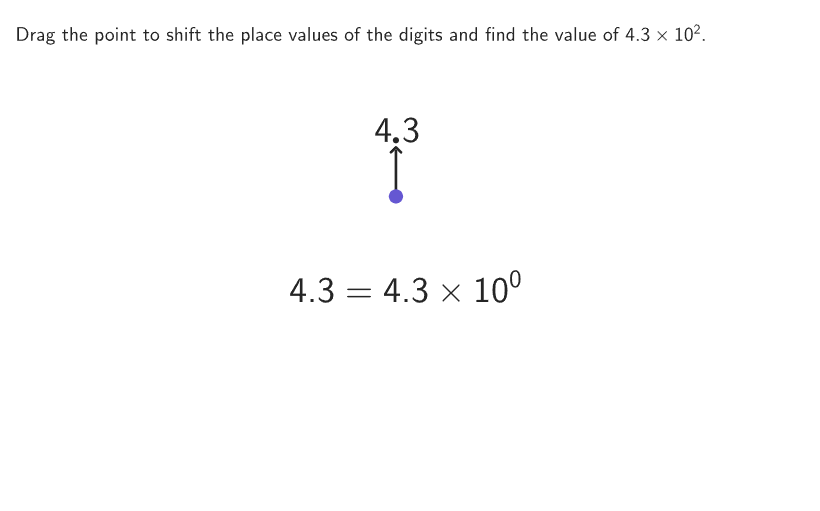
本范例演示如何将标准记数法转换为科学记数法,反之亦然。涉及的核心数学概念包括科学记数法的格式、系数要求以及指数的意义。作图要点使用了GeoGebra命令如Shuffle, Sequence, Point, IndexOf, If等来生成和操作数字。适合6-8年级学生学习科学记数法的应用和转换技巧。
GeoGebra 命令及参数
Shuffle(Sequence[100]) → random1, {5, 90, 22, 15, 25, 60, 55, 65, 83, 86, 80, 46, 8, 82, 6, 56, 84, 24, 85, 18, 93, 17, 40, 52, 74, 71, 95, 88, 20, 38, 23, 97, 58, 68, 89, 1, 14, 9, 64, 100, 48, 67, 62, 54, 81, 77, 10, 2, 45, 73, 12, 27, 75, 42, 30, 57, 11, 37, 87, 79, 19, 94, 39, 29, 43, 49, 61, 34, 96, 72, 66, 33, 3, 91, 47, 16, 32, 69, 44, 26, 53, 35, 4, 51, 76, 13, 92, 31, 63, 7, 36, 70, 99, 78, 98, 21, 50, 59, 28, 41}Shuffle(Sequence[100]) → random3, {24, 67, 3, 38, 10, 4, 60, 55, 78, 90, 50, 75, 17, 46, 36, 63, 1, 95, 98, 56, 70, 65, 54, 33, 74, 79, 94, 88, 45, 89, 40, 26, 34, 77, 18, 86, 61, 48, 85, 62, 99, 64, 91, 9, 43, 15, 39, 84, 35, 87, 82, 49, 100, 23, 58, 27, 96, 6, 52, 53, 21, 13, 92, 57, 11, 73, 41, 42, 28, 80, 2, 47, 29, 68, 93, 97, 44, 19, 59, 72, 32, 81, 7, 31, 37, 12, 22, 5, 25, 83, 14, 69, 16, 20, 51, 76, 71, 66, 30, 8}Shuffle(Sequence[100]) → random2, {39, 32, 22, 50, 42, 41, 31, 68, 25, 81, 33, 6, 56, 63, 7, 8, 51, 61, 100, 70, 74, 5, 9, 20, 46, 58, 94, 71, 53, 76, 12, 91, 21, 92, 27, 3, 2, 97, 55, 54, 35, 66, 29, 26, 86, 52, 73, 30, 78, 93, 96, 37, 16, 82, 49, 65, 64, 45, 60, 23, 84, 19, 62, 83, 95, 43, 99, 79, 75, 17, 38, 10, 24, 59, 69, 40, 77, 15, 4, 90, 85, 13, 98, 89, 72, 1, 14, 88, 48, 28, 36, 67, 34, 87, 44, 47, 80, 11, 18, 57}Sequence(Anchor + ((A * boxWidth) + (1.3 * gap), (-vGap)), A, 2, maxPositions) → pointAnchorsPoint(pointAnchors) → PDecimalIndexOf(PDecimal, pointAnchors) → decimalIndexIf(decimalIndex ≟ 10, (("\textcolor{" * colorGreyMedium) * "}{0}"), If[decimalIndex > 10, "0", ""]) → labelKIf(decimalIndex ≟ 9, (("\textcolor{" * colorGreyMedium) * "}{0}"), If[decimalIndex > 9, "0", ""]) → labelJElement(random3, Mod[countQuestion, Length[random3]] + 1) → randomNum3If(numSignificant > 2, Mod[randomNum3, 9] + 1, 0) → significant3Element(random1, Mod[countQuestion, Length[random1]] + 1) → randomNum1Element(random2, Mod[countQuestion, Length[random2]] + 1) → randomNum2If(numSignificant > 1, Mod[randomNum2, 9] + 1, 0) → significant2If(decimalIndex ≟ 8, (("\textcolor{" * colorGreyMedium) * "}{0}"), If[decimalIndex > 8, "0", ""]) → labelIIf(significant3 > 0, ("" * significant3), If[decimalIndex ≟ 7, (("\textcolor{" * colorGreyMedium) * "}{0}"), If[decimalIndex > 7, "0", ""]]) → labelHIf(significant2 > 0, ("" * significant2), If[decimalIndex ≟ 6, (("\textcolor{" * colorGreyMedium) * "}{0}"), If[decimalIndex > 6, "0", ""]]) → labelGIf(decimalIndex ≤ 5, "0", "") → labelEIf(decimalIndex ≤ 4, "0", "") → labelDIf(decimalIndex ≤ 3, "0", "") → labelCIf(decimalIndex ≤ 2, "0", "") → labelBIf(decimalIndex ≟ 1, "0", "") → labelAShuffle({-1, -2, -3, -4, -5, 1, 2, 3, 4, 5}) → randPowers, {2, -2, -3, -1, -4, 4, 5, 3, -5, 1}Element(randPowers, Mod[countQuestion, Length[randPowers]] + 1) → randomPowerCorner(5) → layoutAppSizeIf(correct, {0, 103 / 255, 88 / 255}, {101 / 255, 87 / 255, 210 / 255}) → rgbDecimalIf(correct, {0, 103 / 255, 88 / 255}, {37 / 255, 37 / 255, 37 / 255}) → rgbNumbersIf(decimalIndex ≟ 12, (("\textcolor{" * colorGreyMedium) * "}{0}"), If[decimalIndex > 12, "0", ""]) → labelMIf(decimalIndex ≟ 11, (("\textcolor{" * colorGreyMedium) * "}{0}"), If[decimalIndex > 11, "0", ""]) → labelLSequence(Anchor + (If[A ≤ decimalIndex, (A * boxWidth), (A * boxWidth) + gap], 0), A, 1, maxPositions) → textAnchorsTableText({studentExpr}, {"\hspace{800px}"}, "c") → centerExprZip(Text[("" * A), B + (boxWidth - gap / 2, 0), false, true, 0, 0], A, labelContent, B, textAnchors) → allLabelsSegment(PDecimal, PDecimal + (0, vGap - 0.3)) → arrowDecimalcirclePixels(PDecimal, 7 + (7 * pulsing), Corner[1], Corner[3], Corner[5]) → pulsingPoint
AI 绘图提示语参考
图形是一个科学记数法转换界面,包含多个数字点,每个数字点旁边有标签,标签显示小数点和指数。界面中有箭头指向数字点,以及一个脉冲点表示动态效果。数字点通过随机数生成,标签根据数字的指数和小数点位置生成。构造顺序:先生成随机数序列,然后生成数字点,再生成标签,最后添加箭头和脉冲点。
以上提示语为根据原始绘图命令整理而来,仅供参考。