
探索方程解的个数
几何画板及绘图内容加载中,请稍等……
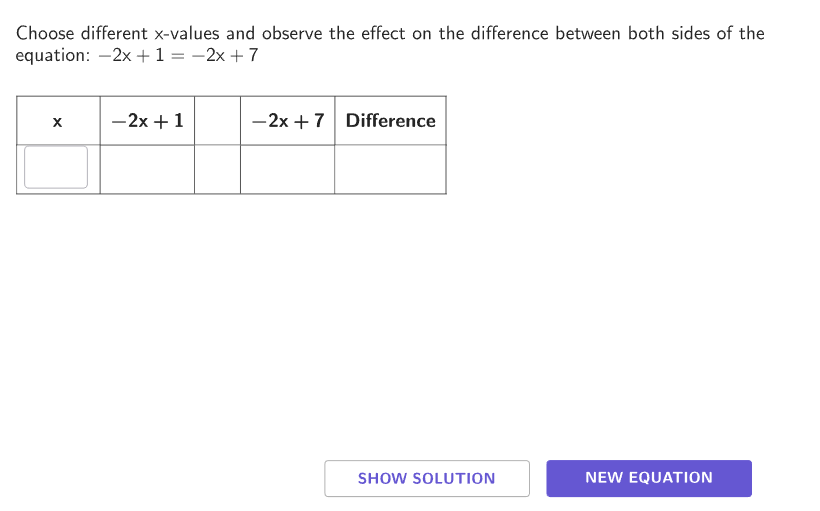
本范例通过互动活动,帮助学生探究线性方程在何种情况下有0个、1个或无限多个解。涉及的核心数学概念包括线性方程的性质和解的判定。作图要点使用了GeoGebra命令如Shuffle, Join, Element, If等,通过滑块和选择项让学生直观感受不同系数对解的影响。适合6-8年级学生,用于理解方程解的多样性。
GeoGebra 命令及参数
Shuffle(Sequence[-5, 5]) → sols, {2, -1, -2, -4, 3, 1, 5, 0, 4, -3, -5}Shuffle(Flatten[Sequence[Sequence[3], kk, 1, 10]]) → solutions, {2, 1, 1, 3, 3, 3, 2, 2, 3, 2, 2, 1, 3, 1, 3, 2, 3, 1, 2, 1, 1, 2, 1, 3, 3, 1, 2, 1, 2, 3}Join({{1 / 2, 1 / 5, 2 / 5}, (-1 * {1 / 2, 1 / 5, 2 / 5})}) → allowedFractionsShuffle(Flatten[{Sequence[-10, 10] \ {0}, allowedFractions}]) → bNums, {1, 2, -7, 5, -9, 10, 9, -6, 4, 0.4, -1, 0.2, -5, 8, 3, -0.4, -0.5, 6, -0.2, 0.5, -4, -8, 7, -2, -3, -10}Shuffle(Flatten[{Sequence[-10, 10] \ {0, 1}, allowedFractions}]) → aNums, {-2, -7, 4, 9, 0.4, 6, -5, 2, 0.2, 8, -6, 7, -3, -0.5, -0.4, -1, 0.5, 5, -0.2, -10, -4, 3, -8, 10, -9}Element(aNums, Mod[questionCount, Length[aNums]] + 1) → aShuffle(Flatten[{Sequence[-10, 10] \ {0, 1, a}, allowedFractions}]) → cNums, {3, -6, 6, -1, 0.2, -8, 7, -5, -9, -0.2, 5, -10, 0.4, 8, -3, -4, -0.4, 4, -0.5, 0.5, 2, 9, -7, 10}Element(sols, Mod[questionCount + 1, Length[sols]] + 1) → intElement(sols, Mod[questionCount, Length[sols]] + 1) → solElement(solutions, Mod[questionCount, Length[solutions]] + 1) → solutionsCurrentIf(solutionsCurrent ≠ 1, Element[bNums, Mod[questionCount, Length[bNums]] + 1], int - (a * sol)) → bShuffle(Flatten[{Sequence[-10, 10] \ {0, b}, allowedFractions}]) → dNums, {7, -1, 0.2, -6, 9, 0.4, 6, 3, -2, -5, -7, -3, 2, -8, 10, -9, -10, -4, -0.2, 4, -0.5, 8, 5, -0.4, 0.5}If(Length[xNumbers] ≥ maxAllowed, 1 + maxS - slide, 1) → minElement(cNums, Mod[questionCount, Length[cNums]] + 1) → c1If(solutionsCurrent ≟ 1, c1, a) → cElement(dNums, Mod[questionCount, Length[dNums]] + 1) → d1If(solutionsCurrent ≟ 3, b, solutionsCurrent ≟ 1, int - (c * sol), d1) → dIf(Length[xNumbers] ≟ 0, {}, Zip[g1(kk) - f1(kk), kk, xNumbers]) → DifNumerator(a - c) → numerDenominator(a - c) → denomIf(Length[xNumbers] ≤ maxAllowed, Length[xNumbers], min + maxAllowed - 1) → maxAppend("\vspace{15}\hspace{25}\bold{x}\hspace{15}\phantom{\frac{2}{5}}", If[Length[xNumbers] ≟ 0, {"\phantom{\frac{2}{5}}"}, Take[Append[Zip[(("\phantom{\frac{2}{5}}" * Text[ii]) * "\phantom{\frac{2}{5}}"), ii, xNumbers], "\phantom{\frac{2}{5}}"], min, max + 1]]) → colXZip((("$\textsf{" * tt) * " }$"), tt, {"Simple: \(ax+b = cx+d\)", "More complex: \(ax+b = c(x+d)\)", "Most complex: \(a(x+b) = c(x+d)\)"}) → optionsSelectedIndex(options) → caseNumIf(caseNum ≟ 3, left3, left12) → leftIf(caseNum ≟ 1, right1, right23) → rightIf(Length[xNumbers] ≟ 0, {}, Zip[f1(kk), kk, xNumbers]) → leftNumbersIf(Length[xNumbers] ≟ 0, {}, Zip[g1(kk), kk, xNumbers]) → rightNumbersIf(Length[xNumbers] ≟ 0, {"\hspace{50}"}, Zip[If[AA < BB, "<", AA > BB, ">", "="] + "\phantom{\frac{2}{5}}\hspace{-15}", AA, leftNumbers, BB, rightNumbers]) → ineqTextfield(xStudent) → InputBox1Append((("\bold{" * If[caseNum ≟ 3, left3, left12]) * "}"), If[Length[xNumbers] ≟ 0, {}, Take[Append[Zip[Text[ii], ii, leftNumbers, DD, Dif], "\hspace{50}"], min, max + 1]]) → colLeftAppend((("\bold{" * If[caseNum ≟ 1, right1, right23]) * "}"), If[Length[xNumbers] ≟ 0, {}, Take[Append[Zip[Text[ii], ii, rightNumbers, DD, Dif], "\hspace{50}"], min, max + 1]]) → colRightAppend("\hspace{25}", If[Length[xNumbers] ≟ 0, {}, Take[Append[Zip[ii, ii, ineq, DD, Dif], "\hspace{25}"], min, max + 1]]) → colMiddlePolygon(Zip[PixelsToPoint[Corner[1], Corner[3], Corner[5], CLIPBOARDmagicSTRINGA], CLIPBOARDmagicSTRINGA, {(pixelsLeft_{1}, pixelsTop_{1}), (pixelsLeft_{1}, y(Corner[5]) - pixelsBottom_{1}), Corner[5] - (pixelsRight_{1}, pixelsBottom_{1}), (x(Corner[5]) - pixelsRight_{1}, pixelsTop_{1})}]) → borderBox_{1}Append("\textsf\bold{Difference}", If[Length[xNumbers] ≟ 0, {}, Take[Append[Zip[Text[ii], ii, Dif], "\hspace{50}"], min, max + 1]]) → colDifZip((("$\textsf{" * TT) * " }$"), TT, {"\phantom{One solution}", "One solution", "No solution", "Infinite solutions"}) → AnswerIf(caseNum ≟ 3, left3, left12) → A1If(caseNum ≟ 1, right1, right23) → B1TableText(Take[solLeft, If[caseNum ≥ 2, 1, 2], If[solutionsCurrent ≟ 1, 5, 4]], Sequence["=", kk, 1, 3 + If[caseNum ≠ 1, 1, 0] + If[solutionsCurrent ≟ 1, 1, 0]], Take[solRight, If[caseNum ≥ 2, 1, 2], If[solutionsCurrent ≟ 1, 5, 4]], "vrcl") → solSimple2Sequence(142 + (ii * (189 - 142)), ii, 0, 5) → yIB, {142, 189, 236, 283, 330, 377}Textfield(xStudent) → InputBox2Textfield(xStudent) → InputBox3Textfield(xStudent) → InputBox4Textfield(xStudent) → InputBox5If(Defined[Element[colX, C1]], Element[colX, C1], "") → D1If(Defined[Element[colLeft, C1]], Element[colLeft, C1], "") → E1If(Defined[Element[colLeft, C2]], Element[colLeft, C2], "") → E2If(Defined[Element[colLeft, C3]], Element[colLeft, C3], "") → E3If(Defined[Element[colLeft, C4]], Element[colLeft, C4], "") → E4If(Defined[Element[colLeft, C5]], Element[colLeft, C5], "") → E5If(Defined[Element[colLeft, C6]], Element[colLeft, C6], "") → E6If(Defined[Element[colMiddle, C1]], Element[colMiddle, C1], "") → F1If(solutionsCurrent ≟ 3 ∧ Defined[Element[xNumbers, I2]], Element[colors, 1], If[solutionsCurrent ≟ 2 ∧ Defined[Element[xNumbers, I2]] ∨ J2 ≥ 10, Element[colors, 4], If[J2 ≥ 5, Element[colors, 3], If[J2 > 0, Element[colors, 2], If[J2 ≟ 0, Element[colors, 1], "white"]]]]) → K2If(solutionsCurrent ≟ 3 ∧ Defined[Element[xNumbers, I3]], Element[colors, 1], If[solutionsCurrent ≟ 2 ∧ Defined[Element[xNumbers, I3]] ∨ J3 ≥ 10, Element[colors, 4], If[J3 ≥ 5, Element[colors, 3], If[J3 > 0, Element[colors, 2], If[J3 ≟ 0, Element[colors, 1], "white"]]]]) → K3If(solutionsCurrent ≟ 3 ∧ Defined[Element[xNumbers, I4]], Element[colors, 1], If[solutionsCurrent ≟ 2 ∧ Defined[Element[xNumbers, I4]] ∨ J4 ≥ 10, Element[colors, 4], If[J4 ≥ 5, Element[colors, 3], If[J4 > 0, Element[colors, 2], If[J4 ≟ 0, Element[colors, 1], "white"]]]]) → K4If(solutionsCurrent ≟ 3 ∧ Defined[Element[xNumbers, I5]], Element[colors, 1], If[solutionsCurrent ≟ 2 ∧ Defined[Element[xNumbers, I5]] ∨ J5 ≥ 10, Element[colors, 4], If[J5 ≥ 5, Element[colors, 3], If[J5 > 0, Element[colors, 2], If[J5 ≟ 0, Element[colors, 1], "white"]]]]) → K5If(solutionsCurrent ≟ 3 ∧ Defined[Element[xNumbers, I6]], Element[colors, 1], If[solutionsCurrent ≟ 2 ∧ Defined[Element[xNumbers, I6]] ∨ J6 ≥ 10, Element[colors, 4], If[J6 ≥ 5, Element[colors, 3], If[J6 > 0, Element[colors, 2], If[J6 ≟ 0, Element[colors, 1], "white"]]]]) → K6If(Defined[Element[colRight, C1]], Element[colRight, C1], "") → G1If(Defined[Element[colDif, C1]], Element[colDif, C1], "") → H1If(Defined[Element[colRight, C2]], Element[colRight, C2], "") → G2If(Defined[Element[colRight, C3]], Element[colRight, C3], "") → G3If(Defined[Element[colRight, C4]], Element[colRight, C4], "") → G4If(Defined[Element[colRight, C5]], Element[colRight, C5], "") → G5If(Defined[Element[colRight, C6]], Element[colRight, C6], "") → G6TableText(Take[{{D1, E1, F1, G1, H1}, {D2, E2, F2, G2, H2}, {D3, E3, F3, G3, H3}, {D4, E4, F4, G4, H4}, {D5, E5, F5, G5, H5}, {D6, E6, F6, G6, H6}}, 1, Min[max + 2, 6]], "c|_lllll") → text2
AI 绘图提示语参考
该图形展示一个线性方程的解的探索。图中包含一个方程的表达式,可能以ax+b=cx+d的形式呈现。旁边列出可能的解的集合,包括整数和分数解。解的分类标签显示三种情况:唯一解、无解和无限解。构造顺序为:先绘制方程,然后生成解的列表,接着添加分类标签,最后根据解的数量显示相应的解类型。图形旨在帮助理解方程解的多样性。
以上提示语为根据原始绘图命令整理而来,仅供参考。