
分数相等还是不相等?分数扩展与简化练习
几何画板及绘图内容加载中,请稍等……
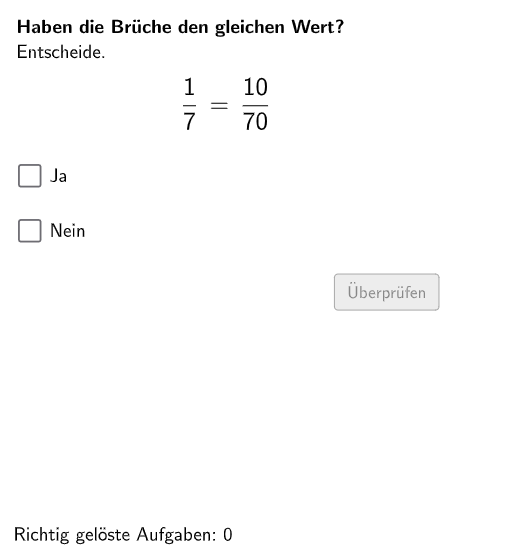
本范例是一个交互式分数相等性判断练习。学生在GeoGebra环境中随机生成两个分数,需要判断它们是否相等,并通过扩展或简化来验证答案。核心数学概念包括分数的扩展(分子分母同乘相同数)和简化(分子分母同除以公约数)。利用Shuffle、Element、If等命令实现随机题目生成和答案验证,结合Textfield文本框供学生输入答案。构造中使用了Polygon、CircleArc等图形元素进行可视化展示,适合5-6年级学生进行数感培养和分数运算练习,也可作为教师课堂教学的互动演示工具。
GeoGebra 命令及参数
Shuffle(Sequence[Random[2, 10], i, 1, 100]) → randomNosForNennerE, {4, 7, 2, 6, 9, 3, 7, 6, 5, 8, 3, 3, 7, 3, 6, 2, 8, 9, 10, 8, 7, 10, 8, 10, 7, 10, 2, 10, 7, 2, 3, 2, 6, 7, 9, 6, 5, 5, 5, 3, 10, 9, 7, 4, 2, 4, 9, 9, 7, 8, 9, 7, 8, 6, 7, 3, 9, 10, 5, 2, 2, 3, 7, 4, 3, 3, 2, 9, 3, 6, 8, 4, 3, 2, 8, 6, 9, 3, 8, 5, 9, 2, 3, 4, 6, 8, 8, 8, 9, 3, 8, 6, 2, 5, 6, 9, 4, 10, 6, 5}Element(randomNosForNennerE, Mod[questionCount, 100] + 1) → NennerEShuffle(Sequence[Random[1, NennerE - 1], i, 1, 100]) → randomNosForZaehlerE, {2, 1, 1, 5, 6, 5, 2, 3, 6, 4, 3, 6, 2, 6, 1, 3, 6, 4, 1, 3, 6, 1, 6, 5, 1, 3, 3, 2, 5, 6, 1, 6, 3, 6, 6, 2, 6, 4, 3, 3, 4, 1, 5, 5, 4, 4, 1, 3, 6, 5, 6, 3, 4, 3, 4, 2, 5, 3, 2, 5, 6, 5, 5, 5, 6, 4, 4, 6, 1, 6, 4, 1, 3, 3, 3, 1, 3, 6, 4, 2, 3, 1, 1, 3, 2, 5, 6, 5, 4, 2, 3, 3, 4, 2, 4, 6, 1, 6, 2, 2}Element(randomNosForZaehlerE, Mod[questionCount, 100] + 1) → ZaehlerEShuffle(Sequence[Random[2, 10], i, 1, 100]) → randomNosForErweiterungsZahl, {3, 10, 8, 10, 9, 4, 10, 2, 8, 3, 6, 8, 2, 5, 3, 9, 3, 3, 6, 2, 4, 10, 8, 7, 9, 10, 2, 4, 9, 9, 8, 2, 6, 8, 6, 8, 4, 8, 2, 8, 4, 7, 6, 9, 9, 5, 9, 10, 10, 5, 5, 6, 8, 4, 4, 3, 4, 4, 7, 7, 2, 3, 7, 5, 8, 8, 5, 6, 2, 5, 2, 8, 10, 7, 5, 2, 9, 9, 5, 8, 6, 4, 9, 4, 2, 5, 3, 10, 10, 3, 7, 2, 5, 3, 10, 3, 6, 7, 9, 5}Element(randomNosForErweiterungsZahl, Mod[questionCount, 100] + 1) → ErweiterungsZahlIf(Mod[NennerE, ErweiterungsZahl] ≟ 0 ∧ Mod[ZaehlerE, ErweiterungsZahl] ≟ 0, NennerE / ErweiterungsZahl, (NennerE * ErweiterungsZahl)) → nennerSShuffle(Sequence[Random[2, 30], i, 1, 100]) → randomNosForX, {7, 15, 3, 19, 18, 16, 11, 14, 3, 5, 23, 29, 24, 5, 19, 26, 30, 30, 7, 13, 30, 7, 6, 9, 13, 4, 3, 4, 14, 22, 24, 12, 13, 17, 4, 5, 19, 8, 13, 7, 5, 7, 12, 23, 25, 9, 27, 3, 24, 3, 24, 29, 14, 16, 22, 23, 7, 4, 21, 11, 5, 28, 25, 13, 27, 4, 29, 21, 21, 8, 2, 22, 10, 25, 21, 28, 20, 25, 18, 19, 27, 20, 3, 23, 28, 22, 2, 5, 4, 7, 30, 16, 28, 21, 3, 22, 30, 25, 8, 11}Shuffle(Sequence[Random[1, 4], i, 1, 100]) → Layout, {4, 1, 3, 1, 3, 1, 1, 1, 3, 4, 3, 1, 3, 2, 4, 3, 1, 1, 2, 4, 3, 1, 4, 4, 3, 2, 2, 2, 3, 2, 4, 4, 3, 1, 4, 3, 3, 4, 1, 3, 2, 3, 2, 1, 3, 3, 1, 3, 1, 2, 2, 2, 1, 1, 3, 3, 4, 3, 1, 3, 2, 3, 3, 1, 3, 3, 1, 3, 2, 2, 4, 1, 2, 1, 2, 3, 3, 3, 4, 4, 3, 1, 2, 1, 3, 1, 4, 4, 3, 1, 3, 1, 2, 2, 1, 3, 1, 4, 4, 1}Element(Layout, Mod[questionCount, 100] + 1) → layElement(randomNosForY, Mod[questionCount, 100] + 1) → numYIf(Mod[NennerE, ErweiterungsZahl] ≟ 0 ∧ Mod[ZaehlerE, ErweiterungsZahl] ≟ 0, ZaehlerE / ErweiterungsZahl, (ZaehlerE * ErweiterungsZahl)) → zaehlerSTextfield(aInput) → InputBox1Textfield(bInput) → InputBox2Polygon(PtopLeftCornerFeedback, PtopRightCornerFeedback, PbottomRightCornerFeedback, PbottomLeftCornerFeedback) → rectangleCorrect, ptopleftcornerfeedback, ptoprightcornerfeedback, pbottomrightcornerfeedback, pbottomleftcornerfeedbackPolygon(PtopLeftCornerFeedback_{2}, PtopRightCornerFeedback_{2}, PbottomRightCornerFeedback_{2}, PbottomLeftCornerFeedback_{2}) → rectangleCorrect_{2}, ptopleftcornerfeedback_{2}, ptoprightcornerfeedback_{2}, pbottomrightcornerfeedback_{2}, pbottomleftcornerfeedback_{2}If(bruchVerschieden, B, A) → SelectedPointCorner(text6, 3) → CornerText1Segment(C, D) → fDefined(aInput) → fixed2Polygon(PtopLeftCornerFeedback_{1}, PtopRightCornerFeedback_{1}, PbottomRightCornerFeedback_{1}, PbottomLeftCornerFeedback_{1}) → rectangleCorrect_{1}, ptopleftcornerfeedback_{1}, ptoprightcornerfeedback_{1}, pbottomrightcornerfeedback_{1}, pbottomleftcornerfeedback_{1}CircleArc(E, F, G) → cCircleArc(H, I, J) → dPoint(c) → KVector(K, L) → uPoint(d) → MVector(M, N) → vCircleArc(O, P, Q) → eCircleArc(R, S, T) → gPoint(e) → UVector(U, V) → wPoint(g) → WVector(W, Z) → aCircleArc(A_1, B_1, C_1) → hCircleArc(D_1, E_1, F_1) → kPoint(h) → G_1Vector(G_1, H_1) → bPoint(k) → I_1Vector(I_1, J_1) → i
AI 绘图提示语参考
绘制一个用于分数等值练习的交互式几何示意:先画出两个长方形区域的轮廓,用同样的四个角点形成一块矩形,并再在另一组四个角点处画出第二块矩形作为对照;在矩形旁用两段圆弧弧线形成成对的曲线结构,并在各弧线上取对应点,然后用从这些点出发的向量箭头方向标示出两条不同的运动/比较方向;再继续画出另外一组圆弧与点,最后用向量把它们连接起来形成清晰的对比引导,同时留出可输入的文本框以填写答案。
以上提示语为根据原始绘图命令整理而来,仅供参考。