
球面上的 Droz-Farny 线
几何画板及绘图内容加载中,请稍等……
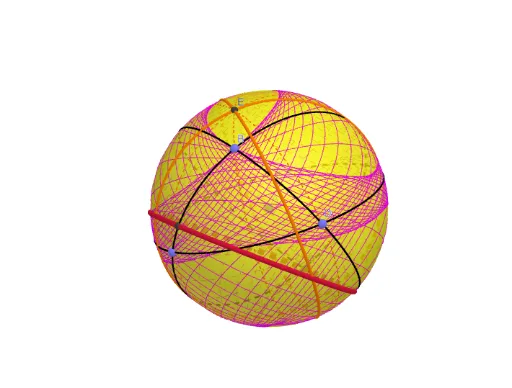
①本范例演示了球面上 Droz-Farny 线的构造与性质;②涉及的核心数学概念包括球面几何、对称性、重心、几何作图;③作图要点提炼自 GeoGebra 命令:使用 Sphere 创建球体,PointIn 确定点位置,Plane 创建平面,IntersectPath 求交点,OrthogonalLine 作垂线,Intersect 求交点,Line 创建直线,Circle 创建圆,Point 创建点,Rotate 进行旋转,Midpoint 求中点,Sequence 创建序列;④适合高中及以上学生及数学爱好者学习球面几何与几何作图。
GeoGebra 命令及参数
Sphere(A, 1) → aPointIn(a) → BPointIn(a) → CPointIn(a) → DPlane(A, B, C) → bPlane(A, B, D) → cPlane(A, C, D) → dIntersectPath(b, a) → eIntersectPath(c, a) → fIntersectPath(d, a) → gOrthogonalLine(A, c) → iOrthogonalLine(A, b) → jPlane(C, i) → kIntersectPath(k, a) → qPlane(D, j) → mIntersectPath(m, a) → rOrthogonalLine(A, d) → hPlane(B, h) → lIntersectPath(l, a) → pIntersect(r, p, 1) → ELine(A, E) → nCircle(E, 1, n) → sPoint(s) → FRotate(F, π / 2, n) → F'Plane(F, n) → oPlane(F', n) → tIntersectPath(o, a) → c_1IntersectPath(t, a) → d_1Intersect(d_1, e, 1) → GIntersect(c_1, e, 2) → HIntersect(g, c_1, 1) → IIntersect(d_1, g, 2) → JMidpoint(G, H) → KMidpoint(I, J) → LLine(A, K) → f_1Line(L, A) → g_1Intersect(f_1, e, 1) → MIntersect(g_1, g, 2) → NIntersect(c_1, f, 2) → OIntersect(f, d_1, 2) → PMidpoint(O, P) → QLine(A, Q) → h_1Intersect(h_1, f, 1) → RCircle(M, N, R) → e_1Sequence(Tool1[A, B, C, D, Rotate[F, ((w * 2) * π / 72)]], w, 1, 72) → L_1
AI 绘图提示语参考
在单位球面上,取球心与球面上三个点,分别由球心与其中两点确定三个大圆。过球心作垂直于其中两个大圆所在平面的直线,并分别过球面上另一点作包含该直线的平面,与球面相交得到两个大圆。再过球心作垂直于第三个大圆所在平面的直线,过球面上剩余一点作包含该直线的平面,与球面相交得到第三个大圆。这三个新大圆与原大圆相交,得到若干交点,取其中两对交点的中点,连接球心与中点,与对应原大圆相交,得到三个点。以这三个点作圆,并让一个点在该圆上旋转,生成一系列轨迹。
以上提示语为根据原始绘图命令整理而来,仅供参考。