
通过分解确定立体几何体积
几何画板及绘图内容加载中,请稍等……
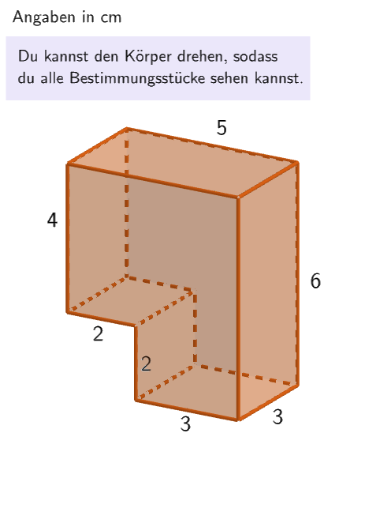
该范例演示了如何通过分解立体图形来计算其体积。核心数学概念包括体积计算、几何变换和空间几何。作图要点涉及使用GeoGebra命令如Translate、If、Element等进行图形构造和参数设置。适合中学几何学习或数学建模练习。
GeoGebra 命令及参数
Translate({Prism[Polygon[(-0.5, 1.5, -1), (-0.5, 1.5, -1) + (3, 0), (-0.5, 1.5, -1) + (3, -3), (-0.5, 1.5, -1) + (0, -3)], (-0.5, 1.5, 5)]}, Vector[(dx / 2 + 0.001, 0, 0)]) → object122HintSenkrecht1Translate({Prism[Polygon[(-0.5, 1.5), (-0.5, 1.5) + (3, 0), (-0.5, 1.5) + (3, 0, 2), (-0.5, 1.5) + (0, 0, 2)], (-0.5, -1.5)]}, Vector[(0, 0, ((-dz)) / 2 - 1)]) → object122HintWaagrecht1Translate({Prism[Polygon[(-2.5, 1.5, 1), (-2.5, 1.5, 1) + (5, 0), (-2.5, 1.5, 1) + (5, 0, 4), (-2.5, 1.5, 1) + (0, 0, 4)], (-2.5, -1.5, 1)]}, Vector[(dx, 0, dz / 2 + 0.001)]) → object122HintWaagrecht2Translate({Prism[Polygon[(-0.5, 1.5, 1), (-0.5, 1.5, 1) + (0, -3), (-0.5, 1.5, 1) + (-2, -3), (-0.5, 1.5, 1) + (-2, 0)], (-0.5, 1.5, 5)]}, Vector[(((-dx)) / 2, 0, 0)]) → object122HintSenkrecht2If(SelectedIndex[l1] ≟ 2, Volume[object122HintWaagrecht1(1)], Volume[object122HintSenkrecht1(1)]) → sol2If(SelectedIndex[l1] ≟ 2, Volume[object122HintWaagrecht2(1)], Volume[object122HintSenkrecht2(1)]) → sol1Element(randomQuestions, Mod[questionCount, Length[randomQuestions]] + 1) → randomQuestionElement(allQuestions, randomQuestion) → actualQuestionShuffle(Sequence[Element[actualQuestion, i], i, 2, numberOfAnswers + 1]) → actualAnswersShuffled, {?, ?, ?, ?, ?, ?}Element(actualAnswersShuffled, 3) → actualAnswer03Element(actualAnswersShuffled, 2) → actualAnswer02Element(actualAnswersShuffled, 1) → actualAnswer01Element(actualAnswersShuffled, 4) → actualAnswer04Element(actualAnswersShuffled, 5) → actualAnswer05Element(actualAnswersShuffled, 6) → actualAnswer06Element(actualAnswer06, 2) → chk06ExpectedElement(actualAnswer05, 2) → chk05ExpectedElement(actualAnswer04, 2) → chk04ExpectedElement(actualAnswer01, 2) → chk01ExpectedElement(actualAnswer02, 2) → chk02ExpectedElement(actualAnswer03, 2) → chk03ExpectedCone((0, 0, 2), (0, 0, 5), 1) → figur022kegel, figur012kegel_{2}, figur012kegel_{3}Cone(((-2.7755575615628914E-17), 0, 1), ((-2.7755575615628914E-17), 0, -3), 1.5) → figur031kegel, figur021kegel_{2}, figur021kegel_{3}Cone((0, 0, 1), (0, 0, 4), 2.5) → figur042kegel, figur032kegel_{2}, figur032kegel_{3}Cone((0, 0, 1), (0, 0, 5), 1.5) → figur062kegel, figur062kegel_{2}, figur062kegel_{3}Textfield(input1) → InputBox1LaTeX(randomQuestion, true, true) → text1Remove(l1, {SelectedElement[l1]}) → l2Textfield(input2) → InputBox2LaTeX(page, true, true) → text5Sum({attemptCountInputBox1, attemptCountInputBox2}) → attemptCountTextfield(input3) → InputBox3If(page ≟ 2, page2CheckboxChanged, page ≟ 7, SelectedIndex[l2] ≠ 1, true, page ≟ 3, dz ≥ 2 ∨ dx ≥ 2, page ≟ 4, correct, page ≟ 5, dz ≟ 0 ∧ dx ≟ 0, page ≟ 6, correctInputBox3) → fixedCornerThreeD(-1, 11) → viewActualSelectedIndex(l1Page8) → selectedIndexPage8SelectedIndex(l1) → a
AI 绘图提示语参考
绘制一个三维图形的分解体积计算示例,包含多个棱柱和圆锥体,通过平移变换组合成一个大体积,并标注计算体积的公式和关键步骤,展示几何变换和空间几何关系,适合教学演示。
以上提示语为根据原始绘图命令整理而来,仅供参考。