
三角形的旋转描述
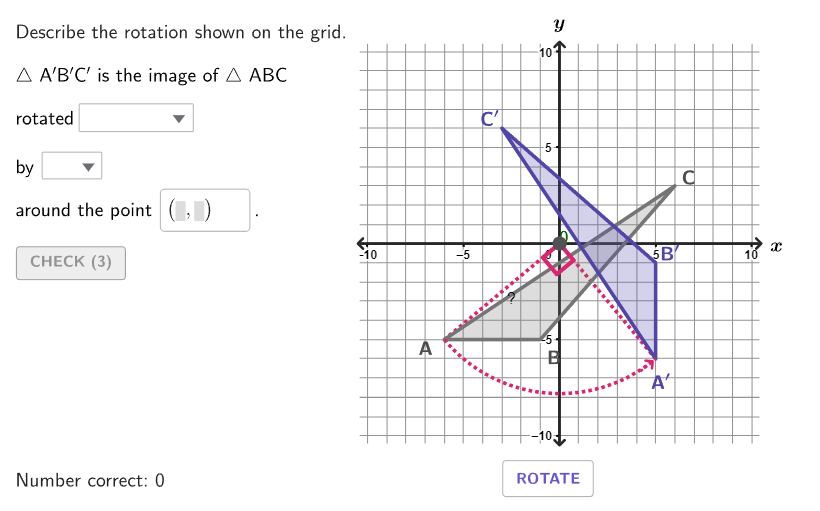
几何画板及绘图内容加载中,请稍等……
本范例演示如何在坐标平面上描述三角形的旋转。通过分析旋转的方向、角度和中心,学生可以理解刚性变换的概念。使用GeoGebra命令如Rotate、Angle、Textfield等进行构造。适合初中6-8年级学生学习几何变换。
GeoGebra 命令及参数
Shuffle(Sequence[100]) → randomList1, {47, 50, 61, 12, 35, 67, 94, 74, 76, 45, 98, 65, 25, 86, 19, 55, 85, 84, 93, 8, 26, 73, 52, 57, 75, 18, 69, 63, 37, 96, 88, 48, 1, 54, 62, 42, 17, 90, 6, 59, 39, 99, 77, 36, 16, 13, 23, 44, 71, 4, 43, 21, 70, 92, 32, 31, 80, 14, 79, 72, 38, 29, 100, 9, 5, 2, 28, 49, 78, 60, 24, 20, 95, 87, 15, 33, 68, 56, 91, 58, 53, 46, 22, 89, 30, 51, 3, 10, 64, 11, 97, 41, 34, 81, 82, 27, 40, 83, 7, 66}Shuffle(Sequence[100]) → randomList2, {12, 30, 39, 71, 65, 22, 63, 92, 44, 97, 76, 81, 55, 96, 58, 24, 26, 70, 91, 36, 15, 41, 48, 99, 68, 73, 50, 84, 18, 86, 13, 7, 11, 90, 85, 31, 93, 10, 37, 57, 33, 62, 88, 95, 17, 20, 78, 60, 3, 9, 43, 35, 79, 75, 2, 51, 87, 77, 59, 19, 34, 29, 16, 69, 32, 4, 46, 49, 5, 47, 25, 100, 94, 8, 40, 6, 28, 1, 82, 27, 23, 54, 66, 56, 42, 64, 21, 38, 83, 74, 98, 61, 67, 72, 80, 14, 45, 89, 52, 53}Zip((("$\text{" * A) * " }$"), A, {"\phantom{clockwise}", "clockwise", "counterclockwise"}) → selectDirectionZip((("$\text{" * A) * "}$"), A, {"\phantom{180}", "90^\circ ", "180^\circ", "270^\circ"}) → selectAngleElement(randomList2, Mod[countQuestion, Length[randomList2]] + 1) → randomNum2Element(randomList1, Mod[countQuestion, Length[randomList1]] + 1) → randomNum1Element({verticesCase1(indexCase1), verticesCase2(indexCase2), verticesCase3(indexCase3)}, caseNum) → currentVerticesFlatten(Sequence[Sequence[(i, j), i, -10, 10], j, -10, 10]) → gridPointsClosestPoint(gridPoints, TriangleCenter[currentVertices(1), currentVertices(2), currentVertices(3), 1]) → CenterCase2Element({(0, 0), CenterCase2, centersCase3(indexCase3)}, caseNum) → RotationPointZip(Distance[RotationPoint, A], A, currentVertices) → distanceToCenterIndexOf(Max[distanceToCenter], distanceToCenter) → whichIndexPolygon(Zip[PixelsToPoint[Corner[1], Corner[3], Corner[5], A], A, {(pixelsLeft, pixelsTop), (pixelsLeft, y(Corner[5]) - pixelsBottom), Corner[5] - (pixelsRight, pixelsBottom), (x(Corner[5]) - pixelsRight, pixelsTop)}]) → borderBoxCorner(5) → layoutAppSizePolygon({(-10.5, -10.5), (-10.5, 10.5), (10.5, 10.5), (10.5, -10.5)}) → viewboxZip(Vector[UnitVector[Vector[CenterCase2, A]]], A, currentVertices) → vLabelsPolygon(currentVertices) → triABCRotate(triABC, (slideRotate * rotateAngle°), RotationPoint) → rotationTriangleSequence(Vertex[rotationTriangle, A], A, 1, 3) → rotatedVerticesZip(Vector[Rotate[A, rotateDegrees°, RotationPoint]], Vector[A], vLabels) → vLabelsRotatedAngle(currentVertices(whichIndex), RotationPoint, rotatedVertices(whichIndex)) → showAngleCounterClockwiseAngle(rotatedVertices(whichIndex), RotationPoint, currentVertices(whichIndex)) → showAngleClockwiseTextfield(StudentCenter) → inputCenterZip(Text[("" * A), B + C, false, true, 0, 0], A, {"A", "B", "C"}, B, currentVertices, Vector[C], vLabels) → labelsABCSegment(rotatedVertices(whichIndex) + vArrow, rotatedVertices(whichIndex) + (0.2 * vArrow)) → directionArrowCircleArc(RotationPoint, If[¬clockwiseDirection, currentVertices(whichIndex), rotatedVertices(whichIndex) + (0.5 * vArrow)], If[¬clockwiseDirection, rotatedVertices(whichIndex), currentVertices(whichIndex) + (0.5 * vArrow)]) → displayRotationZip(Text[("" * If[B ≠ D, A, ""]), B + C, false, true, 0, 0], A, {"A^{\prime}", "B^{\prime}", "C^{\prime}"}, B, rotatedVertices, Vector[C], vLabelsRotated, D, currentVertices) → labelsABCPrimeSegment((-10.5, 0), (10.5, 0)) → axisSegmentXSegment((0, -10.5), (0, 10.5)) → axisSegmentYText("x", (11.3, 0), true, true, 0, 0) → lblXText("y", (0, 11.5), true, true, 0, 0) → lblYIf(correctDirection, check, cross) → feedbackDirectionIf(correctAngle, check, cross) → feedbackAngleIf(correctCenter, check, cross) → feedbackPoint
AI 绘图提示语参考
画一个包含两个三角形的图形。左侧是一个三角形,右侧是其旋转后的版本。旋转中心位于图形中央偏左的位置。两个三角形通过箭头和标签连接,箭头指示旋转方向,标签显示旋转角度和中心点。图形中还包含坐标轴和网格线,以帮助定位旋转中心和角度。整体布局清晰,适合展示三角形的旋转变换。
以上提示语为根据原始绘图命令整理而来,仅供参考。