
描述图形的水平与垂直平移
几何画板及绘图内容加载中,请稍等……
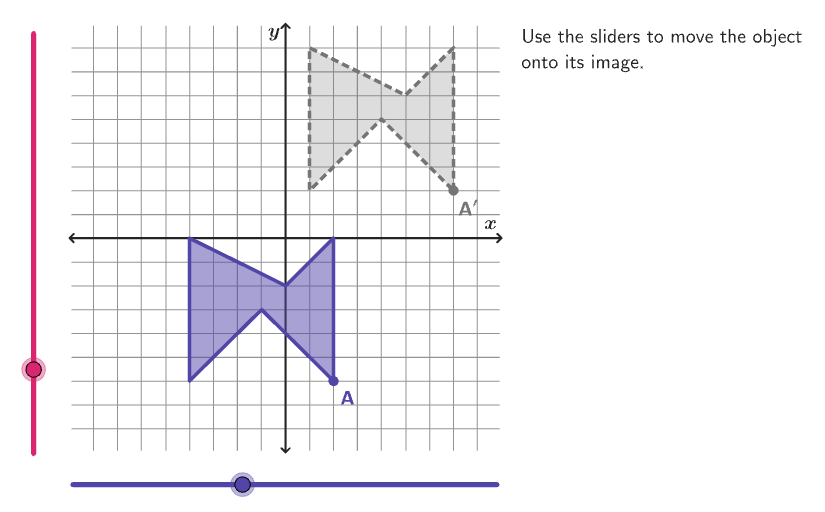
本范例演示如何在坐标系中水平与垂直平移图形。涉及的核心数学概念包括平移变换、坐标变换。作图要点——从下方『构造摘要』提炼用到了哪些 GeoGebra 命令/对象:Shuffle, Vector, Mod, Element, Translate, Rotate, Textfield, Polygon, Corner, Segment, Intersect, Text;对象:input2, listBasicVertices, randomList6, input1, vectorSt, listCenters, countQuestion, randomNum6, randomList2, randomNum2, randomList1, randomNum1, CenterPoint, radios, radiusFig, listCoordInitCenter, xInitCenter, randomList3, randomNum3, yInitCenter, vectorInitial, CenterPointPre, verticesPre, randomList4, randomNum4, yInitCenterImg, xInitCenterImg, CenterPointImg, xMax, yMin, randomList7, vectorTransl, randomList5, randomNum5, colorGreyDark, btnNew, InputBox1, correct, scriptResetApp, colorTealSuccess。适合的学段或用途:6-8年级,学习如何描述图形的平移变换。
GeoGebra 命令及参数
Shuffle(Sequence[15]) → randomList6, {1, 3, 14, 9, 7, 6, 15, 8, 4, 13, 10, 12, 5, 2, 11}Vector((input1, input2)) → vectorStMod(Element[randomList6, Mod[countQuestion, 15] + 1], 4) → randomNum6Shuffle(Sequence[15]) → randomList2, {3, 2, 14, 12, 7, 15, 6, 8, 4, 10, 9, 5, 13, 1, 11}Element(randomList2, Mod[countQuestion, 15] + 1) → randomNum2Shuffle(Sequence[20]) → randomList1, {4, 8, 14, 6, 9, 13, 2, 3, 1, 20, 17, 5, 15, 16, 10, 7, 11, 18, 12, 19}Element(listCoordInitCenter, Mod[randomNum2, Length[listCoordInitCenter]] + 1) → xInitCenterShuffle(Sequence[15]) → randomList3, {15, 5, 2, 7, 12, 14, 3, 1, 4, 13, 11, 10, 8, 6, 9}Element(randomList3, Mod[countQuestion, 15] + 1) → randomNum3Element(listCoordInitCenter, Mod[randomNum3, Length[listCoordInitCenter]] + 1) → yInitCenterVector(CenterPoint, (xInitCenter, yInitCenter)) → vectorInitialTranslate(CenterPoint, vectorInitial) → CenterPointPreRotate(Translate[listBasicVertices(randomNum1), vectorInitial], (90° * randomNum6), CenterPointPre) → verticesPreShuffle(Sequence[15]) → randomList4, {7, 5, 4, 6, 3, 9, 14, 13, 2, 11, 15, 12, 8, 1, 10}Element(randomList4, Mod[countQuestion, 15] + 1) → randomNum4Element(listCoordInitCenter \ Sequence[yInitCenter - 2, yInitCenter + 2], Mod[randomNum4, Length[listCoordInitCenter \ Sequence[yInitCenter - 2, yInitCenter + 2]]] + 1) → yInitCenterImgElement(listCoordInitCenter \ Sequence[xInitCenter - 2, xInitCenter + 2], Mod[randomNum4, Length[listCoordInitCenter \ Sequence[xInitCenter - 2, xInitCenter + 2]]] + 1) → xInitCenterImgShuffle(Sequence[15]) → randomList7, {10, 4, 1, 8, 14, 6, 5, 3, 11, 2, 13, 9, 12, 15, 7}Vector(CenterPointPre, CenterPointImg) → vectorTranslShuffle(Sequence[15]) → randomList5, {4, 2, 15, 7, 12, 14, 13, 6, 10, 11, 9, 8, 5, 3, 1}Element(randomList5, Mod[countQuestion, 15] + 1) → randomNum5Textfield(input1) → InputBox1Polygon(Zip[PixelsToPoint[Corner[1], Corner[3], Corner[5], A], A, {(pixelsLeft, pixelsTop), (pixelsLeft, y(Corner[5]) - pixelsBottom), Corner[5] - (pixelsRight, pixelsBottom), (x(Corner[5]) - pixelsRight, pixelsTop)}]) → borderBoxCorner(5) → layoutAppSizePolygon({(9, 9), (-9, 9), (-9, -9), (9, -9)}) → viewBoxSegment((-9, 0), (9, 0)) → axisXSegment((0, -9), (0, 9)) → axisYPolygon(verticesPre) → FigurePreTranslate(verticesPre, vectorTransl) → verticesImgPolygon(verticesImg) → FigureImgTranslate(verticesPre, vectorSt) → verticesStPolygon(verticesSt) → FigureStIntersect(Circle[CenterPointPre, Distance[CenterPointPre, A] + 0.8], Ray[CenterPointPre, A]) → posLblPointPre,Translate(posLblPointPre, vectorTransl) → posLblPointImgText("A", posLblPointPre, false, true, 0, 0) → lblAText("A^\prime", posLblPointImg, false, true, 0, 0) → lblA'
AI 绘图提示语参考
在直角坐标系中画一张初始平面图形,并在其上建立一个“刚体运动”的对照过程:先给定一组顶点形成多边形作为原图,标出坐标轴与画面边界视窗。再选取初始平移向量,把原图平移得到第一张图像。接着以旋转后的顶点集合为基础,再根据另一条由原图到目标位置的平移向量,构造第二次平移得到目标图像。最后在两次对应位置附近放置标记点,并写出点的符号标注为 A 与 A′,用以对应展示从原位置到移动后位置的关系。
以上提示语为根据原始绘图命令整理而来,仅供参考。