
长方体侧面积与表面积:用分割求和的自测建模
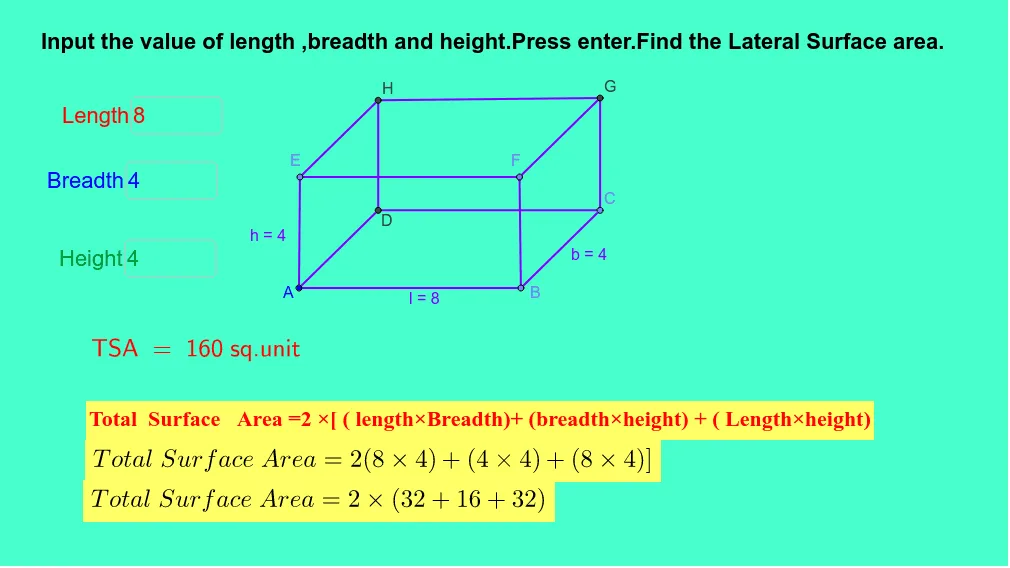
几何画板及绘图内容加载中,请稍等……
本范例演示如何用“把表面分成小块并求近似”的思想,构造并理解长方体的表面积与侧面积(可对应到上、下和或黎曼和的图形化直观)。核心数学概念包括立体几何中的长方体(长、宽、高)几何量、侧面积/总表面积计算,以及用分割求和建立积分直觉:将连续变化的面积用若干矩形/条带近似并累加,从而得到与真实面积一致的结果。作图要点:通过 Textfield 进行尺寸输入;使用 Point、Segment、Line 确定关键点与边界;用 Intersect 获取几何交点;利用 OrthogonalLine 构造与边界垂直的分割线或投影线条带;同时用诸如 l_1、h_1、b、h、lb、bh、lh、A、a_2、B、l、c_2、C、b、d、e、D、f、g、i、j、k、m、n_1、E、o、F 等对象来表示尺寸变量、构造出的分割条带与用于求和的组件;配合 inputBox1/2/3 及其分组变量 inputBox1_1…inputBox3_3,实现不同分割步数或维度参数的可视化自测。适合初高中衔接阶段、立体几何与微积分入门的课堂演示或课后练习,用于帮助学生把“面积=求和极限”的思想与长方体表面积建立联系。
GeoGebra 命令及参数
Textfield(l_1) → inputBox1Textfield(b_2) → inputBox2Textfield(h_1) → inputBox3Textfield(l_1) → inputBox1_1Textfield(b_2) → inputBox2_1Textfield(h_1) → inputBox3_1Textfield(l_1) → inputBox1_2Textfield(b_2) → inputBox2_2Textfield(h_1) → inputBox3_2Textfield(l_1) → inputBox1_3Textfield(b_2) → inputBox2_3Textfield(h_1) → inputBox3_3Point(Circle[A, abs(l_1)]) → BSegment(A, B) → lPoint(Circle[B, abs(b_2)]) → CSegment(B, C) → bLine(C, l) → dLine(A, b) → eIntersect(e, d) → DSegment(D, C) → fSegment(D, A) → gOrthogonalLine(A, l) → iOrthogonalLine(B, l) → jOrthogonalLine(D, f) → kOrthogonalLine(C, f) → mPoint(Circle[A, abs(h_1)]) → ESegment(A, E) → hPoint(Circle[B, abs(h_1)]) → FSegment(B, F) → pLine(E, g) → qLine(E, l) → rLine(F, b) → sIntersect(m, s) → GIntersect(q, k) → HSegment(H, G) → tSegment(F, G) → a_1Segment(E, H) → b_1Segment(C, G) → c_1Segment(H, D) → d_1Segment(E, F) → e_1Textfield(l_1) → inputBox1_4Textfield(b_2) → inputBox2_4Textfield(h_1) → inputBox3_4Textfield(l_1) → inputBox1_5Textfield(b_2) → inputBox2_5Textfield(h_1) → inputBox3_5Textfield(l_1) → inputBox1_6Textfield(b_2) → inputBox2_6Textfield(h_1) → inputBox3_6Textfield(l_1) → inputBox1_7Textfield(b_2) → inputBox2_7Textfield(h_1) → inputBox3_7Point(Circle[A_1, abs(l_1)]) → B_1Segment(A_1, B_1) → l_2Point(Circle[B_1, abs(b_2)]) → C_1Segment(B_1, C_1) → b_3Line(C_1, l_2) → d_2Line(A_1, b_3) → e_2OrthogonalLine(A_1, l_2) → i_1OrthogonalLine(B_1, l_2) → j_1Point(Circle[A_1, abs(h_1)]) → E_1Segment(A_1, E_1) → h_2Line(E_1, l_2) → r_1Textfield(l_1) → inputBox1_8Textfield(b_2) → inputBox2_8Textfield(h_1) → inputBox3_8Textfield(l_1) → inputBox1_9Textfield(b_2) → inputBox2_9Textfield(h_1) → inputBox3_9Textfield(l_1) → inputBox1_{10}Textfield(b_2) → inputBox2_{10}Textfield(h_1) → inputBox3_{10}Textfield(l_1) → inputBox1_{11}Textfield(b_2) → inputBox2_{11}Textfield(h_1) → inputBox3_{11}Point(Circle[A_2, abs(l_1)]) → B_2Segment(A_2, B_2) → l_3Point(Circle[B_2, abs(b_2)]) → C_2Segment(B_2, C_2) → b_4Line(C_2, l_3) → d_3Line(A_2, b_4) → e_3OrthogonalLine(A_2, l_3) → i_2OrthogonalLine(B_2, l_3) → j_2Point(Circle[A_2, abs(h_1)]) → E_2Segment(A_2, E_2) → h_3Line(E_2, l_3) → r_2Textfield(l_1) → inputBox1_{12}Textfield(b_2) → inputBox2_{12}Textfield(h_1) → inputBox3_{12}Textfield(l_1) → inputBox1_{13}Textfield(b_2) → inputBox2_{13}Textfield(h_1) → inputBox3_{13}Textfield(l_1) → inputBox1_{14}Textfield(b_2) → inputBox2_{14}Textfield(h_1) → inputBox3_{14}Textfield(l_1) → inputBox1_{15}Textfield(b_2) → inputBox2_{15}Textfield(h_1) → inputBox3_{15}Textfield(l_1) → inputBox1_{16}Textfield(b_2) → inputBox2_{16}Textfield(h_1) → inputBox3_{16}Textfield(l_1) → inputBox1_{17}Textfield(b_2) → inputBox2_{17}Textfield(h_1) → inputBox3_{17}Textfield(l_1) → inputBox1_{18}Textfield(b_2) → inputBox2_{18}Textfield(h_1) → inputBox3_{18}Textfield(l_1) → inputBox1_{19}Textfield(b_2) → inputBox2_{19}Textfield(h_1) → inputBox3_{19}Point(Circle[A_3, abs(l_1)]) → B_3Segment(A_3, B_3) → l_4Point(Circle[B_3, abs(b_2)]) → C_3Segment(B_3, C_3) → b_5Line(C_3, l_4) → d_4Line(A_3, b_5) → e_4OrthogonalLine(A_3, l_4) → i_3OrthogonalLine(B_3, l_4) → j_3Point(Circle[A_3, abs(h_1)]) → E_3Segment(A_3, E_3) → h_4Line(E_3, l_4) → r_3Textfield(l_1) → inputBox1_{20}Textfield(b_2) → inputBox2_{20}Textfield(h_1) → inputBox3_{20}Textfield(l_1) → inputBox1_{21}Textfield(b_2) → inputBox2_{21}Textfield(h_1) → inputBox3_{21}Textfield(l_1) → inputBox1_{22}Textfield(b_2) → inputBox2_{22}Textfield(h_1) → inputBox3_{22}Textfield(l_1) → inputBox1_{23}Textfield(b_2) → inputBox2_{23}Textfield(h_1) → inputBox3_{23}Textfield(l_1) → inputBox1_{24}Textfield(b_2) → inputBox2_{24}Textfield(h_1) → inputBox3_{24}Textfield(l_1) → inputBox1_{25}Textfield(b_2) → inputBox2_{25}Textfield(h_1) → inputBox3_{25}Textfield(l_1) → inputBox1_{26}Textfield(b_2) → inputBox2_{26}Textfield(h_1) → inputBox3_{26}Textfield(l_1) → inputBox1_{27}Textfield(b_2) → inputBox2_{27}Textfield(h_1) → inputBox3_{27}Textfield(l_1) → inputBox1_{28}Textfield(b_2) → inputBox2_{28}Textfield(h_1) → inputBox3_{28}Textfield(l_1) → inputBox1_{29}Textfield(b_2) → inputBox2_{29}Textfield(h_1) → inputBox3_{29}Textfield(l_1) → inputBox1_{30}Textfield(b_2) → inputBox2_{30}Textfield(h_1) → inputBox3_{30}Textfield(l_1) → inputBox1_{31}Textfield(b_2) → inputBox2_{31}Textfield(h_1) → inputBox3_{31}
AI 绘图提示语参考
绘制一个长方体,并使用小条分割其表面,计算每个小条的面积并累加,以估算长方体的表面积和侧面积。输入长、宽、高,根据输入值创建长方体的顶点和边,使用垂直线分割表面,计算每个小条的面积并累加,观察累加结果如何接近实际表面积。
以上提示语为根据原始绘图命令整理而来,仅供参考。