
交叉角与角度测量:通过补充角和邻补角计算角度
几何画板及绘图内容加载中,请稍等……
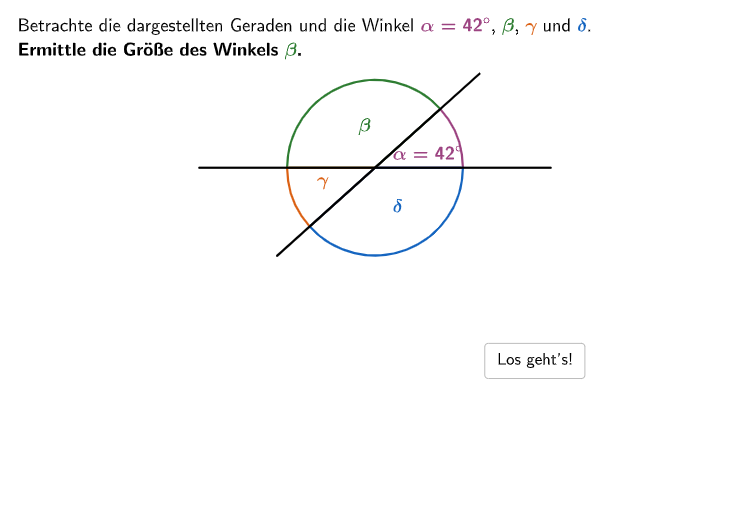
本范例演示如何通过补充角和邻补角的概念计算几何图形中的角度。核心数学概念包括角度分类(锐角、直角、钝角、直线角、平角、优角)和角度度量。作图要点涉及使用GeoGebra命令如Angle、Point、Segment等进行角度测量和计算。适合小学5-6年级学生,用于几何学习中的角度测量练习。
GeoGebra 命令及参数
Sequence(Random[1, 10], i, 1, 10) → randomNumbers, {3, 2, 9, 10, 7, 2, 4, 7, 9, 6}Element(randomNumbers, Mod[questionCount, Length[randomNumbers]] + 1) → randomNumberTextfield(input) → inputBoxAngle(Pos2, Pos1, Pos3) → alpha1Angle(Pos3, Pos1, Pos4) → beta1Angle(Pos4, Pos1, Pos5) → gamma1Angle(Pos5, Pos1, Pos2) → delta1Textfield(input21) → InputBox21Textfield(input22) → InputBox22SelectedIndex(dropdown31) → index31SelectedIndex(dropdown41) → index41SelectedIndex(dropdown51) → index51If(selecteda, index51 ≟ 4, index51 ≟ 3) → correctdd51TextToUnicode(Text[InputBox21]) → uni21TextToUnicode(Text[InputBox22]) → uni22Text(capa, Pos1 + (radius / 2 - 0.8, 0.4), false, true, 0, 0) → cap1Text(capb, Pos4 + (radius / 2 + 1.75, 1), false, true, 0, 0) → cap2Textfield(input31) → InputBox31TextToUnicode(Text[InputBox31]) → uni31Text(capc, Pos4 + (radius / 2 + 0.8, -0.3), false, true, 0, 0) → cap3Textfield(input41) → InputBox41TextToUnicode(Text[InputBox41]) → uni41Text(capd, Pos1 + (0.5, -0.8), false, true, 0, 0) → cap4Angle(Pos2, Pos1, Pos3) → alpha2Angle(Pos3, Pos1, Pos4) → beta2Angle(Pos4, Pos1, Pos5) → gamma2Angle(Pos5, Pos1, Pos2) → delta2Sequence(Pos61 + (2.25 * (cos((1° * k)), sin((1° * k)))), k, 0, 359) → PosList61Point(PosList61) → Pos62Sequence(Pos61 + (2.5 * (cos((1° * k)), sin((1° * k)))), k, 0, 359) → PosList62Point(PosList62) → Pos63If(IndexOf[Pos62, PosList61] ≟ 1, 360, IndexOf[Pos62, PosList61] - 1) → index621If(IndexOf[Pos61 - (Pos62 - Pos61), PosList61] ≟ 1, 360, IndexOf[Pos61 - (Pos62 - Pos61), PosList61] - 1) → index622If(IndexOf[Pos63, PosList62] ≟ 1, 360, IndexOf[Pos63, PosList62] - 1) → index631If(IndexOf[Pos61 - (Pos63 - Pos61), PosList62] ≟ 1, 360, IndexOf[Pos61 - (Pos63 - Pos61), PosList62] - 1) → index632Sort({index621, index622, index631, index632}) → IndexListAngle(Pos61 + (radius * UnitVector[Vector[Pos61, AnglePointList(3)]]), Pos61, Pos61 + (radius * UnitVector[Vector[Pos61, AnglePointList(4)]])) → delta3Angle(Pos61 + (radius * UnitVector[Vector[Pos61, AnglePointList(4)]]), Pos61, Pos61 + (radius * UnitVector[Vector[Pos61, AnglePointList(1)]])) → alpha3Angle(Pos61 + (radius * UnitVector[Vector[Pos61, AnglePointList(1)]]), Pos61, Pos61 + (radius * UnitVector[Vector[Pos61, AnglePointList(2)]])) → beta3Angle(Pos61 + (radius * UnitVector[Vector[Pos61, AnglePointList(2)]]), Pos61, Pos61 + (radius * UnitVector[Vector[Pos61, AnglePointList(3)]])) → gamma3SelectedIndex(dropdown61) → index61Textfield(input61) → InputBox61If(step ≟ 2, (11.5, 2.6), step ≟ 3, (11.75, 1.5), step ≟ 4, (0, 1.25), step ≟ 6, (-0.5, -0.35), (1, 1)) → PosBtnShowSolutionSegment(Pos1 + (Distance[Pos1, Pos62] * (cos(Angle[Pos1 + (1, 0), Pos1, Pos62] + arrowCircleDistance + arrowCircleAngle), sin(Angle[Pos1 + (1, 0), Pos1, Pos62] + arrowCircleDistance + arrowCircleAngle))), Pos1 + (Distance[Pos1, Pos62] * (cos(Angle[Pos1 + (1, 0), Pos1, Pos62] + arrowCircleDistance + arrowCircleAngle), sin(Angle[Pos1 + (1, 0), Pos1, Pos62] + arrowCircleDistance + arrowCircleAngle))) + (arrowCircleLength * UnitOrthogonalVector[Vector[Pos1, Pos1 + (Distance[Pos1, Pos62] * (cos(Angle[Pos1 + (1, 0), Pos1, Pos62] + arrowCircleDistance + arrowCircleAngle), sin(Angle[Pos1 + (1, 0), Pos1, Pos62] + arrowCircleDistance + arrowCircleAngle)))]])) → arrowCircleArrow621Segment(Pos1 + (Distance[Pos1, Pos63] * (cos(Angle[Pos1 + (1, 0), Pos1, Pos63] + arrowCircleDistance + arrowCircleAngle), sin(Angle[Pos1 + (1, 0), Pos1, Pos63] + arrowCircleDistance + arrowCircleAngle))), Pos1 + (Distance[Pos1, Pos63] * (cos(Angle[Pos1 + (1, 0), Pos1, Pos63] + arrowCircleDistance + arrowCircleAngle), sin(Angle[Pos1 + (1, 0), Pos1, Pos63] + arrowCircleDistance + arrowCircleAngle))) + (arrowCircleLength * UnitOrthogonalVector[Vector[Pos1, Pos1 + (Distance[Pos1, Pos63] * (cos(Angle[Pos1 + (1, 0), Pos1, Pos63] + arrowCircleDistance + arrowCircleAngle), sin(Angle[Pos1 + (1, 0), Pos1, Pos63] + arrowCircleDistance + arrowCircleAngle)))]])) → arrowCircleArrow631Segment(Pos1 + (Distance[Pos1, Pos62] * (cos(Angle[Pos1 + (1, 0), Pos1, Pos62] - arrowCircleDistance - arrowCircleAngle), sin(Angle[Pos1 + (1, 0), Pos1, Pos62] - arrowCircleDistance - arrowCircleAngle))), Pos1 + (Distance[Pos1, Pos62] * (cos(Angle[Pos1 + (1, 0), Pos1, Pos62] - arrowCircleDistance - arrowCircleAngle), sin(Angle[Pos1 + (1, 0), Pos1, Pos62] - arrowCircleDistance - arrowCircleAngle))) - (arrowCircleLength * UnitOrthogonalVector[Vector[Pos1, Pos1 + (Distance[Pos1, Pos62] * (cos(Angle[Pos1 + (1, 0), Pos1, Pos62] - arrowCircleDistance - arrowCircleAngle), sin(Angle[Pos1 + (1, 0), Pos1, Pos62] - arrowCircleDistance - arrowCircleAngle)))]])) → arrowCircleArrow622Segment(Pos1 + (Distance[Pos1, Pos63] * (cos(Angle[Pos1 + (1, 0), Pos1, Pos63] - arrowCircleDistance - arrowCircleAngle), sin(Angle[Pos1 + (1, 0), Pos1, Pos63] - arrowCircleDistance - arrowCircleAngle))), Pos1 + (Distance[Pos1, Pos63] * (cos(Angle[Pos1 + (1, 0), Pos1, Pos63] - arrowCircleDistance - arrowCircleAngle), sin(Angle[Pos1 + (1, 0), Pos1, Pos63] - arrowCircleDistance - arrowCircleAngle))) - (arrowCircleLength * UnitOrthogonalVector[Vector[Pos1, Pos1 + (Distance[Pos1, Pos63] * (cos(Angle[Pos1 + (1, 0), Pos1, Pos63] - arrowCircleDistance - arrowCircleAngle), sin(Angle[Pos1 + (1, 0), Pos1, Pos63] - arrowCircleDistance - arrowCircleAngle)))]])) → arrowCircleArrow632If(step ≟ 2, correct21 ∧ correct22, step ≟ 3, correctdd31 ∧ correct31 ∧ isCalculated31, step ≟ 4, correctdd41 ∧ correct41 ∧ isCalculated41, step ≟ 5, correctdd51, true) → clickableBtnNext
AI 绘图提示语参考
绘制一个由四条射线从公共顶点出发形成的交叉角图形,包含四个相邻角。每个角用弧线标出,并配有输入框和下拉菜单,用于填写或选择角度值。图形中显示角度分类(锐角、直角、钝角等)的标签,并带有箭头指示旋转方向。整体布局包含多个步骤的交互界面,用于逐步计算和验证角度关系。
以上提示语为根据原始绘图命令整理而来,仅供参考。