
用直方图可视化爆米花派对数据
几何画板及绘图内容加载中,请稍等……
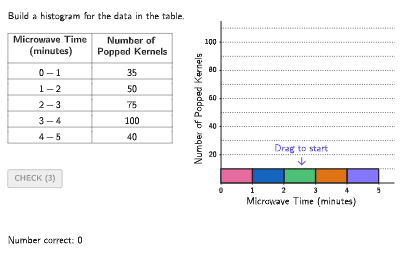
本范例演示如何根据爆米花派对的原始数据表格绘制直方图进行数据可视化。核心数学概念包括数据的分组整理、频数统计以及直方图的绘制规则(无间隙、条形宽度代表组距)。制作要点:利用GeoGebra的Bar系列对象(Bar1a_{1}至Bar5b_{1})绘制条形,通过input1-5接收用户输入的分组数据,使用TableText命令将原始数据以表格形式呈现,结合Sequence和Zip命令生成动态数据序列。范例还包含计时器(timer)和正确性判断(correct1-5)实现交互式练习。适合6-8年级学生练习数据组织与直方图解读技能。
GeoGebra 命令及参数
Sequence(Random[0, 99] / 100, A, 1, 200) → allRandomSeeds, {0.07, 0.62, 0.12, 0.7, 0.46, 0.58, 0.6, 0, 0.71, 0.76, 0.97, 0, 0.36, 0.22, 0.8, 0.19, 0.99, 0.2, 0.44, 0.54, 0.99, 0.02, 0.46, 0.05, 0.29, 0.51, 0.46, 0.69, 0.1, 0.49, 0.82, 0.08, 0.66, 0.25, 0.59, 0.82, 0.11, 0.78, 0.06, 0.5, 0.6, 0.22, 0.52, 0.34, 0.82, 0.85, 0.81, 0, 0.6, 0.87, 0.88, 0.41, 0.23, 0.53, 0.48, 0.16, 0.48, 0.92, 0.24, 0.73, 0.82, 0.18, 0.87, 0.52, 0.26, 0.73, 0.58, 0.9, 0.06, 0.14, 0.36, 0.51, 0.86, 0.03, 0.25, 0.17, 0.13, 0.82, 0.88, 0.96, 0.71, 0.66, 0.22, 0.95, 0.85, 0.63, 0.12, 0.92, 0.43, 0.22, 0.68, 0.72, 0.98, 0.35, 0.68, 0.22, 0.58, 0.56, 0.05, 0.82, 0.01, 0.63, 0.47, 0.5, 0.66, 0.99, 0.42, 0.85, 0.46, 0.8, 0.64, 0.6, 0.77, 0.73, 0.71, 0.78, 0.15, 0.79, 0.06, 0.24, 0.77, 0.73, 0.43, 0.94, 0.74, 0.55, 0.09, 0.09, 0.46, 0.04, 0.92, 0.94, 0.66, 0.36, 0.89, 0.48, 0.83, 0.86, 0.84, 0.9, 0.9, 0.07, 0.86, 0.28, 0.25, 0.72, 0.88, 0.88, 0.6, 0.22, 0.98, 0.48, 0.78, 0.37, 0.41, 0, 0.22, 0.86, 0.88, 0.46, 0.99, 0.66, 0.22, 0.91, 0.04, 0.89, 0.92, 0.28, 0.78, 0.92, 0.43, 0.45, 0.2, 0.71, 0, 0.31, 0.04, 0.43, 0.96, 0.2, 0.67, 0.31, 0.21, 0.3, 0.84, 0.22, 0.66, 0.36, 0.9, 0.65, 0.79, 0.93, 0.25, 0.87, 0.6, 0.51, 0.9, 0.07, 0.64, 0.47}Take(allRandomSeeds, randIndex, randIndex + numRandoms - 1) → currentRandomSeedsIf(timer < 0, 0, timer) → timerAnsZip(If[timer ≟ 1 ∧ A ≟ true, colorTealSuccess, colorBlack], A, correctList) → colorRowSequence((("\color{" * colorRow(A)) * "}") + ((5 * Element[randomFreq, A])), A, 1, 5) → randomFreqColorPolygon(Zip[PixelsToPoint[Corner[1], Corner[3], Corner[5], A], A, {(pixelsLeft, pixelsTop), (pixelsLeft, y(Corner[5]) - pixelsBottom), Corner[5] - (pixelsRight, pixelsBottom), (x(Corner[5]) - pixelsRight, pixelsTop)}]) → borderBoxCorner(5) → layoutAppSizeexpandSegment(PMoveA, PMoveB, (pulsing * 7), Corner[1], Corner[3], Corner[5]) → pulsingObjectonboardingTextOffset(Corner[onboardingText, 1], Corner[onboardingText, 3], onboardingCase, Corner[1], Corner[3], Corner[5]) → OnboardingTextOffsetTableText({"\text\bold{Microwave Time\\ (minutes)}", (("\\\color{" * colorRow(1)) * "}0-1"), (("\\\color{" * colorRow(2)) * "}1-2"), (("\\\color{" * colorRow(3)) * "}2-3"), (("\\\color{" * colorRow(4)) * "}3-4"), (("\\\color{" * colorRow(5)) * "}4-5")}, Append["\text\bold{ Number of\\Popped Kernels}", randomFreqColor], "|_vc") → tableFreqtwoPointBox(Bar1a_{1}, Bar1b_{1}) → bar1_{1}twoPointBox(Bar2a_{1}, Bar2b_{1}) → bar2_{1}twoPointBox(Bar3a_{1}, Bar3b_{1}) → bar3_{1}twoPointBox(Bar4a_{1}, Bar4b_{1}) → bar4_{1}twoPointBox(Bar5a_{1}, Bar5b_{1}) → bar5_{1}Zip(twoPointBox[CLIPBOARDmagicSTRINGA, CLIPBOARDmagicSTRINGB], CLIPBOARDmagicSTRINGA, {Bar1a_{1}, Bar2a_{1}, Bar3a_{1}, Bar4a_{1}, Bar5a_{1}}, CLIPBOARDmagicSTRINGB, {Bar1b_{1}, Bar2b_{1}, Bar3b_{1}, Bar4b_{1}, Bar5b_{1}}) → barOutlines_{1}VerticalText("Number of Popped Kernels") → labelY_{1}Sequence(Text[("" * A), (0, 0) + (A, 0), true, true, 0, -1], A, 0, 5, 1) → questionNumbersX_{1}Sequence(Segment[(0, A), (5.5, A)], A, 10, maxY, 10) → horizGrids_{1}Polygon({(-0.1, -3), (5.5, -3), (5.5, maxFreq + 5), (-0.1, maxFreq + 5)}) → viewBoxZip(Text[("" * CLIPBOARDmagicSTRINGA), (0, 2) + (0, CLIPBOARDmagicSTRINGA), true, true, -1, 0], CLIPBOARDmagicSTRINGA, Sequence[20, (ceil(Max[Append[22, randomFreq]] / 2) * 10), 20]) → questionNumbersY_{1}twoPointBox(Bar1a_{1} + (0, (timerAns * dif1)), Bar1b_{1} + (0, (timerAns * dif1))) → barAns1twoPointBox(Bar2a_{1} + (0, (timerAns * dif2)), Bar2b_{1} + (0, (timerAns * dif2))) → barAns2twoPointBox(Bar3a_{1} + (0, (timerAns * dif3)), Bar3b_{1} + (0, (timerAns * dif3))) → barAns3twoPointBox(Bar4a_{1} + (0, (timerAns * dif4)), Bar4b_{1} + (0, (timerAns * dif4))) → barAns4twoPointBox(Bar5a_{1} + (0, (timerAns * dif5)), Bar5b_{1} + (0, (timerAns * dif5))) → barAns5Zip(Polygon[{(A - 1, 0), (A, 0), (A, Element[inputSaved, A]), (A - 1, Element[inputSaved, A])}], A, incorrectIndexes) → studentAnsSequence(a - 0.3, a, 0.5, 4.5, 1) → crossXleft, {0.2, 1.2, 2.2, 3.2, 4.2}Sequence(a + 0.3, a, 0.5, 4.5, 1) → crossXright, {0.8, 1.8, 2.8, 3.8, 4.8}Sequence((-0.23 * maxY), n, 1, 5) → crossYbtm, {-29.900000000000002, -29.900000000000002, -29.900000000000002, -29.900000000000002, -29.900000000000002}Zip(If[R ≥ A, R, A], R, {randomNum1, randomNum2, randomNum3, randomNum4, randomNum5}, A, inputSaved) → crossYbtmDeprecatedZip(twoPointBox[CLIPBOARDmagicSTRINGA, CLIPBOARDmagicSTRINGB], CLIPBOARDmagicSTRINGA, {Bar1a_{1} + (0, (timerAns * dif1)), Bar2a_{1} + (0, (timerAns * dif2)), Bar3a_{1} + (0, (timerAns * dif3)), Bar4a_{1} + (0, (timerAns * dif4)), Bar5a_{1} + (0, (timerAns * dif5))}, CLIPBOARDmagicSTRINGB, {Bar1b_{1} + (0, (timerAns * dif1)), Bar2b_{1} + (0, (timerAns * dif2)), Bar3b_{1} + (0, (timerAns * dif3)), Bar4b_{1} + (0, (timerAns * dif4)), Bar5b_{1} + (0, (timerAns * dif5))}) → barOutlinesAnsSegment(Bar2a_{1}, (0, y(Bar2a_{1}))) → guide2Segment(Bar3a_{1}, (0, y(Bar3a_{1}))) → guide3Segment(Bar4a_{1}, (0, y(Bar4a_{1}))) → guide4Segment(Bar5a_{1}, (0, y(Bar5a_{1}))) → guide5
AI 绘图提示语参考
画一个关于爆米花派对的数据直方图,展示微波炉时间与爆米花粒数的关系。使用不同颜色和高度的条形表示不同时间段的爆米花粒数分布,确保条形之间没有间隙,宽度代表时间段宽度。在图表下方添加坐标轴和标签,标注'爆米花粒数'和微波炉时间(分钟)。
以上提示语为根据原始绘图命令整理而来,仅供参考。