
圆锥与圆锥截面
几何画板及绘图内容加载中,请稍等……
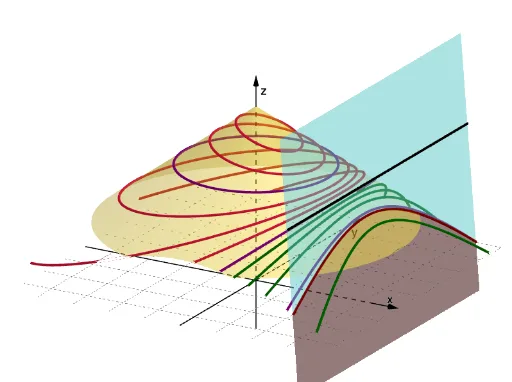
①本范例演示圆锥及其截面(圆、椭圆、双曲线、抛物线)的形成与性质;②涉及核心概念:圆锥、圆锥截面、焦点、准线、解析几何;③作图要点:使用 GeoGebra 命令 Cone(圆锥)、Line(直线)、IntersectPath(路径交点)、Plane(平面)、Rotate(旋转);④适合高中数学学生及教师用于理解圆锥截面定理和二次曲线的几何定义。
GeoGebra 命令及参数
Cone((0, 0, 3), (0, 0, 9), 8) → a, a_2, a_3Cone((0, 0, 9 - (5 * 3)), (0, 0, 9), (5 * 4)) → b, c, dLine((6, 0, 6), (6, 1, 6)) → fIntersectPath(Plane[(6, 0, 0), f], d) → eIntersectPath(Plane[(8, 0, 0), f], d) → gIntersectPath(Plane[(10, 0, 0), f], d) → hIntersectPath(Plane[(4, 0, 0), f], d) → kIntersectPath(Plane[(2, 0, 0), f], d) → pIntersectPath(Plane[(0, 0, 0), f], d) → qIntersectPath(Plane[(-2, 0, 0), f], d) → rIntersectPath(Plane[(-6, 0, 0), f], d) → sIntersectPath(Plane[(0, 0, 6), f], d) → tIntersectPath(Plane[(0, 0, 8), f], d) → c_1IntersectPath(Plane[(0, 0, 7), f], d) → d_1IntersectPath(Plane[(0, 0, 5), f], d) → e_1IntersectPath(Plane[(0, 0, 4), f], d) → f_1Plane((0, 0, 8), f) → iRotate(i, n, f) → i'IntersectPath(i', b) → g_1