
用数轴比较有理数
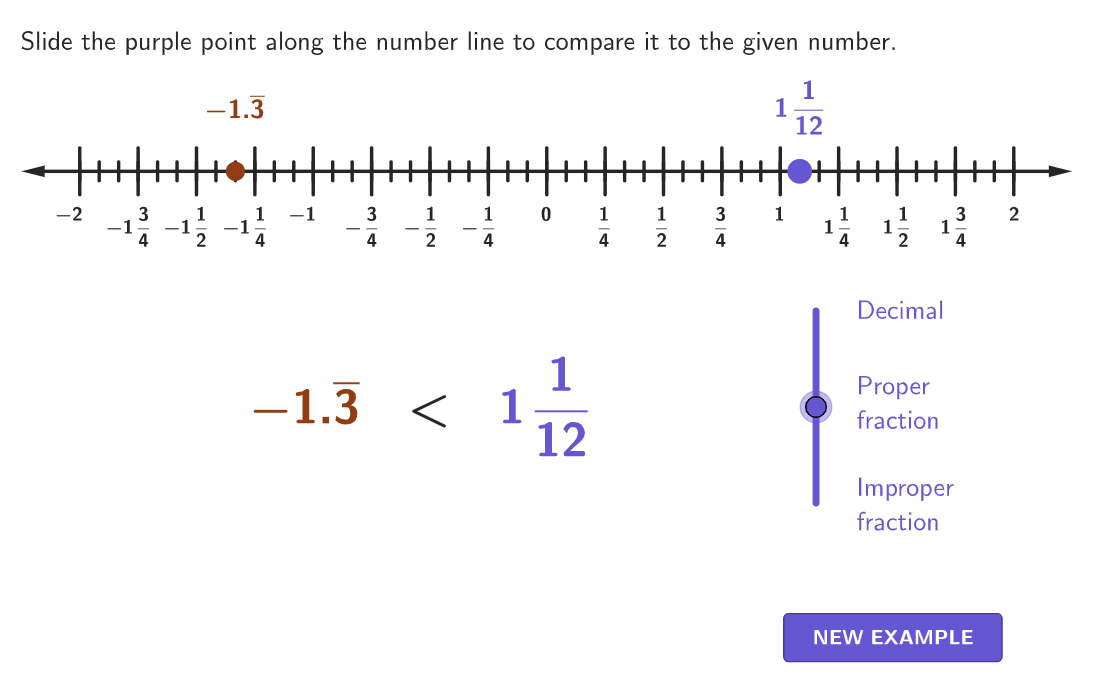
几何画板及绘图内容加载中,请稍等……
本范例通过数轴演示如何比较有理数。涉及的核心数学概念包括有理数的定义、数轴的使用以及有理数的大小比较。作图要点使用了 GeoGebra 命令如 numberLine, textNumberLineDecimal, textNumberLineFraction, slider 等。适合 6-8 年级学生学习有理数的比较和排序。
GeoGebra 命令及参数
Shuffle(Sequence[Random[-18, 18] / 12, i, 1, 100]) → randomNums, {-1.3333333333333333, -0.25, 0.5833333333333334, 0.4166666666666667, 0.16666666666666666, 0, 1.5, 0.6666666666666666, 0.8333333333333334, 1, -0.08333333333333333, 0.25, 0.25, 0.16666666666666666, 1.5, -0.8333333333333334, 0.5833333333333334, -0.9166666666666666, -0.08333333333333333, 0, -0.8333333333333334, 1.3333333333333333, -0.5, 0.3333333333333333, -1.1666666666666667, 1.3333333333333333, 0.8333333333333334, 0.4166666666666667, 0.5833333333333334, -0.75, 1.25, 0.08333333333333333, -0.5, -0.8333333333333334, 0.08333333333333333, 0.25, -1.3333333333333333, -1.0833333333333333, 0.4166666666666667, 0, -0.8333333333333334, 1.5, 1, -1.3333333333333333, -0.9166666666666666, 0.16666666666666666, 0.4166666666666667, 1.0833333333333333, 0.4166666666666667, 0.25, -1.1666666666666667, 0.4166666666666667, -0.3333333333333333, 1.1666666666666667, 0.25, -0.25, 0.25, -1.5, 0.6666666666666666, 0.5833333333333334, -0.9166666666666666, 0.6666666666666666, -1.3333333333333333, 0.4166666666666667, -1.3333333333333333, 1.25, 1, -0.8333333333333334, 0.16666666666666666, 0.75, -0.25, 1.3333333333333333, 0.5833333333333334, 0.5, -0.08333333333333333, -0.08333333333333333, -1.5, 0.3333333333333333, 0.9166666666666666, -1.3333333333333333, -0.5833333333333334, -1.1666666666666667, -0.3333333333333333, 0, 1.5, 1.4166666666666667, 0.4166666666666667, -0.4166666666666667, 0.5, 1.1666666666666667, 0.25, -1.3333333333333333, -0.3333333333333333, 1.1666666666666667, 0.8333333333333334, -1.0833333333333333, 0.8333333333333334, -1.0833333333333333, -0.6666666666666666, 1.4166666666666667}Element(randomNums, Mod[count, 100] + 1) → randomNumShuffle(Sequence[Random[0, 2], i, 1, 100]) → randomForms, {2, 0, 0, 2, 2, 1, 2, 0, 0, 2, 1, 2, 2, 1, 1, 2, 2, 2, 0, 0, 0, 1, 2, 2, 0, 1, 1, 1, 1, 2, 1, 2, 1, 1, 0, 1, 1, 0, 2, 0, 1, 1, 1, 1, 2, 0, 1, 2, 0, 1, 0, 0, 1, 0, 1, 0, 2, 2, 0, 2, 1, 2, 1, 1, 0, 2, 1, 1, 1, 2, 1, 0, 0, 2, 2, 2, 2, 1, 0, 0, 0, 2, 0, 2, 1, 0, 1, 2, 1, 2, 2, 1, 0, 2, 1, 0, 0, 1, 0, 1}Element(randomForms, Mod[count, 100] + 1) → randomFormSequence(i, i, minX, maxX, 1 / 12) → allXPoint(Zip[(A, 0), A, allX]) → MovingPointShuffle(Sequence[-10, 10]) → numberOptions, {-10, -5, 3, -4, -2, 5, 9, 4, -8, 8, 0, 10, 6, 7, -9, 1, -6, -3, -1, -7, 2}Sort(Take[numberOptions, 1, 3]) → orderedNumbersSequence(i, i, minX, maxX, 1 / 4) → displayXZip(Segment[(A, -0.1), (A, 0.1)], A, displayX) → numberLineBigTicksZip(Segment[(A, -0.04), (A, 0.04)], A, allX) → numberLineSmallTicksZip(Text[(("" * If[A < 0, "-", ""]) * abs(A)), (A - 0.022, -0.1) + If[A < 0, 0, (0.04, 0)], true, true, 0, -1], A, displayX) → textNumberLineDecimalZip(Text[(("" * If[A < 0, "-", ""]) * FractionText[abs(A)]), (A - 0.022, -0.1) + If[A < 0, 0, (0.04, 0)], true, true, 0, -1], A, displayX) → textNumberLineFractionCorner(5) → DimsIf(sliderFormat ≟ 0, Text[If[numberMovingPoint < 0, "\[-", "\["] + (FractionText[abs(numberMovingPoint)]) + "\]", (0, 0), true, true], sliderFormat ≟ 2, barNotation[numberMovingPoint], textMovingProper) → textMovingPointIf(randomForm ≟ 0, textFixedImproper, randomForm ≟ 2, barNotation[randomNum], textFixedProper) → textFixedPointSequence(i, i, -2, 2, 1 / 12) → numberLineValsZip(floor(n), n, allX) → numberLineWholesZip(Text[(("" * If[A < 0, "-", ""]) * If[A ≠ 0, properFraction[abs(A)], "0"]), (A - 0.022, -0.1) + If[A < 0, 0, (0.04, 0)], true, true, 0, -1], A, displayX) → textNumberLineProperIf(sliderFormat ≟ 0, textNumberLineFraction, sliderFormat ≟ 1, textNumberLineProper, textNumberLineDecimal) → numberLineDigitsmakeBox(MovingPoint + (((-wh)) / 2, wh), wh, wh) → movingCenterBoxmakeBox(RandomPoint + (((-wh)) / 2, wh), wh, wh) → fixedCenterBox
AI 绘图提示语参考
画一个数轴,上面标记有12个等间距的刻度,从-2到2。在数轴上随机选择一个点作为移动点,并在数轴上随机选择另一个点作为固定点。移动点和固定点分别用不同的颜色标记,并在数轴上显示它们的数值,包括整数、分数和小数形式。数轴上还应显示整数点,并在每个整数点上标注相应的数值。
以上提示语为根据原始绘图命令整理而来,仅供参考。