
外接圆与四边形动画演示
几何画板及绘图内容加载中,请稍等……
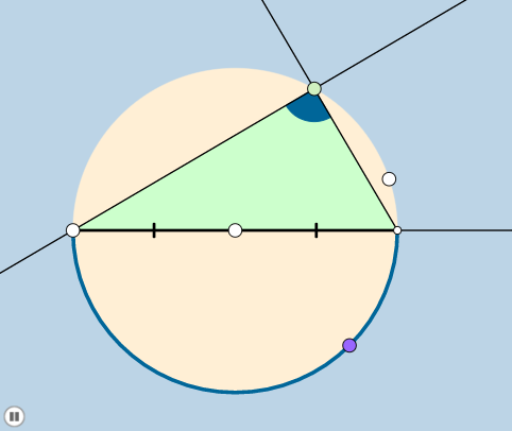
①本范例通过动画演示四边形的外接圆构造及其性质;②涉及核心数学概念包括外接圆、圆周角、余弦定理、四边形分类;③作图要点运用了Circle, Point, Line, Intersect, CircleArc, Segment, Dilate, Rotate, Ray, Min, CircleSector, OrthogonalLine, Angle, Vector, Translate, Mirror, Polygon等GeoGebra命令;④适合高中数学几何教学与学习,用于理解四边形与圆的几何关系。
GeoGebra 命令及参数
Circle(A, B) → cPoint(c) → CLine(C, A) → aIntersect(c, a, 2) → DCircleArc(A, C, D) → dCircleArc(A, D, C) → ePoint(e) → ESegment(C, D) → hDilate(C, If[0 < b ≤ 1, 1 - b, 0], A) → C'Segment(C, C') → iDilate(A, If[1 < b ≤ 2, 2 - b, 0], D) → A'Segment(A, A') → jRotate(C, If[2 < b ≤ 3, ((-(b - 2)) * π), (-π)], A) → C'_1Rotate(C', If[2 < b ≤ 3, ((-(b - 2)) * π), (-π)], A) → C''Segment(C'_1, C'') → i'Rotate(C, If[3 < b ≤ 4, ((b - 3) * π), π], A) → C'_2CircleArc(A, C, C'_2) → kDilate(D, If[5 < b ≤ 6, 6 - b, 0], E) → D'Segment(D, D') → fRay(D, E) → gPoint(g) → FRay(E, F) → lDilate(C, If[5 < b ≤ 6, 6 - b, 0], E) → C'_3Segment(C, C'_3) → mMin({m, f}) → nCircle(E, (0.2 * n)) → pIntersect(p, l) → G,Intersect(c, m, 1) → HIntersect(p, m) → I,CircleSector(E, G, I) → qRotate(q, If[6.5 < b ≤ 7.5, ((b - 6.5) * π / 2), π / 2], E) → q'Point(cc) → JLine(C, D) → rOrthogonalLine(J, r) → sIntersect(s, r) → KLine(C, E) → tOrthogonalLine(J, t) → f_1Intersect(t, f_1) → LLine(K, L) → g_1Line(J, E) → h_1Intersect(g_1, h_1) → MAngle(A, M, J) → αLine(A, M) → i_1Circle(C, 1) → c_1Circle(E, 1) → d_1Intersect(d_1, t, 2) → NIntersect(c_1, t, 1) → ORay(E, N) → j_1Ray(C, O) → k_1Dilate(J, If[8 < b ≤ 9, 9 - b, 0], K) → J'Segment(J, J') → l_1Dilate(E, If[9 < b ≤ 10, 10 - b, 0], K) → E'Vector(E, E') → uTranslate(q', u) → q''Line(E, r) → m_1Point(m_1) → PAngle(D, E, P) → βRotate(q'', If[10 < b ≤ 11, ((b - 10) * β), β], K) → q'''Mirror(J, r) → J'_1Dilate(K, If[9 < b ≤ 10, 10 - b, 0], J'_1) → K'Segment(K, K') → n_1Dilate(J, If[11 < b ≤ 12, 12 - b, 0], L) → J'_2Segment(J, J'_2) → p_1Dilate(E, If[12 < b ≤ 13, 13 - b, 0], L) → E'_1Vector(E, E'_1) → vTranslate(q', v) → q''_1Dilate(J, If[13 < b ≤ 14, 14 - b, 0], E) → J'_3Segment(J, J'_3) → q_1Dilate(K, If[14 < b ≤ 15, 15 - b, 0], M) → K'_1Segment(K, K'_1) → r_1Dilate(M, If[15 < b ≤ 16, 16 - b, 0], L) → M'Segment(M, M') → s_1Circle(A, 1) → e_1Circle(M, 1) → t_1Intersect(t_1, c, 1) → QIntersect(t_1, i_1) → R, SIntersect(e_1, i_1) → T, UDilate(A, If[16 < b ≤ 17, 17 - b, 0], M) → A'_1Segment(A, A'_1) → a_1Ray(M, S) → b_1Ray(A, T) → f_2Dilate(E, If[17 < b ≤ 18, 18 - b, 0], M) → E'_2Vector(E, E'_2) → wTranslate(q', w) → q''_2Line(E, f_2) → g_2Point(g_2) → VAngle(V, E, L) → δRotate(q''_2, If[18 < b ≤ 19, ((-(b - 18)) * δ), (-δ)], M) → c_2Polygon(C, D, E) → poly1, e_2, c_3, d_2CircleArc(A, E, C) → h_2CircleArc(A, D, E) → k_2CircleArc(A, C, D) → p_2Polygon(C, D, E) → poly2, e_3, c_4, d_3Circle(C, 1) → q_2Circle(D, 1) → r_2Intersect(r_2, a) → A_1, B_1Ray(D, B_1) → i_2
AI 绘图提示语参考
画一个四边形,并展示其外接圆的动态构造过程。首先绘制四边形的一条边和该边的中垂线,找到外接圆的圆心,并画出外接圆。接着,通过旋转和缩放四边形的顶点,展示四边形形状的变化以及外接圆如何随之改变。最后,添加一些辅助线和角度标记,以说明圆周角定理和余弦定理在其中的应用。
以上提示语为根据原始绘图命令整理而来,仅供参考。