
使用缩放图计算房间实际面积
几何画板及绘图内容加载中,请稍等……
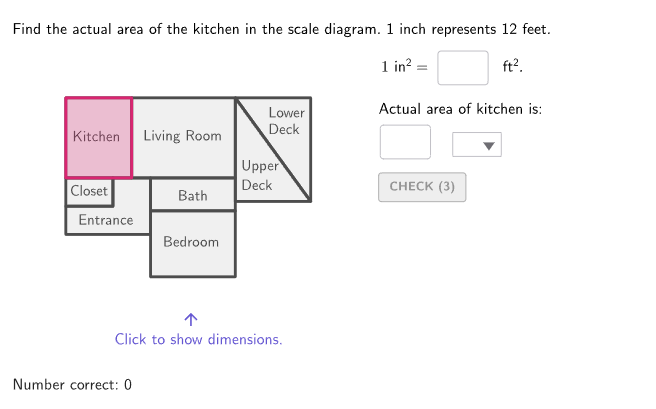
这个范例演示了如何通过缩放图计算房间的实际面积。核心数学概念包括比例尺、面积计算和几何作图。作图要点包括使用GeoGebra命令如RandomUniform、Shuffle、Polygon等来创建缩放模型,并计算实际面积。适合6-8年级学生用于测量和面积估算练习。
GeoGebra 命令及参数
RandomUniform(1, 7.999, 100) → randoms, {1.2111458055099855, 3.8089325707464563, 5.1151894953811325, 1.8012129080393011, 4.290719252613236, 7.269918569276233, 4.994934921167073, 2.465121025524579, 3.5989161314566225, 3.6597041878168883, 5.430573187771517, 6.459777621688009, 3.1371746824825455, 7.5234714341842155, 5.877088244490722, 7.142048134586424, 4.215348627598898, 2.1981203080871046, 6.736375247706555, 5.287027526045911, 6.356781347576113, 4.981015894679816, 5.1933120944582605, 3.44841019938957, 5.849167893295147, 3.450596270021063, 2.7008555723330945, 4.399712059010753, 7.318376266752407, 1.9097951062554774, 7.698504481965493, 2.6898631942030624, 1.483741288134305, 4.590544176434216, 7.531689113303022, 1.9332366424994396, 4.974170082347882, 4.550149133936972, 5.372820879999847, 1.278441011306365, 3.8306849319181615, 6.242082715575146, 2.2948830689395523, 1.5151921101156431, 5.947781646332657, 2.523707154517797, 7.407563231088848, 6.5382763593972015, 3.411215543299439, 3.3216234450002617, 3.245009817785751, 5.354041718939687, 6.254514152936212, 1.4077502182822261, 7.289349118094225, 6.488993751731399, 6.784680454825646, 7.624860515743089, 1.7611248381174593, 3.5929280132294883, 7.14218637397675, 6.580146091435655, 1.3998087455003607, 6.116611082620962, 7.316451088422276, 1.138440214593607, 3.164493264391668, 6.324316735676298, 2.3075718369986786, 5.168011585383606, 7.321807613005595, 2.42753996725284, 1.590112489798361, 7.764339752879986, 1.4999925000810712, 5.43394041903031, 1.4752592417187615, 1.682001026014297, 3.796936948877444, 3.2980272360219507, 5.341633319315523, 3.96172964585027, 2.073816050117621, 7.1562580715406785, 3.097489927242415, 3.690875382633696, 2.987771192838805, 7.908124473104278, 3.5459486370704725, 6.472850414711692, 2.3188465660085607, 5.012395622742947, 5.658282191727563, 2.6197550378769026, 5.514137881182875, 1.2800267910914782, 2.0031396189990116, 5.145178216158226, 4.285820085904344, 2.5172800492153193}Shuffle(Sequence[1, 7]) → shuffledIndices, {1, 4, 3, 5, 7, 6, 2}Shuffle({4, 5, 6, 7, 8, 9, 10, 11, 12}) → randomList2, {12, 10, 8, 4, 6, 7, 11, 9, 5}Zip((("$\text{" * A) * " }$"), A, {"\phantom{ft^2}", "ft^2", "in^2"}) → selectUnitsIf(caseNum ≟ 3, {1, 2, 2, 6, 6, 9, 10}, {1, 2, 3, 6, 8, 9, 10}) → roomIndexOptionsElement({CellRange(B2,K2,"polygon"), CellRange(B4,K4,"polygon"), CellRange(B6,K6,"polygon")}, caseNum) → currentPlanElement(roomIndexOptions, shuffledIndices(Mod[countQuestion, Length[shuffledIndices]] + 1)) → currentRoomElement(currentPlan, currentRoom) → pulsinghighlightRoomElement({CellRange(B13,K13,"numeric"), CellRange(B14,K14,"numeric"), CellRange(B15,K15,"numeric")}, caseNum) → currentHeightIndicesElement({CellRange(B9,K9,"list"), CellRange(B10,K10,"list"), CellRange(B11,K11,"list")}, caseNum) → currentBaseIndicesElement(randomList2, Mod[countQuestion, Length[randomList2]] + 1) → scaleFeetElement({CellRange(B3,K3,"list"), CellRange(B5,K5,"list"), CellRange(B7,K7,"list")}, caseNum) → currentOffsetsElement(currentOffsets, currentRoom) → measureOffsetsIf(Defined[Vertex[pulsinghighlightRoom, 4]], 4, 3) → numVerticesSequence(Vertex[pulsinghighlightRoom, A], A, 1, numVertices) → verticesHighlightSequence(Segment[verticesHighlight(A) + measureOffsets(A), verticesHighlight(Mod[A, numVertices] + 1) + measureOffsets(A)], A, 1, numVertices) → measureSegmentsElement(currentBaseIndices, currentRoom) → baseIndicesElement(currentHeightIndices, currentRoom) → heightIndexZip(round(((A * 1 / scaleFeet) * 2), 1), A, measureSegments) → measureInchesIf(currentRoom < 9, (measureInches(baseIndices(1)) * measureInches(heightIndex)), If[caseNum ≟ 1, (measureInches(baseIndices(1)) * measureInches(heightIndex) / 2), ((measureInches(baseIndices(1)) + measureInches(baseIndices(2))) / 2 * measureInches(heightIndex))]) → areaInchesElement(randomList2, Mod[countQuestion, 15] + 1) → randomNum2Element(roomIndexOptions, Mod[countQuestion, 20] + 1) → randomNum1Textfield(inputScaleSquareFeet) → InputBox2Polygon(Zip[PixelsToPoint[Corner[1], Corner[3], Corner[5], A], A, {(pixelsLeft, pixelsTop), (pixelsLeft, y(Corner[5]) - pixelsBottom), Corner[5] - (pixelsRight, pixelsBottom), (x(Corner[5]) - pixelsRight, pixelsTop)}]) → borderBoxCorner(5) → layoutAppSizeboxTool(7, 8.5, A2 + (0, 10.5)) → B2boxTool(11, 8.5, A2 + (7, 10.5)) → C2boxTool(9, 3.5, A2 + (9, 7)) → D2boxTool(0, 0, A2) → E2boxTool(9, 4.5, A2) → F2boxTool(9, 7, A2 + (9, 0)) → G2Polygon(Zip[A2 + (0, 4.5) + K, K, {(0, 0), (0, 3), (5, 3), (5, 6), (9, 6), (9, 0)}]) → H2Element(currentPlan, 1) → kitchenElement(currentPlan, 2) → livingElement(currentPlan, 4) → ensuiteElement(currentPlan, 8) → closetElement(currentPlan, 5) → denElement(currentPlan, 6) → bedroomElement(currentPlan, 7) → entranceboxTool(9.5, 5, A4 + (10.5, 0)) → B4boxTool(10.5, 14, A4 + (9.5, 5)) → C4boxTool(9.5, 5, A4 + (0, 5)) → H4boxTool(9.5, 9, A4 + (0, 10)) → G4boxTool(6, 5, A4) → D4boxTool(0, 0, A4) → F4Element(currentPlan, 9) → upperDeckElement(currentPlan, 3) → bathTextfield(inputActual) → InputBox3If(showDimensions, {192 / 255, 192 / 255, 192 / 255}, {77 / 255, 77 / 255, 77 / 255}) → planColorboxTool(5, 3, A2 + (0, 7.5)) → I2boxTool(4.5, 5, A4 + (6, 0)) → I4If(doubleInchScale, 2, 1) → showScaleInchesIf(doubleInchScale, (2 * scaleFeet), scaleFeet) → showScaleFeetPolygon({A2 + (18, 8), A2 + (26, 8), A2 + (18, 19)}) → J2Polygon({A2 + (26, 8), A2 + (26, 19), A2 + (18, 19)}) → K2Polygon({A4 + (20, 9), A4 + (25, 5), A4 + (25, 19), A4 + (20, 19)}) → J4Polygon({A4 + (20, 0), A4 + (25, 0), A4 + (25, 5), A4 + (20, 9)}) → K4Element(currentPlan, 10) → lowerDeckboxTool(6, 8, A6 + (10, 0)) → B6boxTool(13, 10, A6 + (3, 8)) → C6boxTool(8, 4.5, A6 + (16, 0)) → D6boxTool(0, 0, A6) → E6boxTool(8, 6.5, A6 + (16, 11.5)) → F6boxTool(10, 8, A6) → G6Polygon(Zip[A6 + (16, 4.5) + K, K, {(0, 0), (0, 7), (7, 7), (7, 2), (3, 2), (3, 0)}]) → H6boxTool(5, 2, A6 + (19, 4.5)) → I6Polygon({A6 + (0, 8), A6 + (3, 8), A6 + (3, 18), A6 + (-5, 18)}) → J6Polygon({A6 + (-5, 0), A6, A6 + (0, 8), A6 + (-5, 18)}) → K6boxTool(0, 0, A4) → E4Sequence(If[displayFractions, FractionText[measureInches(A)], ("\vphantom{\frac{1}{2}}" * measureInches(A))], A, 1, numVertices) → allMeasuresLatexZip(Text[(("" * A) * "~in"), Midpoint[B] - (2.8 * UnitOrthogonalVector[B]), false, true, 0, 0], A, allMeasuresLatex, B, measureSegments) → measureLabels
AI 绘图提示语参考
请绘制一个房间的缩放图,包含多个房间的轮廓,如厨房、客厅、卧室等。图形中应有边界框和测量线段,标注缩放比例和实际面积。绘制顺序:先画房间轮廓,再添加边界框和测量线,最后计算并标注面积。
以上提示语为根据原始绘图命令整理而来,仅供参考。