
构建等腰梯形
几何画板及绘图内容加载中,请稍等……
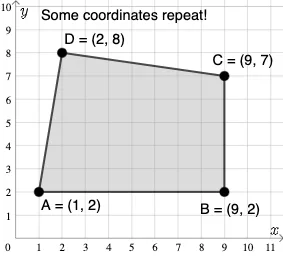
这个范例演示了如何使用GeoGebra构建等腰梯形。核心数学概念包括坐标几何、梯形和相似变换。通过使用PointIn、Polygon、Segment等命令,用户可以自由调整梯形的形状和大小。适合初中及以上学生进行几何作图练习。
GeoGebra 命令及参数
PointIn(e) → APointIn(e) → BPointIn(e) → CPointIn(e) → DPolygon(A, B, C, D) → q1, a_1, b_1, c_1, d_1Segment(A, B) → fSegment(B, C) → gSegment(C, D) → hSegment(D, A) → iMode(l1) → l2If(Length[l2] ≟ 0, "No repeated coordinates.", "Some coordinates repeat!") → text1